New iTunes Metadata Suggests Users May Soon Be Able to Hide Stock iOS Apps

Apple may be laying the groundwork to allow users to remove or hide stock iOS apps, such as Compass and Tips, from their iPhones in an upcoming version of its mobile software, based on recently added metadata keys showing up on App Store apps.
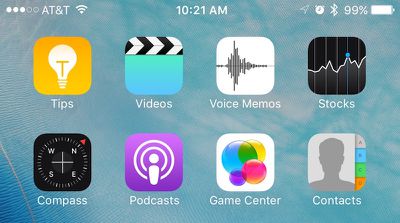
Stock iOS Apps
As discovered by AppAdvice, Apple several weeks ago added a new pair of keys called "isFirstParty" and "isFirstPartyHideableApp" to the metadata of every App Store listing in iTunes. The new keys allow for a Boolean value of "true" or "false" to denote whether the app would be allowed to be hidden or removed from the user's iPhone. It's unclear whether the metadata is referring to an Apple-approved way to simply hide the first-party apps, or remove them altogether.

Last September, Apple CEO Tim Cook spoke about the long-standing desire by users to remove apps like Stocks and Voice Memos from their iPhones to reduce clutter of unused apps. He admitted the company was at a bit of an impasse over the situation, because while some of its first-party experiences could be removed without much of a headache, certain apps "are linked to something else on the iPhone." Their removal could begin a domino effect of bugs and issues elsewhere in iOS, so implementing a feature allowing their removal would be understandably risky.

Stock Apps metadata

Image via AppAdvice

The hints found in the metadata of iTunes could be the potential solution, with Apple specifically targeting first-party apps that are safe to hide or remove, and letting users decide on their end if they choose to do so. With no official word from Apple on the topic since last year, it's hard to say when -- or if -- we will see such a feature implemented into iOS, although iOS 10 coming later this year is an obvious opportunity.

Users looking to minimize clutter from less popular stock apps such as Tips and Compass, and even newer editions like Health and News in some cases, frequently sequester their least favorite apps into a forgotten folder somewhere on their home screens, but some have even gotten crafty in figuring out ways to go one step further in removing unsightly crammed folders from their home screens, without needing to resort to jailbreaking their devices.


Popular Stories

iOS 26

iOS 26.3 and iOS 26.4 Will Add These New Features to Your iPhone

Tuesday February 3, 2026 7:47 am PST by
We are still waiting for the iOS 26.3 Release Candidate to come out, so the first iOS 26.4 beta is likely still at least a week or two away. Following beta testing, iOS 26.4 will likely be released to the general public in March or April. Below, we have recapped known or rumored iOS 26.3 and iOS 26.4 features so far. iOS 26.3 iPhone to Android Transfer Tool iOS 26.3 makes it easier...
Apple Logo Black

Apple's Next Launch is 'Imminent'

Sunday February 1, 2026 12:31 pm PST by
The calendar has turned to February, and a new report indicates that Apple's next product launch is "imminent," in the form of new MacBook Pro models. "All signs point to an imminent launch of next-generation MacBook Pros that retain the current form factor but deliver faster chips," Bloomberg's Mark Gurman said on Sunday. "I'm told the new models — code-named J714 and J716 — are slated...
iOS 26 Home Feature

Apple Gives Final Warning to Home App Users

Tuesday February 3, 2026 8:55 am PST by
In 2022, Apple introduced a new Apple Home architecture that is "more reliable and efficient," and the deadline to upgrade and avoid issues is fast approaching. In an email this week, Apple gave customers a final reminder to upgrade their Home app by February 10, 2026. Apple says users who do not upgrade may experience issues with accessories and automations, or lose access to their smart...
Aston Martin CarPlay Ultra Screen

Apple's CarPlay Ultra to Expand to These Vehicle Brands Later This Year

Sunday February 1, 2026 10:08 am PST by
Last year, Apple launched CarPlay Ultra, the long-awaited next-generation version of its CarPlay software system for vehicles. Nearly nine months later, CarPlay Ultra is still limited to Aston Martin's latest luxury vehicles, but that should change fairly soon. In May 2025, Apple said many other vehicle brands planned to offer CarPlay Ultra, including Hyundai, Kia, and Genesis. In his Powe...
Apple Foldable Thumb

First Foldable iPhone Design Details Revealed

Monday February 2, 2026 7:19 am PST by
Apple's first foldable iPhone will feature relocated volume buttons, an all-black camera plateau, a smaller Dynamic Island, and more, according to design leaks from a known Weibo leaker. The user known as "Instant Digital" today claimed to share several key details about the design of the foldable iPhone: The volume buttons will be located on the top edge of the device, aligned to the...

Top Rated Comments

levitynyc Avatar
128 months ago
This means the end of the "Crapple" folder.
Score: 19 Votes (Like | Disagree)
hybrid_x Avatar
128 months ago
I don't see what the big deal is with being able to hide the default apps. Just collect the ones you don't want to see into a folder, and bury it on the last home screen. Done. Hidden.
Score: 16 Votes (Like | Disagree)
Mac Rules Avatar
128 months ago
Isn't this one of the signs of the apocalypse?
Score: 12 Votes (Like | Disagree)
jasonklee Avatar
128 months ago
Finally. Can't wait to remove useless apps like Game Center, Tips, Compass, Messages, Safari, News, Health, Calendar, Photos, Camera, FaceTime, Contacts, Settings, App Store, iTunes Store, Music, Mail, Stocks, Reminders, Notes, Videos, Maps, Wallet, Watch, Activity, iBooks, Podcasts, Find My Friends, Find My iPhone, Calculator, Voice Memos, and Phone.
Score: 12 Votes (Like | Disagree)
scottish Avatar
128 months ago
This would be great!
Score: 9 Votes (Like | Disagree)
gsmornot Avatar
128 months ago
This says hide, not remove. Is that right? If so, I'm already doing this.
Score: 8 Votes (Like | Disagree)