Apple Seeds Second Beta of tvOS 9.2 to Developers

Apple today provided developers with the second beta of an upcoming 9.2 update to tvOS, the operating system that runs on the fourth-generation Apple TV and powers its built-in App Store. Today's tvOS 9.2 beta 2 comes two weeks after Apple released the first beta of tvOS 9.2 and just hours after the release of tvOS 9.1.1, a minor update that follows tvOS 9.1.

tvOS betas are more difficult to install than beta updates for iOS and OS X. Installing the tvOS beta requires the Apple TV to be connected to a computer with a USB-C to USB-A cable, with the software downloaded and installed via iTunes or Apple Configurator. Those who have already installed the first tvOS 9.2 beta will be able to download the update over the air.


tvOS 9.2 is a major update for the tvOS operating system. It introduces support for Bluetooth keyboards, allowing a keyboard to be paired to the Apple TV for text entry. Bluetooth keyboard support is a major feature that was missing from previous versions of tvOS and its addition should make it much easier to do tasks like entering passwords on the fourth-generation Apple TV.

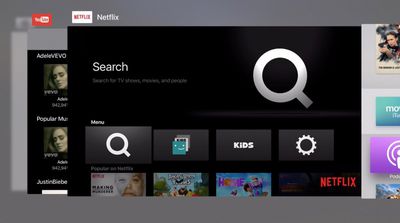
Along with Bluetooth keyboard support, the tvOS 9.2 update introduces support for grouping apps into folders on the Home screen like on iOS devices, plus it includes a new look for the App Switcher interface.

tvos_folder
tvOS 9.2 also includes support for the Podcasts app included in tvOS 9.1.1, introduces MapKit so developers can incorporate maps into their tvOS apps, and it adds Siri support for US Spanish (in the US only) and French Canadian (in Canada only). UK English, Australian English, and US English are also now available as Siri options in the UK, Australian, and US Storefronts when English is set as the tvOS language.
tvos_switcher
What's New in tvOS 9.2 beta 2:

iCloud Photo Library - Full iCloud Photo Library access is available on the Apple TV with the second tvOS 9.2 beta installed. It can be enabled through the iCloud section of the Settings menu. In the current public version of tvOS, users can only view Photo Stream content on the Apple TV.

Live Photos - With iCloud Photo Library access comes support for Live Photos. Live Photos saved to an iCloud Photo Library can be played by pressing on the trackpad on the Siri Remote.


Related Roundup: Apple TV
Buyer's Guide: Apple TV (Don't Buy)

Popular Stories

Aston Martin CarPlay Ultra Screen

Apple's CarPlay Ultra to Expand to These Vehicle Brands Later This Year

Sunday February 1, 2026 10:08 am PST by
Last year, Apple launched CarPlay Ultra, the long-awaited next-generation version of its CarPlay software system for vehicles. Nearly nine months later, CarPlay Ultra is still limited to Aston Martin's latest luxury vehicles, but that should change fairly soon. In May 2025, Apple said many other vehicle brands planned to offer CarPlay Ultra, including Hyundai, Kia, and Genesis. In his Powe...
Apple Logo Black

Apple Just Made Its Second-Biggest Acquisition Ever After Beats

Thursday January 29, 2026 10:07 am PST by
Apple today confirmed to Reuters that it has acquired Q.ai, an Israeli startup that is working on artificial intelligence technology for audio. Apple paid close to $2 billion for Q.ai, according to sources cited by the Financial Times. That would make this Apple's second-biggest acquisition ever, after it paid $3 billion for the popular headphone and audio brand Beats in 2014. Q.ai has...
Apple Logo Black

Apple's Next Launch is 'Imminent'

Sunday February 1, 2026 12:31 pm PST by
The calendar has turned to February, and a new report indicates that Apple's next product launch is "imminent," in the form of new MacBook Pro models. "All signs point to an imminent launch of next-generation MacBook Pros that retain the current form factor but deliver faster chips," Bloomberg's Mark Gurman said on Sunday. "I'm told the new models — code-named J714 and J716 — are slated...
14 inch MacBook Pro Keyboard

Apple Changes How You Order a Mac

Saturday January 31, 2026 10:51 am PST by
Apple recently updated its online store with a new ordering process for Macs, including the MacBook Air, MacBook Pro, iMac, Mac mini, Mac Studio, and Mac Pro. There used to be a handful of standard configurations available for each Mac, but now you must configure a Mac entirely from scratch on a feature-by-feature basis. In other words, ordering a new Mac now works much like ordering an...
Apple MacBook Pro M4 hero

New MacBook Pros Reportedly Launching Alongside macOS 26.3

Sunday February 1, 2026 5:42 am PST by
Apple is planning to launch new MacBook Pro models with M5 Pro and M5 Max chips alongside macOS 26.3, according to Bloomberg's Mark Gurman. "Apple's faster MacBook Pros are planned for the macOS 26.3 release cycle," wrote Gurman, in his Power On newsletter today. "I'm told the new models — code-named J714 and J716 — are slated for the macOS 26.3 software cycle, which runs from...

Top Rated Comments

Kaibelf Avatar
131 months ago
I'd really like to know what Apple's new addiction to muted, low-contrast colours is? Text that's difficult to read. Poor font choice. I really don't understand this design direction. Should be bold, crisp and good contrast. The tvOS interface definitely does not have that, or am I wrong?
Yes. Not everyone wants their interface to look like a Teletubbies episode.
Score: 6 Votes (Like | Disagree)
SBlue1 Avatar
131 months ago
A requested feature? A TV App Store that I can access with Safari on my Mac or iPad.
Score: 4 Votes (Like | Disagree)
peterdevries Avatar
131 months ago
It would be great if they would enable English Siri in non English speaking countries. I would love to use it here in The Netherlands, but somehow we are stuck with search.
Score: 2 Votes (Like | Disagree)
iFanaddic Avatar
131 months ago
Btw you can type much faster on the Apple TV via the remote app. I didnt know that until yesterday, hopefully this will help someone else!


Attachment Image
Score: 2 Votes (Like | Disagree)
Michaelgtrusa Avatar
131 months ago
Very impressive progress.
Score: 2 Votes (Like | Disagree)
tywebb13 Avatar
131 months ago
You can get all your icloud photos with this build.

To turn on this new feature go to Settings, then the iCloud menu and choose to enable iCloud Photo Library.

EDIT: Oh. I see that macrumors have added this to their story now. It wasn't there before.
Score: 2 Votes (Like | Disagree)