Astropad App Updated With Support for iPad Pro, Apple Pencil - MacRumorsOpen MenuShow RoundupsShow Forums menuVisit ForumsOpen Sidebar
Skip to Content

Astropad App Updated With Support for iPad Pro, Apple Pencil

by

Astropad, the app designed to turn the iPad or iPhone into a graphics tablet for the Mac, was today updated with support for Apple's 12.9-inch iPad Pro and the Apple Pencil accessory.

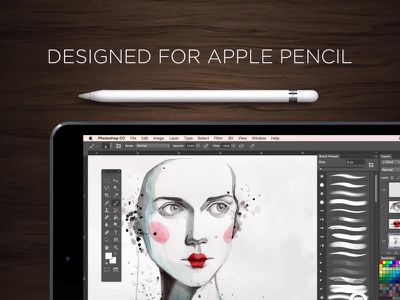
For those unfamiliar with Astropad, it works alongside an accompanying Mac app to mirror the Mac's display to the iPad, allowing the iPad's touch screen and controls to be used for editing photos and creating art in Mac apps like Lightroom and Photoshop.
astropad
With today's update, Astropad has been optimized for the large screen of the iPad Pro, and it's gained features specifically implemented for the Apple Pencil. There's advanced stroke tuning to remote stray points for better stroke quality, tilt support for more accurate brush simulation, and a custom pressure curve designed with the Apple Pencil in mind.

For all users, latency has been reduced, especially for Macs with dual graphics cards, and image quality has been improved.


Astropad Graphics Tablet can be downloaded from the App Store for $19.99. [Direct Link]

Top Rated Comments

Nicky G Avatar
134 months ago
This is definitely a Killer App for artists, illustrators, and designers.
Score: 3 Votes (Like | Disagree)
nagromme Avatar
134 months ago
I was using this before today. There are YouTube reviews as well.

But it did just add tilt support.
Score: 2 Votes (Like | Disagree)
134 months ago
I just made a comment awhile ago about Apple should have made the Pencil as an accessory to Macs. Some comments ask me how and kinda stupid idea. Well I didn't know this app exist and it looks awesome. This would give an idea to Apple to create a native experience. But I also hope this app become successful and Apple will open app to avoid limitation to kind of ideas.
Score: 2 Votes (Like | Disagree)
134 months ago
If you want 2 displays use Duet with a cable.

As for Astropad, It rocks. Been using it for a couple of weeks with my iPad pro, pencil and MacBook Pro Retina using a cable connection and it works extremely well.
Score: 1 Votes (Like | Disagree)
134 months ago
This could have been a good official feature of the ipad pro if apple could make it work better than these third party apps. I suppose they are banking on native 'professional' apps instead.
Score: 1 Votes (Like | Disagree)
134 months ago
Doesn't the picture go over lightning cables as well as wifi?

Thank you, that's just what I needed to hear anyway. It's been really tempting to gamble but I don't know... The low res artefacting and the "feel" on my current iPad are what put me off but I haven't used an apple pencil yet, so have no point of reference. I'd miss my pen buttons for sure, too.
The apps do work over the Lightning/USB cable, mixel missed that. Over the cable, there's no artifacts in my short experience with my hardware (late-2013 rMBP, Dell P2715Q, iPP/Pencil) and the updated apps with PS 2015 CC. I'm not a Cintiq user, but I am a Intuos Pro user.

There's a bit of a "delay" on the iPP, but there's a real-time virtualized drawn path that is real-time; the actual "work" drawn on my display was real-time. I tried out a few 300 DPI documents and was impressed by the response by the HW/SW combo.

One more potential "hole" in the pixelation experience - I have my 2.4/5GHz wifi networks segregated; "slow" responses could be due to the two HW devices connecting to the admittedly-congested 2.4GHz network. I'm planning to try out a wireless connection over my 5GHz network and see what happens, and compare it to a wired connection.

OTOH, I spent about $3k on my Mac, $500 on my display, and about $1100 on my iPP and Pencil - I'm not going to let a $20 app get in the way of drawing bliss. Given that the devs are working their butts off updating their apps and not abandon it, I'm in and I didn't wait for a sale. I did get a 25% off iTS card, so I'll admit that I did cheat a bit there...
Score: 1 Votes (Like | Disagree)

Popular Stories

imac video apple feature

Apple Released Yet Another New Product Today

Friday March 20, 2026 2:39 pm PDT by
Apple has unveiled a whopping nine new products so far this March, including an iPhone 17e, iPad Air models with the M4 chip, MacBook Air models with the M5 chip, MacBook Pro models with M5 Pro and M5 Max chips, the all-new MacBook Neo, an updated Studio Display, a higher-end Studio Display XDR, AirPods Max 2, and now the Nike Powerbeats Pro 2. iPhone 17e features the same overall design as...
iPhone 18 Pro Deep Red Feature

iPhone 18 Pro Launching Later This Year With These 12 New Features

Wednesday March 18, 2026 7:39 am PDT by
While the iPhone 18 Pro and iPhone 18 Pro Max are not expected to launch for another six months or so, there are already plenty of rumors about the devices. It was initially reported that the iPhone 18 Pro models would have fully under-screen Face ID, with only a front camera visible in the top-left corner of the screen. However, the latest rumors indicate that only one Face ID component...
ios 26 4 pastel

iOS 26.4: Top 10 New Features Coming to Your iPhone

Friday March 20, 2026 2:44 pm PDT by
iOS 26.4 isn't the major update with new Siri features that we hoped for, but there are some useful quality of life improvements, and a little bit of fun with an AI playlist generator and new emoji characters. Playlist Playground - Apple Music has a Playlist Playground option that lets you generate playlists from text-based descriptions. You can include moods, feelings, activities, or...
Related Apple News: Sport | Mac | Business | Travel | Opinion