iPad Pro Hands-on Makes the Case for Productivity Uses, Apple Pencil Is Excellent - MacRumorsOpen MenuShow RoundupsShow Forums menuVisit ForumsOpen Sidebar
Skip to Content

iPad Pro Hands-on Makes the Case for Productivity Uses, Apple Pencil Is Excellent

With the launch of the iPad Pro coming up shortly, technology and education expert Fraser Speirs got some hands-on time with the device at an invitation-only event in London yesterday. Speirs has been sharing his thoughts from his one-hour session with the iPad Pro and its accessories and answering questions on Twitter, offering an interesting perspective on the user experience.
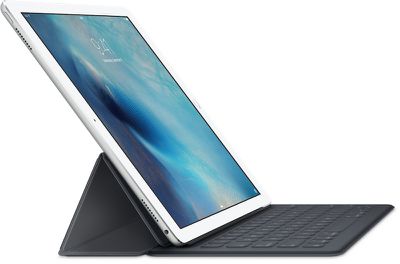
iPad-Pro-Smart-Keyboard
Overall, Speirs was impressed by the iPad Pro, finding it most ideal for productivity tasks in noting the device "is expansive where the Air 2 is intimate. It definitely has a 'work' feel to it, although photos/media are fantastic." Multitasking in particular is "a whole different thing" on the iPad Pro with a true feeling of "two iPads stuck together," an experience that makes it "a great device for serious work and creativity."


Speirs is a bit less enthusiastic about other use cases, noting that "if you just use it to browse and Netflix" there may not be enough benefit from the iPad Pro to make it worth the increased size and weight compared to iPad Air 2. For reading, he feels "it's not a device to snuggle up with" but would be solid for reference work.

Turning to the Apple Pencil, Speirs calls it "extremely impressive" and "certainly the best iPad stylus I have used by a country mile." Palm rejection is described as "near-perfect" and the "best I have ever seen on iOS," making for a smooth experience with writing and drawing apps.
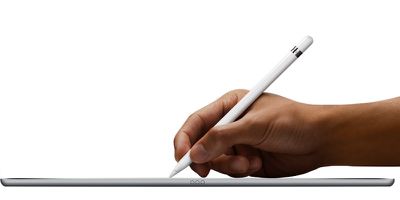
apple_pencil_white
Speirs was less impressed with the Smart Keyboard, calling it "a bit fiddly" due to its size and complexity but a "decent enough" keyboard. As far as the keyboard feel, Speirs compares it most closely to Logitech's Keys-to-Go among accessories iPad users might already be familiar with.

For more of Speirs' thoughts on the iPad Pro and its accessories, check out his Twitter timeline, which is full of tidbits and other impressions.


Related Roundup: iPad Pro
Buyer's Guide: iPad Pro (Buy Now)

Popular Stories

imac video apple feature

Apple Released Yet Another New Product Today

Friday March 20, 2026 2:39 pm PDT by
Apple has unveiled a whopping nine new products so far this March, including an iPhone 17e, iPad Air models with the M4 chip, MacBook Air models with the M5 chip, MacBook Pro models with M5 Pro and M5 Max chips, the all-new MacBook Neo, an updated Studio Display, a higher-end Studio Display XDR, AirPods Max 2, and now the Nike Powerbeats Pro 2. iPhone 17e features the same overall design as...
ios 26 4 pastel

iOS 26.4: Top 10 New Features Coming to Your iPhone

Friday March 20, 2026 2:44 pm PDT by
iOS 26.4 isn't the major update with new Siri features that we hoped for, but there are some useful quality of life improvements, and a little bit of fun with an AI playlist generator and new emoji characters. Playlist Playground - Apple Music has a Playlist Playground option that lets you generate playlists from text-based descriptions. You can include moods, feelings, activities, or...
HomePod mini and Apple TV Sage

New Apple TV and HomePod Mini Remain 'Ready' to Launch

Sunday March 22, 2026 6:33 am PDT by
Apple has unveiled nine new products this month, but the wait continues for the next-generation Apple TV 4K and HomePod mini models. In his Power On newsletter today, Bloomberg's Mark Gurman said new versions of the Apple TV and HomePod mini have been "ready" since last year, but he reiterated that Apple has held off on releasing them until the more personalized version of Siri and other...

Top Rated Comments

JXShine Avatar
136 months ago
Next year, apple will release the iPad Pro 2, featuring 3D touch, 20% lighter body. But that's not it! They will release iOS 10 to make your iPad Pro 1 30% slower!
Score: 43 Votes (Like | Disagree)
136 months ago
As an owner of a 12" Macbook, I still don't see the benefits of an iPad Pro other than the pencil. Anything else, like Office work or some Adobe photoshop, OS X is simply much better and the mouse interface is more useful than iOS and touch interfaces.
Score: 21 Votes (Like | Disagree)
136 months ago
WOW...there's a bunch of insight for you, I could have told you most of those things without the need to get a hands on experience!!
But you wouldn't have any credibility.
Score: 18 Votes (Like | Disagree)
bennyprofane Avatar
136 months ago
SP4 kill this hands down.
I recently bought the SP3. I was just so intrigued by the concept. I had been wishing for an iPad running OS X or at least giving us file system access and the possibility of external storage. I wanted to love the SP3 but there were too many reasons not to.
Windows is not good for touch (and having abandoned windows as my main system more than 10 years ago, I have to say I didn't like coming back at all, even though I still use it for some things on a VM but as a main system it's just so cluttered). The tiles were ugly so I was only in desktop mode and it's so fidly on touch that you have to use a mouse if you want to do more than start a movie or browse some websites. Battery lasted 5 hours tops, huge disappointment.
The screen was reflecting too much. Even when watching a movie, something which shouldn't use a lot of resources, the fan often started blowing.
For a laptop it was just too weak, for a tablet not that great. I guess there are some who have use for it but I much more prefer the combo of a Macbook Pro and an iPad. I sold the SP3 and am considering the iPad Pro. I haven't paid a lot of attention to the SP4 but from what I read, it still has most of the weaknesses I described and the Surface Book having only 3 hours of battery without the keyboard is the biggest joke (apart from that, it would make a cool hackintosh).

One thing the SP3 made me realize is that an iPad running OS X might not be that great. An open and (really) professional iOS is probably better. Perhaps we'll get there by iOS 20.
Score: 12 Votes (Like | Disagree)
136 months ago
When can you pre-order??????????????????????????????????????????????????
Score: 11 Votes (Like | Disagree)
136 months ago
Near perfect palm rejection? I'm a stickler for this, it needs to be perfect or else I'm always going to have issues while taking critical notes. Why near perfect and not perfect?

Anyone know if palm rejection is implemented by the app or if it's handled by iOS?
Score: 11 Votes (Like | Disagree)
Related Apple News: Technology | Sport | Travel | Culture | Politics