

Popular third-party Twitter client Tweetbot is the latest app to be updated with support for the 3D Touch feature on the new iPhone 6s and 6s Plus, and it now supports both Quick Actions on the Home screen and Peek and Pop gestures within the app itself.

A hard press on the Tweetbot icon on the Home screen brings up options to create a new tweet, tweet a photo, and view the Activity Tab that was recently added in the fourth version of the app. When a notification is present, there's also an option to reply to a tweet or a direct message from the Home screen Quick Action list.
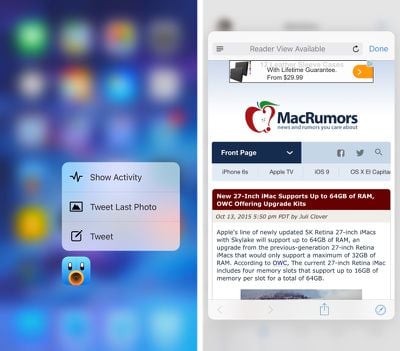
tweetbot3dtouch
Peek gestures, which bring up previews of links, work with embedded tweets, Safari website links, Twitter profiles, and more. A Peek gesture can be initiated in Tweetbot with a hard press, and pressing even harder expands into a Pop gesture, allowing content to be opened from the Peek.

The 3D Touch features in 4.0.1 Tweetbot are available only on the iPhone 6s and the 6s Plus, the two devices that support 3D Touch. Other users will not notice any changes in the app, aside from additional language localization in French, Spanish, and Japanese.

What's New
- 3D touch peek and pop support in the timeline. We'll add it to more places in future releases.
- 3D touch home screen quick actions.
- Localized for French, Spanish and Japanese. More coming.
- Lots of bug fixes.

Tweetbot 4 can be purchased from the App Store for $4.99. [Direct Link]

Update: Just hours after releasing Tweetbot 4.0.1, Tapbots has released Tweetbot 4.0.2. Tweetbot 4.0.2 adds the following features:

- You can now swipe back to dismiss Tweetbot's browser. Feel free to quietly rejoice.
- YouTube links will open directly in the YouTube app, if you have it installed
- Fixed a crash when 3D Touch peeking from night mode, sorry about that

In addition to the above changes, the new version of the app includes a setting to force articles in the Safari viewer to open in Reader Mode if the option is available.


Top Rated Comments

zorinlynx Avatar
133 months ago
Tweetbot is absolutely amazing. Twitter developers should download and play with this app, and take some notes for improving their own app.

It amazes me how a few guys working on their own can produce an app so far superior to the app Twitter themselves makes, with their dev teams and massive resources. In a sense, the official Twitter app has gone downhill over the years while Tweetbot has gotten better.

And of course, rather than improve their own app, they restrict APIs and tokens to make it harder for superior apps to succeed.
Score: 7 Votes (Like | Disagree)
nutmac Avatar
133 months ago
4.0.2 adds swipe gesture to dismiss the browser (Safari View Controller) and an option to open in Reader mode.

Tweetoot 4 is turning out to be the showcase of iOS 9 and iPhone 6s.


Attachment Image
Score: 5 Votes (Like | Disagree)
nutmac Avatar
133 months ago
How did they do that? Why nobody except Tapbots did the swipe back thing for Safari View Controller and the default to reader view?
Tweetbot is using stringCode (http://www.stringcode.co.uk/push-pop-modal-sfsafariviewcontroller-hacking-swipe-from-edge-gesture/) trick.
Score: 2 Votes (Like | Disagree)
4ubrey Avatar
133 months ago
I wonder it 3d touch was an IAP for people who've already paid and paid and paid and paid for this app.
They do extensive work on the app and ask to be paid for it, the nerve!!

C'mon dude. It's like $5 who cares
Score: 2 Votes (Like | Disagree)
newyorksole Avatar
133 months ago
I've had TweetBot since Day 1. Best Twitter App and one of the best Apps overall IMO.
Score: 2 Votes (Like | Disagree)
haruhiko Avatar
133 months ago
How did they do that? Why nobody except Tapbots did the swipe back thing for Safari View Controller and the default to reader view?
Score: 2 Votes (Like | Disagree)

Popular Stories

iOS 26

iOS 26.4 and iOS 27 Features Revealed in New Leak

Friday December 12, 2025 10:56 am PST by
Macworld's Filipe Espósito today revealed a handful of features that Apple is allegedly planning for iOS 26.4, iOS 27, and even iOS 28. The report said the features are referenced within the code for a leaked internal build of iOS 26 that is not meant to be seen by the public. However, it appears that Espósito and/or his sources managed to gain access to it, providing us with a sneak peek...
iOS 26

iOS 26.2 Coming Soon With These 8 New Features on Your iPhone

Thursday December 11, 2025 8:49 am PST by
Apple seeded the second iOS 26.2 Release Candidate to developers earlier this week, meaning the update will be released to the general public very soon. Apple confirmed iOS 26.2 would be released in December, but it did not provide a specific date. We expect the update to be released by early next week. iOS 26.2 includes a handful of new features and changes on the iPhone, such as a new...
iOS 26

Apple Releases iOS 26.2 With Alarms for Reminders, Lock Screen Changes, Enhanced Safety Alerts and More

Friday December 12, 2025 10:10 am PST by
Apple today released iOS 26.2, the second major update to the iOS 26 operating system that came out in September, iOS 26.2 comes a little over a month after iOS 26.1 launched. ‌iOS 26‌.2 is compatible with the ‌iPhone‌ 11 series and later, as well as the second-generation ‌iPhone‌ SE. The new software can be downloaded on eligible iPhones over-the-air by going to Settings >...
AirPods Pro Firmware Feature

Apple Releases New Firmware for AirPods Pro 2 and AirPods Pro 3

Thursday December 11, 2025 11:28 am PST by
Apple today released new firmware designed for the AirPods Pro 3 and the prior-generation AirPods Pro 2. The AirPods Pro 3 firmware is 8B30, up from 8B25, while the AirPods Pro 2 firmware is 8B28, up from 8B21. There's no word on what's include in the updated firmware, but the AirPods Pro 2 and AirPods Pro 3 are getting expanded support for Live Translation in the European Union in iOS...
macOS Tahoe 26 Thumb

Apple Releases macOS Tahoe 26.2 With Edge Light

Friday December 12, 2025 10:08 am PST by
Apple today released macOS Tahoe 26.2, the second major update to the macOS Tahoe operating system that came out in September. macOS Tahoe 26.2 comes five weeks after Apple released macOS Tahoe 26.1. Mac users can download the macOS Tahoe update by using the Software Update section of System Settings. macOS Tahoe 26.2 includes Edge Light, a feature that illuminates your face with soft...
AirTag 2 Mock Feature

Apple AirTag 2: Four New Features Found in iOS 26 Code

Thursday December 11, 2025 10:31 am PST by
The AirTag 2 will include a handful of new features that will improve tracking capabilities, according to a new report from Macworld. The site says that it was able to access an internal build of iOS 26, which includes references to multiple unreleased products. Here's what's supposedly coming: An improved pairing process, though no details were provided. AirTag pairing is already...
Apple Foldable Thumb

Leak Reveals Foldable iPhone Details

Monday December 15, 2025 9:09 am PST by
The first foldable iPhone will feature a series of design and hardware firsts for Apple, according to details shared by the Weibo leaker known as Digital Chat Station. According to a new post, via machine translation, Apple is developing what the leaker describes as a "wide foldable" device, a term used to refer to a horizontally oriented, book-style foldable with a large internal display....
ipados 26 1 slide over

Apple Releases iPadOS 26.2 With Multitasking Improvements

Friday December 12, 2025 10:09 am PST by
Apple today released iPadOS 26.2, the second major update to the iPadOS 26 operating system released in September. iPadOS 26.2 comes a month after iPadOS 26.1. The new software can be downloaded on eligible iPads over-the-air by going to Settings > General > Software Update. iPadOS 26.2 continues with the multitasking improvements that were added with iPadOS 26.1. You can now drag and...














