When creating games and apps for the new Apple TV, developers are required to build in support for the touch-based remote, making all content accessible to all users without the need for additional accessories like an MFi controller.
As noted by developer Dustin Westphal and shared by our sister site Touch Arcade, Apple's App Programming Guide for the tvOS says the following: "Your game must support the Apple TV remote. Your game may not require the use of a controller."
The new Apple TV works with third-party Bluetooth controllers, but because they are an optional accessory, they are not allowed to be the primary input method for a game. This requirement will force developers who want to build games around controller use to also include a touch or motion-based control scheme for use with the Apple TV remote.
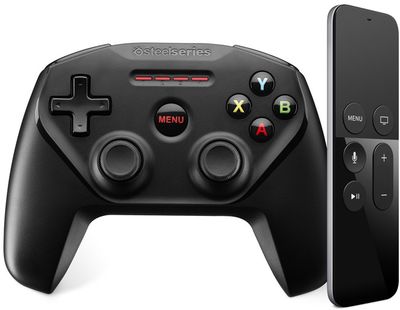
As Touch Arcade points out, the requirement is bound to be a hassle for developers, especially those with games that have complicated control schemes.
There will be games that will have control schemes that are too complicated for the remote, for sure. What if Apple rejects apps that feature terrible controls for the remote, designed only to achieve the bare minimum functionality? Or developers with complicated controls decide to skip making their app compatible with the Apple TV because it won't be worth it? Ideally, we don't want to get to a point where games aren't coming to the Apple TV, or being actively rejected, because they won't fit the remote.
Apple appears to have originally planned to allow developers to require a game controller to play Apple TV games, but the company later nixed that policy and is now requiring all games to support the Apple TV remote in addition to a controller.
Apple's choice to require support for the Apple TV is not surprising, as it also has the same requirements for iOS devices. Developers can build controller support into their iPhone and iPad apps, but apps must also include touch-based control schemes for users who do not have a controller.