

Back in October, popular Mac image editing app Pixelmator was brought to iOS in the form of an iPad app, and as of today, that iOS app is being expanded to the iPhone. Pixelmator for iOS is now a universal app, giving iPhone users a way to edit their images with Pixelmator's powerful image editing tools for the first time.

iPhone support is an important step in Pixelmator's evolution and will let the company reach a much wider customer base. For many people, the iPhone has largely replaced point and shoot cameras. Image sharing site Flickr, for example, lists Apple's iPhones as the top three most popular cameras.

There are already a wealth of image editing apps available for the iPhone, but Pixelmator sets itself apart with a solid set of tools packaged in an accessible interface and iCloud interconnectivity with the Pixelmator Mac app.

pixelmatorphotoadjustments
Pixelmator for iPhone offers the same tools available in the iPad app, so those who have used the previous version of the app will be familiar with its capabilities. On the iPhone, Pixelmator's photo editing tools are likely to be the most useful, letting users adjust colors, fix lighting, add filters, crop, straighten, and distort photographs.

There are also powerful retouching tools that can be used to remove unwanted objects from images, much like in the Mac app. Tools have granular adjustments for making minor tweaks to the look of a photo, and there are brush-on effects in the "Retouch" menu that let users paint on image-correcting adjustments with a finger.
pixelmatorpainting
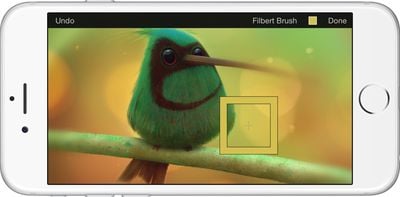
Pixelmator can also be used by artists and mobile designers to create original paintings, drawings, and compositions directly on the iPhone. It has support for more than 100 brushes and it includes a color picker and an eyedropper for managing colors. There's a smear tool for softening image edges, and a wet-painting feature for creating watercolor images. Pixelmator also includes support for words, shapes, and layers, with non-destructive layer styles and blending modes.

pixelmatorlayers
Like the previous iPad version, the new Pixelmator has support for iOS 8 features like iCloud Drive, Extensions, and Handoff. Images created on the iPhone will sync to the iPad and the Mac automatically, and it's also possible to begin an image on one device and switch over to another using Handoff. A Photos extension mades Pixelmator's editing tools available directly in the Photos app.

The iPhone app is being included in the existing Pixelmator app as an update, so all consumers who have previously purchased Pixelmator for iPad can download the new iPhone app at no charge.

Pixelmator for iOS can be downloaded from the App Store for $4.99. [Direct Link]

Top Rated Comments

Michaelgtrusa Avatar
138 months ago
My hat is off the the effort put in by this team of geeks.
Score: 14 Votes (Like | Disagree)
peglegjack Avatar
138 months ago
I have this on my iPad Air 2, but decided to see if it would run on my iPhone 4S as well. Needlessly to say I absolutely stunned at how well it actually ran. What an absolutely amazing job they've done here.
Score: 5 Votes (Like | Disagree)
fluchtpunkt Avatar
138 months ago
I own the iPad version and I was prepared to pay another $5, but they went universal. That was unexpected. Thanks
Score: 3 Votes (Like | Disagree)
morespce54 Avatar
138 months ago
Excellent, this made my day. No one could have blamed them if they'd charged for it as a separate app, making it universal is just typical of their awesomeness. I am proud to have been an early owner of the previously more expensive Pixelmator on OS X and then later on iPad, and I don't begrudge them a penny I've spent on it, as it's just got better and better.[...]


TBH, I bought the Mac App when it first hit the App Store thinking I could use it to do some quick touch ups while using PS for heavy works. It turns out, I'm using Pixelmator so much I haven't fire up PS more than 3 or 4 time last year. Once you get the hold of it, you can do so much, it's amazing (even more, with the Vectormator mode [Command-Shift-V]).
Score: 2 Votes (Like | Disagree)
Mad Mac Maniac Avatar
138 months ago
Next step... APPLE WATCH!
Score: 2 Votes (Like | Disagree)
teslo Avatar
138 months ago
It just won't be a pleasurable experience on such a small screen, no matter how well executed

of course it will be. for a documented bajillion people, it's a pleasurable experience just taking pics and putting crappy filters on them, now you have MORE capabilities than the norm. on your phone. which travels everywhere with you.
Score: 2 Votes (Like | Disagree)

Popular Stories

iOS 26

iOS 26.4 and iOS 27 Features Revealed in New Leak

Friday December 12, 2025 10:56 am PST by
Macworld's Filipe Espósito today revealed a handful of features that Apple is allegedly planning for iOS 26.4, iOS 27, and even iOS 28. The report said the features are referenced within the code for a leaked internal build of iOS 26 that is not meant to be seen by the public. However, it appears that Espósito and/or his sources managed to gain access to it, providing us with a sneak peek...
apple beta 26 lineup

Apple Leak Confirms Work on Foldable iPhone, AirTag 2, and Dozens More Devices

Monday December 15, 2025 2:05 pm PST by
Last week, details about unreleased Apple devices and future iOS features were shared by Macworld. This week, we learned where the information came from, plus we have more findings from the leak. As it turns out, an Apple prototype device running an early build of iOS 26 was sold, and the person who bought it shared the software. The OS has a version number of 23A5234w, and the first...
Apple Foldable Thumb

Leak Reveals Foldable iPhone Details

Monday December 15, 2025 9:09 am PST by
The first foldable iPhone will feature a series of design and hardware firsts for Apple, according to details shared by the Weibo leaker known as Digital Chat Station. According to a new post, via machine translation, Apple is developing what the leaker describes as a "wide foldable" device, a term used to refer to a horizontally oriented, book-style foldable with a large internal display....
Apple Logo Top Half

Early iOS 26 Software Leak Uncovers Dozens of Upcoming Apple Features

Monday December 15, 2025 3:05 pm PST by
Software from an iPhone prototype running an early build of iOS 26 leaked last week, giving us a glimpse at future Apple devices and iOS features. We recapped device codenames in our prior article, and now we have a list of some of the most notable feature flags that were found in the software code. In some cases, it's obvious what the feature flags are referring to, while some are more...
iOS 26

Apple Releases iOS 26.2 With Alarms for Reminders, Lock Screen Changes, Enhanced Safety Alerts and More

Friday December 12, 2025 10:10 am PST by
Apple today released iOS 26.2, the second major update to the iOS 26 operating system that came out in September, iOS 26.2 comes a little over a month after iOS 26.1 launched. ‌iOS 26‌.2 is compatible with the ‌iPhone‌ 11 series and later, as well as the second-generation ‌iPhone‌ SE. The new software can be downloaded on eligible iPhones over-the-air by going to Settings >...
iOS 26

iOS 26.2 Coming Soon With These 8 New Features on Your iPhone

Thursday December 11, 2025 8:49 am PST by
Apple seeded the second iOS 26.2 Release Candidate to developers earlier this week, meaning the update will be released to the general public very soon. Apple confirmed iOS 26.2 would be released in December, but it did not provide a specific date. We expect the update to be released by early next week. iOS 26.2 includes a handful of new features and changes on the iPhone, such as a new...
macOS Tahoe 26 Thumb

Apple Releases macOS Tahoe 26.2 With Edge Light

Friday December 12, 2025 10:08 am PST by
Apple today released macOS Tahoe 26.2, the second major update to the macOS Tahoe operating system that came out in September. macOS Tahoe 26.2 comes five weeks after Apple released macOS Tahoe 26.1. Mac users can download the macOS Tahoe update by using the Software Update section of System Settings. macOS Tahoe 26.2 includes Edge Light, a feature that illuminates your face with soft...
airpods max 2024 colors

AirPods Max 2 Likely to Offer These 10 New Features

Monday December 15, 2025 7:41 am PST by
Apple released the AirPods Max on December 15, 2020, meaning the over-ear headphones launched five years ago today. While the AirPods Max were updated with a USB-C port and new color options last year, followed by support for lossless audio and ultra-low latency audio this year, the headphones lack some of the features that have been introduced for newer generations of the regular AirPods and the ...















