

Google Updates Chrome Browser for iOS With Notification Center Widget, App Extensions - MacRumorsOpen MenuShow RoundupsShow Forums menuVisit ForumsOpen Sidebar
Skip to Content

Google Updates Chrome Browser for iOS With Notification Center Widget, App Extensions

by

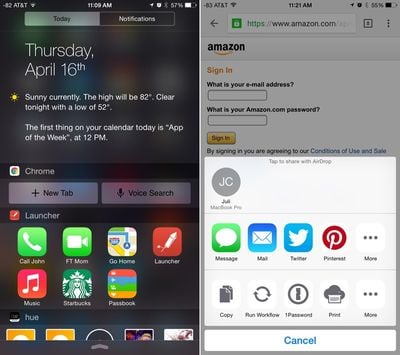
Google today released a significant update to its Chrome browser for iOS, adding several features to improve its compatibility with iOS 8. There's a new Notification Center widget that includes controls to let users launch a new tab or initiate a voice search directly from the Today view of the Notification Center.

Tapping on "New Tab" or on "Voice Search" will automatically launch the Chrome web browser with a new search tab open or an activated voice search, making it handier to look things up quickly. There's no comparable Safari widget for quick launching searches, so the new Chrome widget gives it a bit of a leg up over Apple's built-in browser. Safari users can, however, use Siri for quick searches.
chromeupdate
The app also includes support for iOS Extensions for apps like 1Password and LastPass, so it's now easier to input passwords into Chrome with those apps.

Other new features include the ability to pull to reload and open and close tabs and easier-to-open links copied from other apps.

What's new
- Start searching and browsing faster: quick access to Voice Search and open new tabs from the Today View
- Ergonomically-designed: Pull to reload and open/close tabs
- Support for iOS App Extensions, such as 1Password and LastPass
- Easily open links copied from other apps

The Chrome web browser can be downloaded from the App Store for free. [Direct Link]

Top Rated Comments

bushido Avatar
144 months ago
sweet, now if only i could make it my default browser.

speaking of App Extensions, is it just me downloading the wrong apps (over 120) or are devs barely implementing it? i mean i got 14 Photo Filter Apps and only 2 take advantage of App Extension from within the Photo app.
Score: 2 Votes (Like | Disagree)
144 months ago
Seriously like how hard is just tapping an app icon? Why is swiping from the top and then tapping suddenly considered a "shortcut"?
LOL. I was thinking the exact same thing.

Probably because you can generally access it easily from anywhere with just a swipe. Similar to having a shortcut to something on the dock on your computer where you can usually access it quickly vs opening up Finder finding the right filder and the right file and all that.

It's all simply an option that someone can decide to use or not. Anyone can use it as they see fit, the good thing is that the option is available.
Score: 1 Votes (Like | Disagree)
The Bogeyman Avatar
144 months ago
Google already knows far too much about us. Why use their browser and tell them even more??? Crazy.
Score: 1 Votes (Like | Disagree)
sbailey4 Avatar
144 months ago
notification centre seems to becoming a bin area for messy OS integration

I know right. Soon it will be the HOME screen. Just one long screen with everything on it. Why even go into the device. LOL

Seriously tho how much harder is it to just tap the Chrome icon when you need to open the browser.
Score: 1 Votes (Like | Disagree)
mKTank Avatar
144 months ago
Meh. Javascript is crippled on third party browsers. Gonna stick with Safari.
Score: 1 Votes (Like | Disagree)
Sgh808 Avatar
144 months ago
Hoping this is an indicator for potential integration of the Google app into Notification Centre.
Score: 1 Votes (Like | Disagree)

Popular Stories

google chrome vertical tabs

Google Brings Vertical Tabs and Improved Reading Mode to Chrome

Tuesday April 7, 2026 1:27 pm PDT by
Google today updated its Chrome browser with support for vertical tabs, which are displayed in a sidebar instead of at the top of the browser. The tab layout can be changed by right clicking on any Chrome window and choosing the "Show Tabs Vertically" option. Sidebar tabs feature full page titles and make it simple to organize tab groups. Google has also added a new full-page interface...
Chrome Feature 22

Gemini in Google Chrome Gets a Skills Library for Saving Custom AI Prompts

Tuesday April 14, 2026 10:00 am PDT by
Chrome has been updated today with a Skills library that's designed to let Chrome users turn AI tasks into repeatable skills that can be used on any website. Useful prompts you create for Gemini in Chrome can be saved as a Skill that can be accessed later with a single click. If you're shopping for skincare and ask Gemini about the ingredients in a product, for example, you can save the...
gemini for mac app google

Google Launches Native Gemini AI App for Mac

Wednesday April 15, 2026 10:46 am PDT by
Google is bringing Gemini to the Mac with a new native macOS app that's available starting today. Gemini for Mac can be activated with a keyboard shortcut, and it has built-in tools for generating images, analyzing what's on your screen, reviewing files, and more. Gemini is the last of the three major AI services to have a dedicated Mac app, because OpenAI and Anthropic have had Mac apps for ...
Related Apple News: Sport | Entertainment | Education | Mac | Motoring

















