'Wunderlist' for Apple Watch Brings To-Do Lists, Agendas and Reminders to Your Wrist - MacRumorsOpen MenuShow RoundupsShow Forums menuVisit ForumsOpen Sidebar
Skip to Content

'Wunderlist' for Apple Watch Brings To-Do Lists, Agendas and Reminders to Your Wrist

Wunderlist has provided a closer look at its Apple Watch companion app, which appeared on the App Store on Thursday ahead of the device's launch next month. The app is designed with a unique Home View that provides access to your most important items first, with four buttons that display a bird's eye view of your to-do lists, agenda and reminders on your wrist.
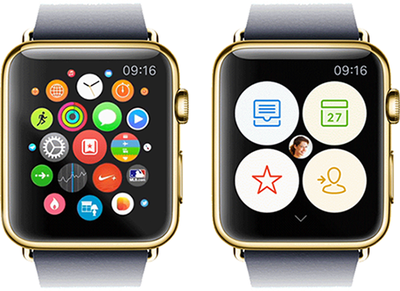
Wunderlist on Apple Watch
Wunderlist for Apple Watch delivers a hand-free experience in situations where you might normally use your iPhone, such as while shopping at a supermarket and checking items off your grocery list, or when using smart voice input to add to-dos for an upcoming meeting. The combination of Glances and real-time notifications ensure that you will stay up to date with important things during your day, be it during your morning commute, at the office or at home.

"As you move through the day, you won’t even have to open Wunderlist on your Watch to get stuff done. Just take a look at our Glance during breakfast to review your most important to-dos for the day. Thanks to Wunderlist’s real-time notifications, a subtle tap on your wrist will let you know what your colleagues are working on during your morning commute, and remind you to pick up the milk on your way home from work."

Wunderlist for Apple Watch features custom animations for interacting with the app, and its developers have carefully considered which font sizes, layouts and interactions would work best with limited screen real estate. The result is a design that was inspired by Wunderlist's brand-new colorful sidebar icons, with the majority of the user interface consisting of white text on a black background.
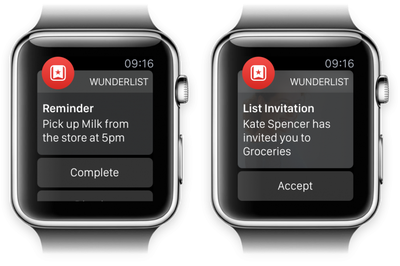
Wunderlist Apple Watch Views
Ultimately, the developers behind Wunderlist for Apple Watch wanted to create software that gets out of your way, all the while providing multipurpose functionality for managing your day-to-day life. Apple Watch, and by extension the wrist, provides a more natural setting for to-do apps such as Wunderlist and Todoist, so it will be interesting to see how developers build upon these apps in the future.

Wunderlist [Direct Link] is free on the App Store for iPhone, iPad and Apple Watch.
Related Roundup: Apple Watch 11
Buyer's Guide: Apple Watch (Caution)

Popular Stories

modular ultra training load

watchOS 27 to Offer New Watch Faces, Including 'Modular Ultra' Variant

Monday May 4, 2026 5:58 am PDT by
For watchOS 27, Apple is testing new Apple Watch faces, and one of them is a simpler version of an existing Apple Watch Ultra watch face that could be coming to standard Series models. Writing in his latest Power On newsletter, Bloomberg's Mark Gurman reports that Apple is testing multiple new faces for watchOS 27, code-named "Orchid." One of them is said to be a "simplified take" on the...
Apple Announces 2026 Pride Band Watch Face and iPhone Wallpaper Feature

Apple Announces 2026 Pride Band, Watch Face, and iPhone Wallpaper

Monday May 4, 2026 6:05 am PDT by
Apple today introduced its 2026 Pride Collection, including a new Apple Watch band, watch face, and a matching wallpaper for the iPhone and iPad. Apple said its Pride Collection celebrates LGBTQ+ communities around the world during Pride Month in June and beyond. In addition, the company noted that it is proud to financially support organizations that serve LGBTQ+ communities. The new Pri...
Apple Watch Ultra 2 Black Titanium

watchOS 26.5 Fixes Two Apple Watch Bugs

Tuesday May 5, 2026 7:56 am PDT by
watchOS 26.5 fixes two Apple Watch bugs, according to Apple's release notes for the update, which is expected to be released next week. Apple fixed bugs in the Messages and Workout apps:• Fixes an issue where Messages on Apple Watch may use SMS instead of iMessage when paired with a dual SIM iPhone • Fixes an issue where Workout app audio alerts could fail to play if the phone was not...

Top Rated Comments

cambookpro Avatar
146 months ago
Can afford $15,000 watch.

Still has to pick up milk from the store at 5pm.

:p
Score: 17 Votes (Like | Disagree)
b0nd18t Avatar
146 months ago
Kinda can't wait to not see as many Apple watch articles here.
Score: 12 Votes (Like | Disagree)
146 months ago
Paper. Give your son the list and ask him to hold it. Ask him to name the stuff he sees. Let him smell the radishes, green onion and cilantro. Staring at your phone while your son is in the cart is why he's destroying stuff.

P

I agree! Even in the last few weeks its become apparent to me what a pain it is to try and hold my phone in one hand with the list, push a heavy cart with the other, and keep my son from destroying the aisles as we go. (Still working on the best approach for the last one.)

It would be nice to have a list go through on the watch, so I can just clear them as I go.
Score: 10 Votes (Like | Disagree)
HitchHykr Avatar
146 months ago
Is it going to notify you that there's yet another app update every 5 minutes?
Score: 7 Votes (Like | Disagree)
69Mustang Avatar
146 months ago
Are we going to get a separate front page post for every watch app that debuts? :confused: Wouldn't a sidebar "collection pot" be a better place to just FYI watch apps?
Score: 6 Votes (Like | Disagree)
146 months ago
This will be great when grocery shopping.
Score: 5 Votes (Like | Disagree)
Related Apple News: Lifestyle | Iphone | Opinion | News | Motoring