

Apple has never shown much interest in styluses, even as companies like Samsung and Microsoft have embraced them as major selling points for smartphones and tablets. Former Apple CEO Steve Jobs even went as far as saying "If you see a stylus, they blew it," on one occasion, and at Macworld in 2007, he asked "Who wants a stylus? Nobody wants a stylus."
Apple's focus on the fingertip as the best input method doesn't mean styluses are entirely pointless -- they can be useful for taking notes, making sketches, creating artwork, and in dozens of other situations. Luckily, Apple's disinterest in the stylus hasn't stopped third-party accessory makers from developing them, and eight years after the iPhone first debuted, there are a range of stylus options on the market.
Adonit is a company that got into the stylus game early, debuting its first stylus on Kickstarter in 2011. The Adonit Jot was one of the first styluses to incorporate a thin plastic precision disc, doing away with a rubber tip to let users see more of the screen while writing. Since then, Adonit has gone on to make a range of styluses, some that even connect via Bluetooth to incorporate pressure sensitivity.
The company's newest styluses, the Jot Pro and the Jot Mini, are standard non-connected styluses, but they're the culmination of years of work perfecting the stylus based on customer feedback and they're some of the nicest writing utensils that Adonit has produced yet. Get a quick look at the Jot Pro or Jot Mini in the video below, or keep reading to see our full thoughts on the two styluses.
What's in the Box
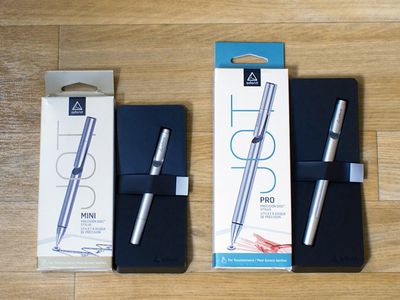
The Jot Pro and the Jot Mini come nicely packaged in an outer cardboard box and a plastic insert with an adhesive strap that holds them in place during shipping. They arrive with caps in place to keep the tip from being damaged and are ready to use once the cap is removed and affixed to the bottom of the stylus.
Design and Features
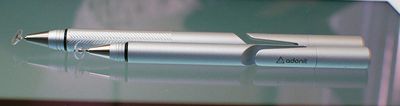
Both the Jot Pro and the Jot Mini are made from a lightweight aluminum in black or silver that matches the aluminum backing of the silver/space gray iPad and iPhone. Each comes with a screw-off cap that connects to both ends of the stylus and serves two purposes -- keeping the stylus safe during transport in a bag or pocket and extending the size of the stylus when in use.
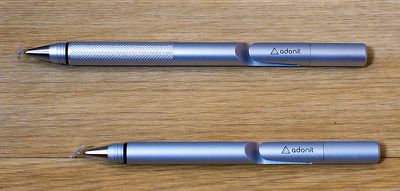
Each version comes with a built-in clip at the end that allows the stylus to clip onto a shirt pocket or bag and they both have the same plastic tip.
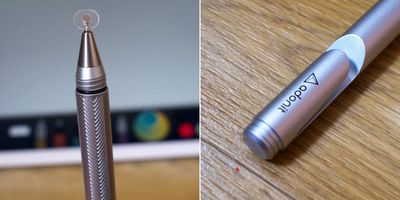
The larger Jot Pro has a few features not found in the miniature version. In addition to being both larger and heavier (123mm and 20 grams vs 98.7mm and 13 grams), it comes with a textured grip to make it easier to hold and a cushion at the tip that gives it a bit more flexibility against the screen for quieter writing.
Functionality
When it comes to styluses, some of the most important elements to consider are the tip of the device, the weight, and how it feels in the hand, as all of these can impact the writing or sketching experience.
The major benefit of the plastic tip of the Jot Pro and Jot Mini is the ability to see the entire screen when you're writing or sketching. With a larger rubber-tipped stylus, the screen is obscured so you can't see the point where the stylus connects to the screen. The plastic tip of the Jot isn't inherently more accurate than a rubber tip, but it can feel more precise because you can see what you're doing.
Writing with a rubber-tipped stylus can sometimes cause overcompensation resulting in distortion because it's difficult to see the letters being formed, but the Jot Pro alleviates that problem for writing that's clearer, especially when writing small letters.
The downside is that there's more resistance against the screen with the Jot Pro, which means that the writing experience is not quite as smooth. This is more evident when attempting to sketch, but it's definitely noticeable when writing too. This extra drag isn't a deal breaker by any means due to the fact that it's fairly subtle, but it's something to be aware of when choosing a stylus.
Earlier Jot styluses had some issues with pivoting and the plastic tip popping off, but those problems seem to been resolved. The tip of both the Jot Mini and the Jot Pro pivoted smoothly and allowed for uninterrupted writing at any angle.
One major con of both styluses and of the plastic tip in general is the noise. When writing or drawing, there's a distinctive click that's similar to the tap of a fingernail against the screen. The larger Jot Pro has a cushioned tip that provides a somewhat smoother writing experience and a slight dampening of the sound, but the click is still very much audible with either stylus.
Weight and hand feel may not seem like important factors when picking a stylus, but these elements can have an impact on the fluidity of writing and the feel of your hand after writing for a long period of time.
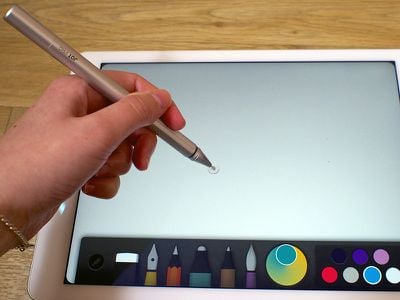
The Jot Pro is slightly thicker than your standard pen, and about as heavy as a nice quality pen you might buy for $40 or $50. It has a textured grip and overall, it feels nice in the hand. The extra weight helps make writing somewhat smoother, and its pen-like feel makes it comfortable to use for long note taking or drawing sessions.
The Jot Mini is smaller, lighter, and thinner than the Jot Pro. The build quality is great, but its small size means that it is slightly less comfortable to hold. Its compact size and light weight make it a great travel stylus for occasional use.
Who's it For?
With the Jot Pro and the Jot Mini, you're getting precision at the cost of a bit of drag on the screen and a clicking sound that might be annoying to some. It's an excellent all around stylus and it really shines in precision writing and drawing situations due to its ability to allow its user to see the entire screen.
Unless you need something portable and low cost, the Jot Pro is the better pick over the Jot Mini. It's larger size means it's more comfortable to use for long periods of time, and its cushioned tip offers a smoother, quieter writing experience.
Pros
- Full field of view
- Very precise feel
- Excellent form factor
Cons
- Pricer than most rubber-tipped styluses
- Clicking sound on screen
- Slight drag compared to rubber tip
How to Buy
The Jot Mini is available from the Adonit website for $19.99. The Jot Pro is also available from the website, but priced slightly higher at $29.99.





















Top Rated Comments
So I bought my Adobe Ink for $200 last summer because I have been desperate for years to get a bluetooth stylus with a small tip and pressure sensitivity for drawing. $200 is a lot of money for something like this and Adobe and Adonit have massively failed. The thing worked ok with my iPad Mini 2, but wasn't supported by any other drawing apps outside of Adobe. This is especially surprising considering that Adonit has an SDK that developers can implement, but for some reason Adobe's Ink is blacklisted, even though I later found out that it is functionally the same as their other small-nibbed pressure sensitive bluetooth styli such as the Jot Touch, which costs half the price. I guess that's what you get when you pay moreno support.
I upgraded to the iPad Air 2 when it came out so that I would have a proper-sized drawing surface (and more RAM for art and design apps). To make thing MUCH worse, the pens didn't even work with them. The company has been very sketchy (no pun intended) when it comes to keeping us in the loop for the past several months, and the SDK's they've released have done little to alleviate the constant dropouts (like every 4-5 seconds so you can't even draw) and wavy linesat least according to other users who can actually use their stylus with 3rd party apps. But there were some improvements. Adobe apparently feels the need to restrict this by not letting me even use it with other apps.
And don't get me started on Adobe. They've never even updated any of their drawing apps to address the issue. They've hardly updated their drawing apps at all since debuting them last summer. At first it seemed like they were going really exciting places with it, then it crapped out and they've lost all momentum in that space. And now I've got this $200, beautifully crafted but functionally retarded aluminum paper weight. Fantastic.
I'd stay away from Adonit. This whole experience has really soured me on themand Adobe. It's going to take a lot to earn back my trust.
Thanks for helping people understand this. Jobs often took extreme viewpoints to get the message across or attack competing products. He knew full well that many Mac users (especially back then relative to the overall population of Mac users) were creatives who were using drawing stylus on their Mac. Stylus have their own place in the input world. At the time he said that they dominated primary input on touch-enabled mobile phones. To attack the stylus was to attack the entire competition who had never come up with intuitive gestures and the smooth with physics scrolling experience of the iPhone.
To those who say that suddenly Apple "fanboys" are interested in stylus that's not true. Many of us have been using them for years as artists, illustrators and photo retouchers. Wacom is where its at and I've owned several of their drawing tablets. What many of us want is to be able to easily do digital sketches on the go using a device we often already have with usstarting with basic things like pressure sensitivity support and palm rejection. Drawing with a finger is not ideal, it never has been, and it never will be. For one it's too fat to be precise. Having an Apple-approved stylus program and API would be incredible. I hope that comes in iOS 9 and Apple makes their own version for $150 or less.
Could MacRumors stop misusing this quote? It's bad enough that everyone on the Apple-hate bandwagon brings this back over and over, we shouldn't have to see this on Apple related sites.
Jobs' comment targeted tablets that rely on styluses for input as opposed to focusing on finger input. He never said that tablets shouldn't use styluses.
Gee, did it take you long to come up with such an excellent pun, or are you just a natural? I'm guessing here, just a wild stab in the dark, that you have never actually used either Final Cut or Aperture. So... Maybe you're talking crap? Just maybe? Hmm...
Adonit has actually been quite forthcoming about the issues with the Air 2. They have addressed it regularly in their forums and posted updates in their blog. It's a difficult situation, which is why it's important for Apple to get on board sooner than later with offering real stylus support. At the moment, there are no active styli from ANY manufacturers that work any better than Adonit's with the new screen.
In the vast majority of cases, Adonit has worked with their customers to make them happy. If you go into the active stylus market with the expectation it is going to work like pen on paper, you are bound to be disappointed and there is no helping you. The screen tech of the iPad has severe limitations, but with that in mind, with good app support some of these offerings are still quite decent.