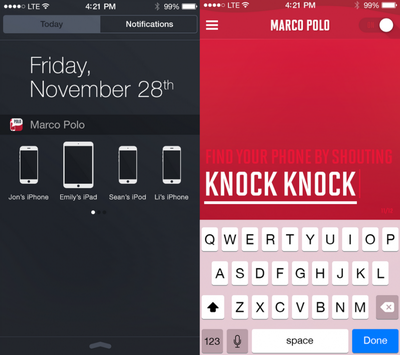
Developer Matt Wiechec today released a major update to his Marco Polo iOS app that helps users recover misplaced iPhones and iPads with the sound of their voice. The new update brings custom responses and a new Notification Center widget that allows users to find other iOS devices also running the app.

Addressing a different use case than Apple's Find My iPhone service, Marco Polo is intended to allow users to easily find an iOS device located in close proximity to the user. The app's core functionality requires the app to be running in the background, with the device's microphone listening for the key passphrase, which is "Marco" by default. Once the user speaks the phrase, the app generates an audio response, with the default being "Polo".

The new update lets Marco Polo users select phrases like "I'm Over Here" and "Who's There?" over the simple "Polo" response, while also bringing a slew of new character voice options, like "Movie Guy" and "Wicked". The widget, once installed in the Today section of the Notification Center and set to discoverable within the app, allows users to find other iOS devices with a simple tap.
Screenshot (132)

Our largest update yet, ready for the new year. We've added great new features, new voices, custom responses, widgets, and improved the entire app experience!

- Custom Responses are here! Now your device can ring back more than just POLO!
- Choose from responses like "I'm Over Here", "Who's There?", "iPhone Reporting", and many others. Even enter your own phrase!
- New iOS 8 Nearby Widget; skip shouting and find other devices right from Notification Center
- Greatly improved voice recognition
- Added new voices like MOVIE GUY and WICKED, including supporter exclusives like ARNOLD, BUSH, KERMIT, SLY, and more
- The app is now Universal to support the iPad, and completely optimized for iOS 8 and the iPhone 6 and iPhone 6 Plus

Marco Polo even allows some customization to the phrase shouted to prompt the app's response, meaning virtually any 12-letter word a user can think of could be used to discover a lost iPhone, an improvement over the original version of the app where some users complained that words with similar sounds to "Marco" such as "mark" would trigger a response.

Functionality in silent mode and while the device is sleeping, as well as a volume boost feature that makes sure the app's voice is heard even if your phone is low, round out most of standard features that were available even before today's 2.0 update.

The app has a decent voice recognition range, and recognizes almost any 12-letter word or phrase added as a passphrase. Slight drawbacks may hinder daily use of the app, however, including the need for the device's microphone to always be active. This means that once you leave the app, the red "recording" microphone bar will be a permanent mainstay atop the iPhone screen. Using the Notification Center widget to discover other missing devices doesn't require the microphone to be on, however.

Potential battery drain may also be a concern given the need to keep the device's microphone active, although we did not see significant drops in battery status during limited testing.

Marco Polo can be downloaded for $0.99 from the App Store. [Direct Link]

Top Rated Comments

ck2875 Avatar
142 months ago
This seems insanely redundant with the "Find My iPhone" feature that allows you to play a sonar sound on your devices, particularly since family sharing in iOS 8 allows you to find family members' devices as well.
Score: 4 Votes (Like | Disagree)
Doctor Q Avatar
142 months ago
When I lose track of my phone, I report a child abduction to the police. The authorities then send out an Amber Alert, which wakes up my phone and produces a loud sound. Simple, effective, and no need to use an extra app! ;)

Seriously, I have yet to lose track of my phone because it's with me anytime I'm not in the shower or going through the metal detector at the airport. But I sometimes call my wife's phone so she can find where she left it.

If you lose track of an iPad or iPod touch, having it respond to a spoken request may come in handy. I'm not sure the phrases need to be entertaining as well, but a little humor never hurts.
Score: 3 Votes (Like | Disagree)
Baytriple Avatar
142 months ago
Thanks for the waste of money you caused me. "Discreet" really if a huge flashing red bar on the top of my iPhone 6+ is discreet then my name is Osama bin laden. That app lasted aprox 2 minutes on my phone.
Score: 1 Votes (Like | Disagree)
Anonymous Freak Avatar
142 months ago
My wife misplaces her phone fairly often, requiring logging in to "Find my iPhone" on my phone and making it beep. This functionality would be great if it were:
1. Baked in to the OS (I *REALLY* worry about a third-party monitoring all microphone input,)
2. Didn't decrease battery life *AT* *ALL*. If this reduces my wife's iPhone to less than a full day of battery, it's useless. She often doesn't notice until the next morning that she can't remember which table it got left under a piece of paper on. If the battery was at 15% at night, it shouldn't be dead by the time she realizes she has to look for it.
Score: 1 Votes (Like | Disagree)
madKIR Avatar
142 months ago
This app has to stay on all the time in order to recognize your commands.
It does drain the battery.
Thumbs down!
Score: 1 Votes (Like | Disagree)
hortod1 Avatar
142 months ago
Tried it, seems to disable any audio notifications (email, sms) as well as disables Hey Siri.
Score: 1 Votes (Like | Disagree)

Popular Stories

iOS 26

iOS 26.4 and iOS 27 Features Revealed in New Leak

Friday December 12, 2025 10:56 am PST by
Macworld's Filipe Espósito today revealed a handful of features that Apple is allegedly planning for iOS 26.4, iOS 27, and even iOS 28. The report said the features are referenced within the code for a leaked internal build of iOS 26 that is not meant to be seen by the public. However, it appears that Espósito and/or his sources managed to gain access to it, providing us with a sneak peek...
iOS 26

Apple Releases iOS 26.2 With Alarms for Reminders, Lock Screen Changes, Enhanced Safety Alerts and More

Friday December 12, 2025 10:10 am PST by
Apple today released iOS 26.2, the second major update to the iOS 26 operating system that came out in September, iOS 26.2 comes a little over a month after iOS 26.1 launched. ‌iOS 26‌.2 is compatible with the ‌iPhone‌ 11 series and later, as well as the second-generation ‌iPhone‌ SE. The new software can be downloaded on eligible iPhones over-the-air by going to Settings >...
Apple Foldable Thumb

Leak Reveals Foldable iPhone Details

Monday December 15, 2025 9:09 am PST by
The first foldable iPhone will feature a series of design and hardware firsts for Apple, according to details shared by the Weibo leaker known as Digital Chat Station. According to a new post, via machine translation, Apple is developing what the leaker describes as a "wide foldable" device, a term used to refer to a horizontally oriented, book-style foldable with a large internal display....
iOS 26

iOS 26.2 Coming Soon With These 8 New Features on Your iPhone

Thursday December 11, 2025 8:49 am PST by
Apple seeded the second iOS 26.2 Release Candidate to developers earlier this week, meaning the update will be released to the general public very soon. Apple confirmed iOS 26.2 would be released in December, but it did not provide a specific date. We expect the update to be released by early next week. iOS 26.2 includes a handful of new features and changes on the iPhone, such as a new...
macOS Tahoe 26 Thumb

Apple Releases macOS Tahoe 26.2 With Edge Light

Friday December 12, 2025 10:08 am PST by
Apple today released macOS Tahoe 26.2, the second major update to the macOS Tahoe operating system that came out in September. macOS Tahoe 26.2 comes five weeks after Apple released macOS Tahoe 26.1. Mac users can download the macOS Tahoe update by using the Software Update section of System Settings. macOS Tahoe 26.2 includes Edge Light, a feature that illuminates your face with soft...
AirPods Pro Firmware Feature

Apple Releases New Firmware for AirPods Pro 2 and AirPods Pro 3

Thursday December 11, 2025 11:28 am PST by
Apple today released new firmware designed for the AirPods Pro 3 and the prior-generation AirPods Pro 2. The AirPods Pro 3 firmware is 8B30, up from 8B25, while the AirPods Pro 2 firmware is 8B28, up from 8B21. There's no word on what's include in the updated firmware, but the AirPods Pro 2 and AirPods Pro 3 are getting expanded support for Live Translation in the European Union in iOS...
ipados 26 1 slide over

Apple Releases iPadOS 26.2 With Multitasking Improvements

Friday December 12, 2025 10:09 am PST by
Apple today released iPadOS 26.2, the second major update to the iPadOS 26 operating system released in September. iPadOS 26.2 comes a month after iPadOS 26.1. The new software can be downloaded on eligible iPads over-the-air by going to Settings > General > Software Update. iPadOS 26.2 continues with the multitasking improvements that were added with iPadOS 26.1. You can now drag and...
airpods max 2024 colors

AirPods Max 2 Likely to Offer These 10 New Features

Monday December 15, 2025 7:41 am PST by
Apple released the AirPods Max on December 15, 2020, meaning the over-ear headphones launched five years ago today. While the AirPods Max were updated with a USB-C port and new color options last year, followed by support for lossless audio and ultra-low latency audio this year, the headphones lack some of the features that have been introduced for newer generations of the regular AirPods and the ...