'Workflow' Brings Powerful Automated Actions to iOS - MacRumorsOpen MenuShow RoundupsShow Forums menuVisit ForumsOpen Sidebar
Skip to Content

'Workflow' Brings Powerful Automated Actions to iOS

by

DeskConnect today launched Workflow, a universal iOS app billed as a "personal automation tool" that allows users to easily create workflows to accomplish various tasks such as creating animated GIFs from a series of photos, grabbing images from a web page, automatically cross-posting photos to Twitter, Facebook, and Instagram in one step, and more.


Workflow contains over 100 different actions users can combine in their own custom workflows, or users can select from a gallery of pre-populated workflows focused on various topics. The gallery includes a number of sample workflows at launch, and users can submit their own for inclusion.
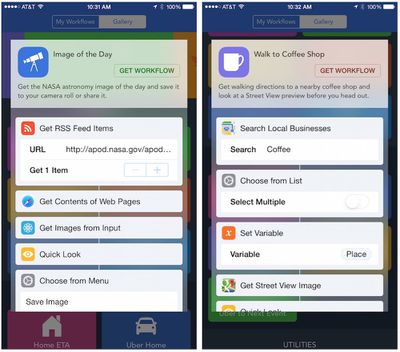
workflow_gallery_samples

Sample workflows from the gallery

The app's simple drag-and-drop interface makes it easy to build workflows, which can be initiated from within in the app, saved to the home screen as a web URL that launches the specified workflow, or launched from other apps through a share sheet extension.

Interestingly, Workflow originally contained a Notification Center widget that allowed users to launch workflows, but as with a number of other developers, DeskConnect ran into issues with Apple's restrictions on what types of content can be presented in Notification Center widgets and the feature had to be removed. Still, Workflow offers a number of handy options for accomplishing tasks of varying complexity, pulling together different types of inputs and actions to greatly simplify multi-step tasks that would normally see users manually switching between several apps to accomplish.

Workflow is available now at an introductory price of $2.99 for a limited time. [Direct Link]

Top Rated Comments

147 months ago
This app reminds me of Automator.
Score: 3 Votes (Like | Disagree)
baryon Avatar
147 months ago
Hope this is better than ITTT, which can't even do the simplest things.
Score: 3 Votes (Like | Disagree)
mxmgodin Avatar
147 months ago
It's featured as an Editor's Choice on the App Store, so it should be safe (for now).

I played around with it a bit, and I quite like it. I hope for better and more varied support of 3rd party apps and services. For example, I'd like to be able to use Google Maps, instead of the stock Maps app, mostly because of transit information, etc.

Update: Just noticed that Google Maps is already supported. :P
Score: 2 Votes (Like | Disagree)
motulist Avatar
147 months ago
I don't see what this would be useful for for most people. Can someone give a list of real world uses that many people would find useful or desirable?
Score: 1 Votes (Like | Disagree)
147 months ago
I'm looking for a real practical use for it. Posting tweets, making animgifs, and sharing photos is of zero interest to me. Anyone got any useful examples of where it can save time for non-social media users like myself?

Can it close all running apps?

Can it play all songs by an artist without me creating a playlist?

Can it set the clipboard text before opening an email (so I can paste a canned response to someone)?

Can it open any website with specific criteria that I've set, such as opening this MacRumors forum with search results for my name?

And so on.
Score: 1 Votes (Like | Disagree)
147 months ago
I'd love Siri integration... to be able to execute my own commands via Siri. But I'm thinking Apple hasn't opened that function up to 3rd party apps yet?

Only for HomeKit (the new home automation api). I think that homekit is only available to "hardware partners" meaning there is a fairly extensive vetting process before a dev even has access to it (I believe).
Score: 1 Votes (Like | Disagree)

Popular Stories

imac video apple feature

Apple Released Yet Another New Product Today

Friday March 20, 2026 2:39 pm PDT by
Apple has unveiled a whopping nine new products so far this March, including an iPhone 17e, iPad Air models with the M4 chip, MacBook Air models with the M5 chip, MacBook Pro models with M5 Pro and M5 Max chips, the all-new MacBook Neo, an updated Studio Display, a higher-end Studio Display XDR, AirPods Max 2, and now the Nike Powerbeats Pro 2. iPhone 17e features the same overall design as...
iPhone 18 Pro Deep Red Feature

iPhone 18 Pro Launching Later This Year With These 12 New Features

Wednesday March 18, 2026 7:39 am PDT by
While the iPhone 18 Pro and iPhone 18 Pro Max are not expected to launch for another six months or so, there are already plenty of rumors about the devices. It was initially reported that the iPhone 18 Pro models would have fully under-screen Face ID, with only a front camera visible in the top-left corner of the screen. However, the latest rumors indicate that only one Face ID component...
ios 26 4 pastel

iOS 26.4: Top 10 New Features Coming to Your iPhone

Friday March 20, 2026 2:44 pm PDT by
iOS 26.4 isn't the major update with new Siri features that we hoped for, but there are some useful quality of life improvements, and a little bit of fun with an AI playlist generator and new emoji characters. Playlist Playground - Apple Music has a Playlist Playground option that lets you generate playlists from text-based descriptions. You can include moods, feelings, activities, or...
Related Apple News: Travel | Technology | Politics | World News | Iphone