

Google is in the process of updating all of its apps with its new Material Design interface guidelines, and as of today, the Google app for iOS has been updated with the new look. Material Design, which Google says is based on ink and paper, uses grid-based layouts, responsive animations, and depth effects to create clean, touchable interface elements.

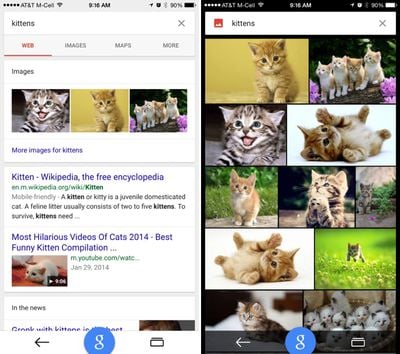
Along with adding new Material Design animations, the Google app has been updated to take advantage of the larger screens on the iPhone 6 and 6 Plus and it now displays bigger photos in image search.

Google's update includes more than just design changes, as the app has been completely rebuilt. There's a new "Google" button that lets users search with just one tap anywhere in the app, and Google Maps integration has been added, letting users check out interactive maps and Google Street View within the app. A new "recents" button is also designed to let users keep track of the searches they've conducted.
googleupdate

Introducing the new Google app
Completely rebuilt to bring you the best of Google:
- Recents--see & return to your recently visited pages
- Google button--start a new search with just one tap
- Google Maps--explore interactive maps, nearby places & Street View right inside the app (for iPhone)

New look and feel:
- Beautiful new Material Design animations
- Bigger photos in image search
-Looks great on the new iPhone 6 & 6 Plus

Google can be downloaded from the App Store for free. [Direct Link]

Top Rated Comments

rwilliams Avatar
146 months ago
Google has really struck gold with Material Design. Their apps look great and have become more enjoyable to use. That's not easy to do.

I can't wait for Gmail and Google Calendar to be redesigned and released.
Score: 9 Votes (Like | Disagree)
fivedots Avatar
146 months ago
Google has really struck gold with Material Design. Their apps look great and have become more enjoyable to use. That's not easy to do.

I can't wait for Gmail and Google Calendar to be redesigned and released.
The Calendar app can't come soon enough! Using Google Calendar on iOS has been nothing but a massive frustration for me:

* Default iOS Calendar: Does not handle invites and does not allow me set notifications per account. Thanks, Google, for nuking Exchange support. This used to work so well.
* Fantastical: Relies on iOS syncing the calendar, adds two times to every event I create
* Sunrise: Uses a proprietary invite system, caused me quite a few problems
* Calendars by Readdle: Does not appear to handle invites
* Gmail: Allows response to invites but terrible app overall
* Inbox: Great app, currently does not handle calendar invites at all

And to add to all of that:

* iCloud calendars don't handle invites well at all, can't accept updates to events using native apps. Whole pile of cross-platform invite issues here.
* Built in 'Birthdays' calendar neglects anniversaries. Google's Birthday calendar has both but does not have any event notifications set for them.

Head, meet wall.
Score: 4 Votes (Like | Disagree)
Simplicated Avatar
146 months ago
Yet still none of their apps supports the standard swipe back gesture that has been around since iOS 7. I passionately hate their apps because of that.
Score: 4 Votes (Like | Disagree)
Nunyabinez Avatar
146 months ago
Serious question. Why would I want this rather than just using Google in Safari?
Score: 3 Votes (Like | Disagree)
doug in albq Avatar
146 months ago
So basically material design is let's add drop shadow everywhere.
No, it's let's add subtile drop shadows everywhere. Those things that help with contrast and depth. Visual design 101 that some folks chose to forget about (for a while). :)
Score: 2 Votes (Like | Disagree)
Razeus Avatar
146 months ago
A much better and clean looking design. Especially when looking at the eyesore that is iOS 7 and 8.
Score: 2 Votes (Like | Disagree)

Popular Stories

iOS 26

iOS 26.3 and iOS 26.4 Will Add These New Features to Your iPhone

Tuesday February 3, 2026 7:47 am PST by
We are still waiting for the iOS 26.3 Release Candidate to come out, so the first iOS 26.4 beta is likely still at least a week or two away. Following beta testing, iOS 26.4 will likely be released to the general public in March or April. Below, we have recapped known or rumored iOS 26.3 and iOS 26.4 features so far. iOS 26.3 iPhone to Android Transfer Tool iOS 26.3 makes it easier...
Apple Logo Black

Apple's Next Launch is 'Imminent'

Sunday February 1, 2026 12:31 pm PST by
The calendar has turned to February, and a new report indicates that Apple's next product launch is "imminent," in the form of new MacBook Pro models. "All signs point to an imminent launch of next-generation MacBook Pros that retain the current form factor but deliver faster chips," Bloomberg's Mark Gurman said on Sunday. "I'm told the new models — code-named J714 and J716 — are slated...
iOS 26 Home Feature

Apple Gives Final Warning to Home App Users

Tuesday February 3, 2026 8:55 am PST by
In 2022, Apple introduced a new Apple Home architecture that is "more reliable and efficient," and the deadline to upgrade and avoid issues is fast approaching. In an email this week, Apple gave customers a final reminder to upgrade their Home app by February 10, 2026. Apple says users who do not upgrade may experience issues with accessories and automations, or lose access to their smart...
Aston Martin CarPlay Ultra Screen

Apple's CarPlay Ultra to Expand to These Vehicle Brands Later This Year

Sunday February 1, 2026 10:08 am PST by
Last year, Apple launched CarPlay Ultra, the long-awaited next-generation version of its CarPlay software system for vehicles. Nearly nine months later, CarPlay Ultra is still limited to Aston Martin's latest luxury vehicles, but that should change fairly soon. In May 2025, Apple said many other vehicle brands planned to offer CarPlay Ultra, including Hyundai, Kia, and Genesis. In his Powe...
Apple Foldable Thumb

First Foldable iPhone Design Details Revealed

Monday February 2, 2026 7:19 am PST by
Apple's first foldable iPhone will feature relocated volume buttons, an all-black camera plateau, a smaller Dynamic Island, and more, according to design leaks from a known Weibo leaker. The user known as "Instant Digital" today claimed to share several key details about the design of the foldable iPhone: The volume buttons will be located on the top edge of the device, aligned to the...

















