Apple Updates Malware Definitions to Protect Against Botnet Threat Coordinated Via Reddit

Last week, Russian anti-virus firm Doctor Web disclosed a newly discovered piece of OS X malware known as Mac.BackDoor.iWorm that at the time had affected roughly 17,000 machines around the world. While the exact mechanism of infection was unclear, an interesting twist to the story involves compromised machines running search queries on Reddit to obtain instructions about which command and control servers should be used to manage the botnet.

It is worth mentioning that in order to acquire a control server address list, the bot uses the search service at reddit.com, and -- as a search query -- specifies hexadecimal values of the first 8 bytes of the MD5 hash of the current date. The reddit.com search returns a web page containing a list of botnet C&C servers and ports published by criminals in comments to the post minecraftserverlists under the account vtnhiaovyd.

Once connected to a command and control server, the backdoor opened by the malware on the user's system can receive instructions to perform a variety of tasks, from stealing sensitive information to receiving or spreading additional malware.

In an effort to address the threat, Apple has now updated its "Xprotect" anti-malware system to recognize two different variants of the iWorm malware and prevent them from being installed on users' machines.
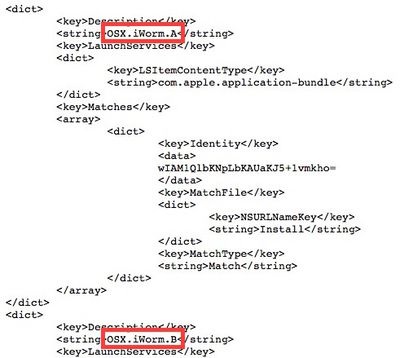
xprotect_iworm
First introduced with OS X Snow Leopard, Xprotect is a rudimentary anti-malware system that recognizes and alerts users to the presence of various types of malware. Given the relative rarity of malware targeting OS X, the malware definitions are updated infrequently, although users' machines automatically check for updates on a daily basis. Apple also uses the Xprotect system on occasion to enforce minimum version requirements for plug-ins such as Flash Player and Java, forcing users to upgrade from older versions known to carry significant security risks.


Popular Stories

Aston Martin CarPlay Ultra Screen

Apple's CarPlay Ultra to Expand to These Vehicle Brands Later This Year

Sunday February 1, 2026 10:08 am PST by
Last year, Apple launched CarPlay Ultra, the long-awaited next-generation version of its CarPlay software system for vehicles. Nearly nine months later, CarPlay Ultra is still limited to Aston Martin's latest luxury vehicles, but that should change fairly soon. In May 2025, Apple said many other vehicle brands planned to offer CarPlay Ultra, including Hyundai, Kia, and Genesis. In his Powe...
Apple Logo Black

Apple's Next Launch is 'Imminent'

Sunday February 1, 2026 12:31 pm PST by
The calendar has turned to February, and a new report indicates that Apple's next product launch is "imminent," in the form of new MacBook Pro models. "All signs point to an imminent launch of next-generation MacBook Pros that retain the current form factor but deliver faster chips," Bloomberg's Mark Gurman said on Sunday. "I'm told the new models — code-named J714 and J716 — are slated...
iOS 26

iOS 26.3 and iOS 26.4 Will Add These New Features to Your iPhone

Tuesday February 3, 2026 7:47 am PST by
We are still waiting for the iOS 26.3 Release Candidate to come out, so the first iOS 26.4 beta is likely still at least a week or two away. Following beta testing, iOS 26.4 will likely be released to the general public in March or April. Below, we have recapped known or rumored iOS 26.3 and iOS 26.4 features so far. iOS 26.3 iPhone to Android Transfer Tool iOS 26.3 makes it easier...
Apple MacBook Pro M4 hero

New MacBook Pros Reportedly Launching Alongside macOS 26.3

Sunday February 1, 2026 5:42 am PST by
Apple is planning to launch new MacBook Pro models with M5 Pro and M5 Max chips alongside macOS 26.3, according to Bloomberg's Mark Gurman. "Apple's faster MacBook Pros are planned for the macOS 26.3 release cycle," wrote Gurman, in his Power On newsletter today. "I'm told the new models — code-named J714 and J716 — are slated for the macOS 26.3 software cycle, which runs from...
iOS 26 Home Feature

Apple Gives Final Warning to Home App Users

Tuesday February 3, 2026 8:55 am PST by
In 2022, Apple introduced a new Apple Home architecture that is "more reliable and efficient," and the deadline to upgrade and avoid issues is fast approaching. In an email this week, Apple gave customers a final reminder to upgrade their Home app by February 10, 2026. Apple says users who do not upgrade may experience issues with accessories and automations, or lose access to their smart...

Top Rated Comments

mikethebigo Avatar
148 months ago
It has been discovered how the botnet is installed. You have to download a pirated app, such as Photoshop, and then give the pirated installer administrator privileges.

No amount of malware security can fix stupid.

EDIT: Link to evidence: http://www.thesafemac.com/iworm-method-of-infection-found/ (http://www.thesafemac.com/iworm-method-of-infection-found/)
Score: 45 Votes (Like | Disagree)
smithrh Avatar
148 months ago
It has been discovered how the botnet is installed. You have to download a pirated app, such as Photoshop, and then give the pirated installer administrator privileges.

No amount of malware security can fix stupid.

Good update - a lot of the "Hey look! Mac malware!" hue and cry has, of course, come from the usual places, namely antivirus software houses - and that hue and cry has not mentioned how the damn thing gets in your Mac in the first place.

That was a glaring omission, and it was right for MacRumors to hold off until now.
Score: 21 Votes (Like | Disagree)
Parasprite Avatar
148 months ago
I will have to check and see if this update is via the store or the site.

You won't find it in either because the update is via xprotect, which is updated automatically. I know there used to be a way to force an update using a terminal command, but iirc there isn't a way to do this in Mavericks (yet).
Score: 16 Votes (Like | Disagree)
brdeveloper Avatar
148 months ago
Well, I'm stuck with Gimp because I'm adult and don't support piracy, and Photoshop is just too expensive for amateur photography, unless it's your main and single hobby. It's not my case, since I'm a multi-interest hobbyist. I even use the buggy Audacity for recording stuff I play with my guitar.

However there's a thing that really annoys me when installing software: allowing administrator rights. Ok, let's give administrator rights so the app can copy stuff to some system folders, but since it should not be the standard behavior of any app, why OSX doesn't give a more detailed explanation of what will be done with the root access I'm giving? It could throw that warning popup with a button providing additional details of the operation, don't you agree?
Score: 12 Votes (Like | Disagree)
slattery69 Avatar
148 months ago
Download and install the xprotect update I posted before in https://forums.macrumors.com/showpost.php?p=20014686&postcount=12

No offence but is the file safe? not to be rude but this thread is about downloading files from unknown sources and just installing them
Score: 10 Votes (Like | Disagree)
nagromme Avatar
148 months ago
You can NAME your trojan “worm,” but that does not make it a worm. (It does make good attention-bait for security firms’ PR departments.)

IF this bad software actually did spread BY ITSELF, then it would seem to be the first real-world successful OS X “virus.” (Technically, “worm” is the better term: a “virus” specifically infects/alters apps, while a “worm” is less specific: any malware that spreads on its own.)

But that doesn’t appear to be the case—making this just another trojan.

Any OS is vulnerable to lies, and that’s what a trojan is: someone lies to you and says “trust this program with your system!” Luckily, OS X makes trojans pretty hard to get these days: you have to go to some very specific effort to run un-trusted, unsigned code. If you know how to do that, you should know better! (Signed code can be remotely shut down by Apple if it's determined to be bad--even outside the App Store.)

Pirates beware: don’t trust shady downloads.
Score: 10 Votes (Like | Disagree)