OS X Yosemite Beta: First Impressions, Installation Tips, Known Issues, and Bug Fixes

Today marked the first day of Apple's public beta testing program for OS X Yosemite, letting thousands of non-developers download the software for the first time. With so many new users, new issues and bugs in the beta are coming to light and being catalogued in our Yosemite forum.

We've pulled out some user reactions from the forums to share, along with some tips on troubleshooting possible issues. For users having problems with the beta, the Yosemite forums can be an invaluable resource, and for users still debating whether or not to install the beta software, make sure to check out this post and our forums before taking the plunge as Yosemite is still somewhat unstable.

First Impressions
A lot of new Yosemite users think that the operating system looks great. According to one user, it makes Windows and Mavericks look antiquated in comparison with its new focus on translucency and clean lines. A "Yosemite is Beautiful" thread is full of praise, with users calling it "stunning" and "the best OS X has ever looked."
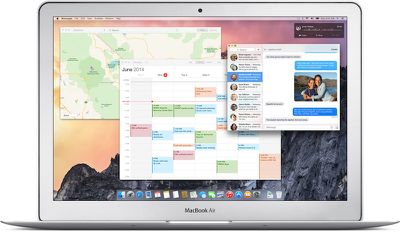
yosemite_macbook_air
While there are a lot of Yosemite users who like the changes Apple's brought to Yosemite, there's a much longer complaint thread entitled "Yosemite Looks Terrible" that includes complaints about Dark Mode, "crappy" fonts, and the bland look of the translucency. Users also say Yosemite looks far less appealing on a non-Retina display.
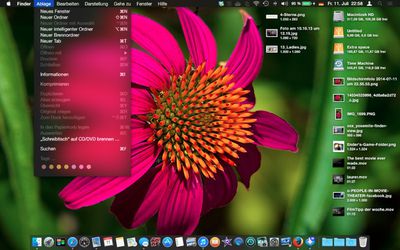
yosemitedarkmode

Yosemite's Dark Mode, screenshot from Yosemite forum thread

Thus far, most users have not noticed significant performance improvements going from Mavericks to Yosemite, but that could change as Yosemite is still very much in a beta form.

Bugs and Issues
A lot of users have received an error message suggesting their Yosemite codes had already been redeemed after requesting a code. According to Apple, simply refreshing the beta page will provide an entirely new code.

One new Yosemite user who installed the operating system on a partition discovered that Yosemite may cause problems with partitions. Other users have also reported issues with partitions after installing Yosemite, while some have had no problems at all. The linked thread contains some Terminal fixes for users experiencing issues.

There's a lengthy bug thread on OS X Yosemite that has been added to throughout the beta testing period. Some remaining bugs include poor management of dual iTunes accounts, crashes in Activity Monitor, making and receiving calls with the FaceTime app, and unreliable WiFi connections. Problems with specific apps are listed in a separate thread, but some issues include frequent crashes with apps like Spotify and Microsoft Office. Apps like Final Cut Pro X, Aperture, iMovie, and Pixelmator also do not appear to be fully functional.

Handoff and Continuity
For users who have the iOS 8 beta installed on their iOS devices, MacRumors forum member Armen has put together a detailed walkthrough on how to set up Continuity and Handoff, new integration features introduced with the two new operating systems. Continuity appears to be largely functional for users with compatible machines, which have a Bluetooth LMP version of 0x6. Handoff does not appear to be working with 2011 MacBooks, but those machines do appear able to access SMS texts and phone calls.

New Features
New Yosemite users and those who are thinking about installing the beta should also check out the OS X 10.10: All The Little Things forum thread that details all of the lesser-known changes made to Yosemite throughout the beta testing period thus far to get familiarized with the operating system. For example, the latest developer preview introduced an entirely new version of iTunes, a new calculator app, and more.

Installation
Users who signed up for the public beta program can access promo codes to install Yosemite through the beta program website. Apple has also been sending out emails to those who have been selected to beta test Yosemite.

Apple recommends Yosemite be installed on a secondary machine as it is beta software, but users who do not have a secondary machine may want to install the operating system on an external drive or on a separate partition. OS X Daily has a set of instructions that walk users through both scenarios, explaining how to install on a partition or external hard drive. A MacRumors forum member has also explained how to create a bootable USB installer.

OS X Yosemite is expected to remain in beta testing until October, with new versions being seeded to both Appleseed participants and developers. Public beta test members will not, however, get as many updates to the software as developers.


Related Forum: OS X Yosemite

Popular Stories

iOS 26

iOS 26.4 and iOS 27 Features Revealed in New Leak

Friday December 12, 2025 10:56 am PST by
Macworld's Filipe Espósito today revealed a handful of features that Apple is allegedly planning for iOS 26.4, iOS 27, and even iOS 28. The report said the features are referenced within the code for a leaked internal build of iOS 26 that is not meant to be seen by the public. However, it appears that Espósito and/or his sources managed to gain access to it, providing us with a sneak peek...
Apple Foldable Thumb

Leak Reveals Foldable iPhone Details

Monday December 15, 2025 9:09 am PST by
The first foldable iPhone will feature a series of design and hardware firsts for Apple, according to details shared by the Weibo leaker known as Digital Chat Station. According to a new post, via machine translation, Apple is developing what the leaker describes as a "wide foldable" device, a term used to refer to a horizontally oriented, book-style foldable with a large internal display....
apple beta 26 lineup

Apple Leak Confirms Work on Foldable iPhone, AirTag 2, and Dozens More Devices

Monday December 15, 2025 2:05 pm PST by
Last week, details about unreleased Apple devices and future iOS features were shared by Macworld. This week, we learned where the information came from, plus we have more findings from the leak. As it turns out, an Apple prototype device running an early build of iOS 26 was sold, and the person who bought it shared the software. The OS has a version number of 23A5234w, and the first...
iOS 26

Apple Releases iOS 26.2 With Alarms for Reminders, Lock Screen Changes, Enhanced Safety Alerts and More

Friday December 12, 2025 10:10 am PST by
Apple today released iOS 26.2, the second major update to the iOS 26 operating system that came out in September, iOS 26.2 comes a little over a month after iOS 26.1 launched. ‌iOS 26‌.2 is compatible with the ‌iPhone‌ 11 series and later, as well as the second-generation ‌iPhone‌ SE. The new software can be downloaded on eligible iPhones over-the-air by going to Settings >...
iOS 26

iOS 26.2 Coming Soon With These 8 New Features on Your iPhone

Thursday December 11, 2025 8:49 am PST by
Apple seeded the second iOS 26.2 Release Candidate to developers earlier this week, meaning the update will be released to the general public very soon. Apple confirmed iOS 26.2 would be released in December, but it did not provide a specific date. We expect the update to be released by early next week. iOS 26.2 includes a handful of new features and changes on the iPhone, such as a new...
Apple Logo Top Half

Early iOS 26 Software Leak Uncovers Dozens of Upcoming Apple Features

Monday December 15, 2025 3:05 pm PST by
Software from an iPhone prototype running an early build of iOS 26 leaked last week, giving us a glimpse at future Apple devices and iOS features. We recapped device codenames in our prior article, and now we have a list of some of the most notable feature flags that were found in the software code. In some cases, it's obvious what the feature flags are referring to, while some are more...
macOS Tahoe 26 Thumb

Apple Releases macOS Tahoe 26.2 With Edge Light

Friday December 12, 2025 10:08 am PST by
Apple today released macOS Tahoe 26.2, the second major update to the macOS Tahoe operating system that came out in September. macOS Tahoe 26.2 comes five weeks after Apple released macOS Tahoe 26.1. Mac users can download the macOS Tahoe update by using the Software Update section of System Settings. macOS Tahoe 26.2 includes Edge Light, a feature that illuminates your face with soft...
AirPods Pro Firmware Feature

Apple Releases New Firmware for AirPods Pro 2 and AirPods Pro 3

Thursday December 11, 2025 11:28 am PST by
Apple today released new firmware designed for the AirPods Pro 3 and the prior-generation AirPods Pro 2. The AirPods Pro 3 firmware is 8B30, up from 8B25, while the AirPods Pro 2 firmware is 8B28, up from 8B21. There's no word on what's include in the updated firmware, but the AirPods Pro 2 and AirPods Pro 3 are getting expanded support for Live Translation in the European Union in iOS...

Top Rated Comments

WilliamLondon Avatar
149 months ago
"Yosemite looks terrible"

Imagine that, on Complaint Central otherwise known as MacRumors, there are people being negative about Apple products. Never saw that coming. :rolleyes:
Score: 20 Votes (Like | Disagree)
Agent OrangeZ Avatar
149 months ago
What this article doesn't address is the systemic download failure rate part of the process. Many users experienced issues with getting their codes. The beta page went down because of problems and that is understandable. However, Apple rolled Mavericks out through the Mac App Store as well as countless updates to the OS and all the 3rd party apps they sell. Mavericks didn't have the download bugs that this "limited" beta has and continues to have.

Apple has no issue selling movies from the iTunes Store, some of which are 7-12GB in size. And yet many many users reported that when they try to download this 5GB Yosemite build that it simply fails time after time, getting anywhere from .5 to 4.5GB complete, often restarting itself at 0MB and then beginning the process again, only to ultimately fail.

"An error has occurred"

"Try your purchase tab again"

This happens over and over for some users but not for others. You can't begin where you left off, and internet speed is not a factor. Doesn't matter if you reboot, empty trash, clear caches. There is no apparent fix. And of course no actual help from Apple.

Sorry Apple, we realize this is a public beta, but this part of the process should be fairly simply and straightforward.

FAIL is the message we get over and over. Fail is what it is then.

You should contact Apple right away and request a refund for what you paid for the beta!
Score: 18 Votes (Like | Disagree)
12dylan34 Avatar
149 months ago
Why did they bother with all this Dark Mode stuff when they could have just copied F.lux? It would have been so much simpler.

Because dark mode is just another UI option, and not intended to fulfill the same purpose of F.lux.
Score: 16 Votes (Like | Disagree)
SeattleMoose Avatar
149 months ago
Will my computer run more efficiently and faster?
Never mind that....check out the "new look".

Sigh...sometimes I miss 10.6.8.

With Snow Leopard, Apple said out of the gate that SL was all about working off bugs and making the OS run better. With SL there were no new features, no new "look", and (thankfully) no social media emphasis. Everything was about speed and efficiency. SL was by far, my favorite version of OS X to date.
Score: 14 Votes (Like | Disagree)
ThunderSkunk Avatar
149 months ago
How Apple went from getting more and more elegant and refined with their UI design, to more bland, cluttered, illegible... first iOS, now OSX?

wtf is going on over there, and is there any way of stopping it?
Score: 10 Votes (Like | Disagree)
Mtmspa Avatar
149 months ago
How Apple went from getting more and more elegant and refined with their UI design, to more bland, cluttered, illegible... first iOS, now OSX?

wtf is going on over there, and is there any way of stopping it?

Yes, use something else and stop whining.
Score: 9 Votes (Like | Disagree)