

Apple Expanding Two-Step Verification to iCloud.com

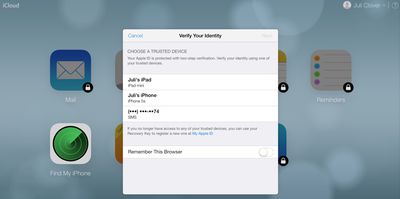
Apple appears to be testing its two-factor authentication system on some iCloud.com accounts, asking for a verification code before allowing users with two-factor verification enabled to access various iCloud.com apps.

First noticed by AppleInsider, the two-factor verification system for iCloud.com requires users to enter a verification code sent via SMS or to a trusted iOS device before the iCloud.com versions of Mail, Contacts, Calendar, Reminders, Pages, Numbers, and Keynote can be used.
icloudtwofactorauthentication
Previously, accessing these apps only required an Apple ID password, but now "Find My iPhone" is the only app that remains accessible without a two-factor verification code. Computers used to access iCloud.com have a "Remember This Browser" option, requiring a verification code to be entered only once.

Originally implemented back in March of 2013, two-factor verification is an opt-in system designed to increase Apple ID account security by requiring identity verification before allowing users to make account changes or purchase content on new devices. It replaces standard security questions with a security code delivered to a trusted device.

At this time, it is unknown if Apple is simply testing the feature with some users or working on a wider rollout for all iCloud.com users with two-factor verification enabled.

Update 3:30 PM PT: Apple appears to have disabled two-factor verification for some iCloud.com accounts that previously had access to the feature, suggesting it may have seen an accidental early launch.


Popular Stories

iOS 26

iOS 26.3 and iOS 26.4 Will Add These New Features to Your iPhone

Tuesday February 3, 2026 7:47 am PST by
We are still waiting for the iOS 26.3 Release Candidate to come out, so the first iOS 26.4 beta is likely still at least a week or two away. Following beta testing, iOS 26.4 will likely be released to the general public in March or April. Below, we have recapped known or rumored iOS 26.3 and iOS 26.4 features so far. iOS 26.3 iPhone to Android Transfer Tool iOS 26.3 makes it easier...
Aston Martin CarPlay Ultra Screen

Apple's CarPlay Ultra to Expand to These Vehicle Brands Later This Year

Sunday February 1, 2026 10:08 am PST by
Last year, Apple launched CarPlay Ultra, the long-awaited next-generation version of its CarPlay software system for vehicles. Nearly nine months later, CarPlay Ultra is still limited to Aston Martin's latest luxury vehicles, but that should change fairly soon. In May 2025, Apple said many other vehicle brands planned to offer CarPlay Ultra, including Hyundai, Kia, and Genesis. In his Powe...
Apple Logo Black

Apple's Next Launch is 'Imminent'

Sunday February 1, 2026 12:31 pm PST by
The calendar has turned to February, and a new report indicates that Apple's next product launch is "imminent," in the form of new MacBook Pro models. "All signs point to an imminent launch of next-generation MacBook Pros that retain the current form factor but deliver faster chips," Bloomberg's Mark Gurman said on Sunday. "I'm told the new models — code-named J714 and J716 — are slated...
Apple MacBook Pro M4 hero

New MacBook Pros Reportedly Launching Alongside macOS 26.3

Sunday February 1, 2026 5:42 am PST by
Apple is planning to launch new MacBook Pro models with M5 Pro and M5 Max chips alongside macOS 26.3, according to Bloomberg's Mark Gurman. "Apple's faster MacBook Pros are planned for the macOS 26.3 release cycle," wrote Gurman, in his Power On newsletter today. "I'm told the new models — code-named J714 and J716 — are slated for the macOS 26.3 software cycle, which runs from...
iOS 26 Home Feature

Apple Gives Final Warning to Home App Users

Tuesday February 3, 2026 8:55 am PST by
In 2022, Apple introduced a new Apple Home architecture that is "more reliable and efficient," and the deadline to upgrade and avoid issues is fast approaching. In an email this week, Apple gave customers a final reminder to upgrade their Home app by February 10, 2026. Apple says users who do not upgrade may experience issues with accessories and automations, or lose access to their smart...

Top Rated Comments

CrazyForApple Avatar
151 months ago
the more secure, the better
Score: 5 Votes (Like | Disagree)
Primejimbo Avatar
151 months ago
You do understand that clicking "remember this computer" is exactly the same as not using it at all, right?

And you're criticizing others for not using it when that's your plan too?
This is my home computer, how is that the same not using it at all? It's just remembering that one computer, not all computers. There is also an option to log off all computers through iCloud.com. So I can go on another computer and log off if needed.
With iCloud.com, it's also the browsers too that it's saving. So you log on safari with it, it won't save it from Chrome.

If my house gets broken into, I doubt they are breaking in to go on my computer and read my email :rolleyes:
Score: 2 Votes (Like | Disagree)
trrosen Avatar
151 months ago
Moronic

Stupid stupid stupid. If I have my IOS device with me why would I log into icloud? So were creating a system that only works when you don't need it?
Score: 2 Votes (Like | Disagree)
rdlink Avatar
151 months ago
"Computers used to access iCloud.com have a "Remember This Browser" option, requiring a verification code to be entered only once."

Surely this means you can login at home, tick the box and you won't be asked for a code again so you can continue using iCloud at school?

I think the OP's point is that their school uses a series of computers on carts, and they won't necessarily have access to the same computer every time. Also, many schools like this clear browser history automatically on logout.
Score: 2 Votes (Like | Disagree)
appleguy123 Avatar
151 months ago
I hope it's optional. I often use icloud to email things to myself to print at my college. Not interested in have to do this every time I need to print something.
Score: 2 Votes (Like | Disagree)
OreoMuncher Avatar
151 months ago
All well and good but...

How on earth am i going to use this is school. Our school uses a cart of windows laptops and we have separate computer rooms. And obviously since I'm in school i can't use my phone... What am i going to do? Will there be an option to turn this off? I physically can't use word or powerpoint in school any more, it's too much of a headache, i really need access to iCloud. Oh god.
Score: 2 Votes (Like | Disagree)
















