FAA Advisory Committee Recommends Relaxation of Electronic Device Restrictions on Commercial Aircraft

The Federal Aviation Administration advisory committee has recommended that electronic device restrictions on commercial aircraft be relaxed. According to the committee, airline passengers should be permitted to use smartphones, tablets, e-readers, and other personal electronic devices during taxi, takeoff and landing.

The 28-member committee agreed on the recommendations during a closed-door meeting, the officials said. The recommendations will be included in a report to be delivered to the FAA early next week, they said.

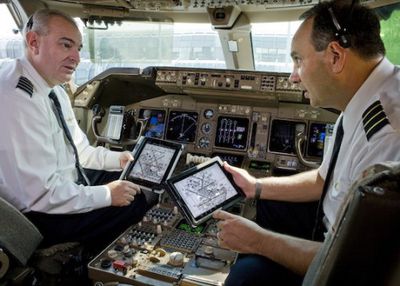
Current rules prohibit the use of electronic devices such as the iPad or the iPhone below 10,000 feet, which means airline passengers are instructed to power off their devices as the plane ascends and descends. Pilots and crew, however, are allowed to use iPads during all phases of flight and many airlines have replaced pilot flight bags with iPads to reduce weight and save money.
united_pilots_ipad-1
The ban has been in place to prevent electronic devices such as cell phones from interfering with cockpit equipment, but modern planes are designed to prevent electronic interference.

The Federal Aviation Administration began reexamining the regulations that ban electronic device usage below 10,000 feet last year, and in March, the FAA’s advisory committee reported that it hoped to loosen device restrictions by the end of the year.

Under today’s recommendation, passengers would be able to use most devices, though some, like Apple’s iPhone, would need to be switched to airplane mode. Downloading data, browsing the web, and talking on the phone would remain prohibited, though reading e-books, listening to music, watching movies, and playing games would be permitted during all phases of flight.

The recommendation will be delivered to the Federal Aviation Administration next week, but it remains up to the FAA to decide whether to follow the recommendations of the committee. The FAA created the committee and was involved in committee deliberations, so it is likely that some of the changes will be implemented, though a timeline for the change is thus far unknown.


Popular Stories

iOS 26

iOS 26.4 and iOS 27 Features Revealed in New Leak

Friday December 12, 2025 10:56 am PST by
Macworld's Filipe Espósito today revealed a handful of features that Apple is allegedly planning for iOS 26.4, iOS 27, and even iOS 28. The report said the features are referenced within the code for a leaked internal build of iOS 26 that is not meant to be seen by the public. However, it appears that Espósito and/or his sources managed to gain access to it, providing us with a sneak peek...
iOS 26

iOS 26.2 Coming Soon With These 8 New Features on Your iPhone

Thursday December 11, 2025 8:49 am PST by
Apple seeded the second iOS 26.2 Release Candidate to developers earlier this week, meaning the update will be released to the general public very soon. Apple confirmed iOS 26.2 would be released in December, but it did not provide a specific date. We expect the update to be released by early next week. iOS 26.2 includes a handful of new features and changes on the iPhone, such as a new...
iOS 26

Apple Releases iOS 26.2 With Alarms for Reminders, Lock Screen Changes, Enhanced Safety Alerts and More

Friday December 12, 2025 10:10 am PST by
Apple today released iOS 26.2, the second major update to the iOS 26 operating system that came out in September, iOS 26.2 comes a little over a month after iOS 26.1 launched. ‌iOS 26‌.2 is compatible with the ‌iPhone‌ 11 series and later, as well as the second-generation ‌iPhone‌ SE. The new software can be downloaded on eligible iPhones over-the-air by going to Settings >...
AirPods Pro Firmware Feature

Apple Releases New Firmware for AirPods Pro 2 and AirPods Pro 3

Thursday December 11, 2025 11:28 am PST by
Apple today released new firmware designed for the AirPods Pro 3 and the prior-generation AirPods Pro 2. The AirPods Pro 3 firmware is 8B30, up from 8B25, while the AirPods Pro 2 firmware is 8B28, up from 8B21. There's no word on what's include in the updated firmware, but the AirPods Pro 2 and AirPods Pro 3 are getting expanded support for Live Translation in the European Union in iOS...
macOS Tahoe 26 Thumb

Apple Releases macOS Tahoe 26.2 With Edge Light

Friday December 12, 2025 10:08 am PST by
Apple today released macOS Tahoe 26.2, the second major update to the macOS Tahoe operating system that came out in September. macOS Tahoe 26.2 comes five weeks after Apple released macOS Tahoe 26.1. Mac users can download the macOS Tahoe update by using the Software Update section of System Settings. macOS Tahoe 26.2 includes Edge Light, a feature that illuminates your face with soft...
AirTag 2 Mock Feature

Apple AirTag 2: Four New Features Found in iOS 26 Code

Thursday December 11, 2025 10:31 am PST by
The AirTag 2 will include a handful of new features that will improve tracking capabilities, according to a new report from Macworld. The site says that it was able to access an internal build of iOS 26, which includes references to multiple unreleased products. Here's what's supposedly coming: An improved pairing process, though no details were provided. AirTag pairing is already...
Apple Foldable Thumb

Leak Reveals Foldable iPhone Details

Monday December 15, 2025 9:09 am PST by
The first foldable iPhone will feature a series of design and hardware firsts for Apple, according to details shared by the Weibo leaker known as Digital Chat Station. According to a new post, via machine translation, Apple is developing what the leaker describes as a "wide foldable" device, a term used to refer to a horizontally oriented, book-style foldable with a large internal display....
ipados 26 1 slide over

Apple Releases iPadOS 26.2 With Multitasking Improvements

Friday December 12, 2025 10:09 am PST by
Apple today released iPadOS 26.2, the second major update to the iPadOS 26 operating system released in September. iPadOS 26.2 comes a month after iPadOS 26.1. The new software can be downloaded on eligible iPads over-the-air by going to Settings > General > Software Update. iPadOS 26.2 continues with the multitasking improvements that were added with iPadOS 26.1. You can now drag and...

Top Rated Comments

Kurwenal Avatar
160 months ago
these restrictions were nonsense


but what's so wrong with having them?

I dunno, how about the fact that they are nonsense?
Score: 14 Votes (Like | Disagree)
troop231 Avatar
160 months ago
I'm OK with this as long as people text, play games, or listen to their headphones. I'm not Ok with this if people are talking loudly on their phone.
Yeah! I wish those people would step outside to place their call, preferably during takeoff :D
Score: 10 Votes (Like | Disagree)
rols Avatar
160 months ago
And tomorrow morning I fly to LA!... a week too early to take full advantage of this new policy.

A week? In a week it goes to the FAA, who then decide what they want to do about it and start the rule-making process which may eventually result in the rules being changed. Then those rules go to the airlines who decide whether they are going to relax their policies and change their safety videos (even if the FAA says you can, that's a minimum policy, the airlines are free to continue to enforce something stricter) and then, only then, will anyone be taking advantage of anything.

I'm pessimistically going for a year or two .. and another 10 before other aviation authorities in other parts of the world decide to follow suit, if they do.
Score: 9 Votes (Like | Disagree)
AngerDanger Avatar
160 months ago
Holy recycled photograph, Batman! (https://www.macrumors.com/2013/03/25/faa-still-looking-at-digital-device-use-during-takeoff-and-landing/)
Score: 9 Votes (Like | Disagree)
Illusion986 Avatar
160 months ago
Definitely about time! So many rules are active from 10-20 years ago that no longer make sense.
Score: 8 Votes (Like | Disagree)
kdarling Avatar
159 months ago
I see the same questions and comments over and over again, from people are obviously neither pilots nor engineers. Let's review some:

But my radio / device is in receive only mode.

ALL digital electronics are transmitters. CPUs require oscillators at MHZ to GHz frequencies. Those are transmitters. Even receive only simple transistor radios have oscillators that transmit.

I don't understand why pilots can use iPads but I can't.

The use of those two iPads in the cockpit has taken most airlines over a year to test and get approved. There is no way that those results carry over to dozens of other people using electronics.

How can electronics so far from the cockpit interfere?

The radio antennas, anti-collision antennas, their wires, and all the modern electronic control wires run through the cabin. You can easily be just a few feet away from one of those. There are cases where pilots have gotten emergency automatic climb/descend commands that likely came from passenger electronics in a seat nearby one of those cables.

Why aren't they worried about outside interference as much?

An airplane is what's called a Faraday Cage, because it's a closed metal tube (or a composite with embedded metal for lightening protection). This prevents outside signals from entering the cabin (except through the windows). It also tends to keep the signals that originate inside, inside and bouncing around.

But interference can't bring down a plane, so why should I worry?

Text messages don't stop a car's engine from working, yet they have caused many wrecks and deaths.

Interference, as in disabling something, is usually not the problem. The problem is causing distractions to the pilots or interference to instruments. Safe flight, especially when in the airport area for landing or takeoff, is highly dependent on good communications and no distractions. Non-pilots don't realize that it takes very little to cause an aviation accident, especially when low and slow and in a crowded airspace. All it needs is a chain of little mistakes.

If it's dangerous, why do they allow usage above 10,000 feet?

10,000 feet is also where speed limits change, radio comm rules change, separation distances change, all sorts of things change.

This is because the more altitude you have, the more time that pilots have to debug a problem.

But some airliners have WiFi

Above 10,000 feet. They also use low power, and expect the passenger devices to likewise use low power. See below.

Got an example of an interference?

I have previously posted quite a few examples from the NASA database. GSM buzz, false anti-collision alarms, navigation instrument wonkiness, and autopilot shut-offs are the main ones.

Handled high up, they're not so bad. Within the airport environment, they're a potential accident chain cause.

Here's a good example: Recently, Boeing engineers were certifying one of their airliner models for WiFi. Quite by accident, they found that some laptops ramped up their WiFi power, causing the plane's WiFi to ramp up, and the interference caused the pilots LCD displays to go blank. (!) They fixed it by adding more display shielding, but ...

Consider if that had happened while landing at night or in clouds. It's been proven many times that without working instruments in dark or sightless conditions, a pilot's (and by extension, the passengers') life expectency is measured in minutes. (There was a 747 that crashed on takeoff at night, because of faulty reading instruments. The pilot accidentally rolled it upside down into the sea.)

Would you risk your familiy, or your child's life, just to use your iPad a few minutes more?

I think, until everything on an airliner is shielded and all signals sent by fiber optics, that this is a mistake.
Score: 6 Votes (Like | Disagree)