

Announced earlier this year, the Automatic Smart Driving Assistant is a Bluetooth 4.0 device that plugs in to your car's OBD-II port. Typically found somewhere under the steering wheel of every vehicle made after 1996 in the USA, the OBD-II port provides all sorts of useful diagnostic information which traditionally is only used by mechanics and for emissions testing.
Over the years, a number of devices have been released for home mechanics to connect to this port -- both to a Mac via USB and to iOS devices via the dock port. However, for the mechanical layman none of them have been that useful, with functionality specifically for figuring out why your "Check Engine" light is on or otherwise tuning/tweaking your engine.
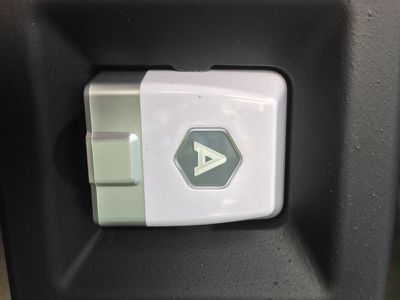
Automatic changes all that. The Smart Driving Assistant is about the size of two matchbooks, and lives its life constantly connected to your car's OBD-II port. Unboxing the device is uneventful, as all that's really in the box is the Smart Driving Assistant, a small Automatic "A" bumper sticker, and a piece of paper that essentially tells you to download the Automatic app on your iPhone. Setup is simple, and involves creating a simple login to the Automatic service and then pairing your iPhone using the unique security code printed on the bottom of the Smart Driving Assistant.
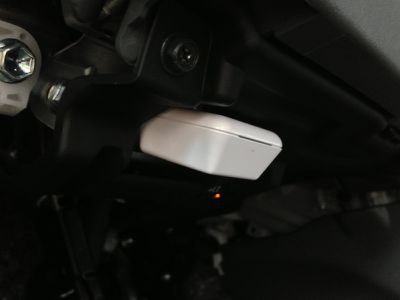
From there, it asks you to start your vehicle, and you're on your way. Amusingly enough, to get the setup to actually finish the engine of your car has to start. I drive a 2011 Prius, and the internal combustion engine only fires up when it's actually needed. So, there was a bit of confusion between what the app was asking me to do (simply start my car) and what I needed to do, which amounted to just driving around the block so the gas engine started.
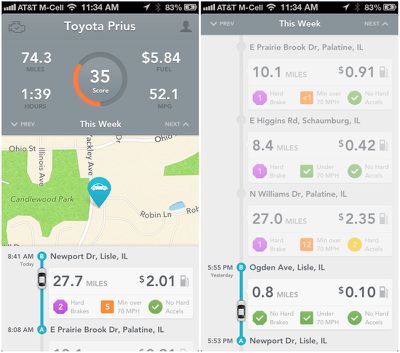
The Automatic app runs in the background and automatically connects to the Smart Driving Assistant whenever you get in your car. Regardless of whether or not you even have the app open, once you start driving, it begins tracking everything you're doing. Data points captured include how long you were driving (both in time and distance), your miles per gallon, how many times you both braked or accelerated too hard, and how many minutes you were driving over 70 miles per hour. Your route is also saved and plotted on a map, and by tracking local gas prices the app computes how much each trip cost you.
All of this data is tallied together for your weekly totals and averages which is displayed at the top of your driving timeline. Additionally, using the information the app collects, it computes a "Drive Score" to grade you on how efficiently it thinks you're driving. In its current implementation this scoring system seems crazy, as right now I'm rocking a 35 out of 100 in my Prius, regardless of the fact that I'm exceeding the EPA estimated MPG of my car. The Automatic blog mentions tweaking this formula, as right now it is not computed on a specific car-by-car basis and instead is just grading you on hard brakes, acceleration, and how often you're driving over 70 MPH.
Arguably the most useful feature of the Automatic Smart Driving Assistant's current implementation is seamlessly saving the location of where you parked your car. When you turn off your car, the app tags your current GPS location, and a simple tap loads up a full-screen map showing where you are in relation to your car. In my experience, accuracy of this feature has been fantastic, and way more useful than my typical routine of wandering through the parking lot pressing the lock button on my key fob over and over when I can't find my car.
Without a doubt, the geek-factor of the Automatic Smart Driving Assistant is off the charts. Being able to load up an app and see exactly where your car is, exactly how much each trip cost you in gas, and everything else feels futuristic -- particularly with how seamless this all is with the automatic Bluetooth connection and background data collection. It's also by far the most user-friendly OBD-II device I've seen, in that it parses the data the port can deliver in a very easy to understand format even for the least mechanically-minded drivers out there. The system also remains in beta testing, although it is unclear whether any additional features will be added before the official launch.
However, just how useful the Smart Driving Assistant actually is in reducing fuel consumption is debatable. It aims to save gas by reducing the amount of hard braking you do, how much of a lead foot you have, and how much you speed. But, do you really need a $70 gizmo to tell you that? Just simply making an effort to drive more slowly and conservatively, and both gradually accelerating and braking will have the same effect -- all without spending $70.


















Top Rated Comments
Before going off just what was mentioned in this article, you should check out some of the other cool features, like it will call 911 when you are in accident and it gives the dispatcher your GPS info. It will also tell you why the "Check Engine" light is on, giving you the actual error codes and the remedy for the issue. I understand not everyone cares about pollution and the world we live in, but if people changed their driving habits just a bit, things would be better.
What a piece of...no, that won't work.
Do I give a ...ah...darn if the piece of...er...junk thinks I accelerated too hard? And by whose standards...some dork sitting behind a computer who thinks driving is about going nice and slow (probably in the left lane) in their automatic shift, never-go-over-the-speed-limit, boring piece of...junk...car?
All that other ...ah...stuff (aside from the find your car thing), is useless and silly ca-ca, fit for folks for whom driving is a data gathering chore.
Of course, I'm just speaking for myself, and perhaps a few other people who enjoy driving and have gone to the bother of actually learning how to drive well. :D
You might as well ask, Do I care if some so-called "scale" thinks I weigh too much?? That scale is useful because you already care about your weight, not because you care about the scale-manufacturer's opinions.
Good question (as horrifying as it is to hear myself say that). If there's any online component, it should be optional I would hope! The thing should be able to run on BT alone with no Internet involved.
Uh, what?