Google Launches Google Drive Cloud Storage Service

Google today announced its long-awaited Google Drive cloud storage service, providing users with 5GB of free storage integrated with Google Docs and other Google services.

Today, we’re introducing Google Drive—a place where you can create, share, collaborate, and keep all of your stuff. Whether you’re working with a friend on a joint research project, planning a wedding with your fiancé or tracking a budget with roommates, you can do it in Drive. You can upload and access all of your files, including videos, photos, Google Docs, PDFs and beyond.

Beyond the free 5GB level, Google offers several levels of paid storage up to 16 TB, all accessible via Google Docs or through clients for PC, Mac, Android and iOS devices -- though the iOS app has yet to be released, Google promises it is "coming soon". One of the biggest features in Drive is the ability to open more than 30 different file types directly in the browser, allowing users without programs like Illustrator and Photoshop to open up files and see what's inside. The service includes extensive sharing and collaboration features, as well.
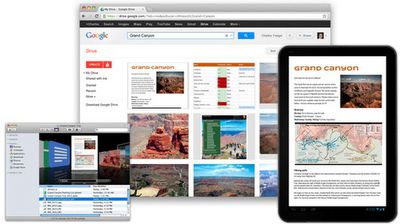
google drive collage
The launch of Google Drive comes as several other cloud storage services have augmented their services in recent days. Microsoft's SkyDrive, which offers users 7GB of free cloud storage, yesterday updated its offering with an updated iOS app [Direct Link] and a preview client for OS X Lion, which allows users to manage their SkyDrive accounts directly from the Finder. Finally, Dropbox extended its file storage service with the ability to quickly share files stored on Dropbox with anyone, simply by creating a link.


Popular Stories

iOS 26

iOS 26.3 and iOS 26.4 Will Add These New Features to Your iPhone

Tuesday February 3, 2026 7:47 am PST by
We are still waiting for the iOS 26.3 Release Candidate to come out, so the first iOS 26.4 beta is likely still at least a week or two away. Following beta testing, iOS 26.4 will likely be released to the general public in March or April. Below, we have recapped known or rumored iOS 26.3 and iOS 26.4 features so far. iOS 26.3 iPhone to Android Transfer Tool iOS 26.3 makes it easier...
Apple Logo Black

Apple's Next Launch is 'Imminent'

Sunday February 1, 2026 12:31 pm PST by
The calendar has turned to February, and a new report indicates that Apple's next product launch is "imminent," in the form of new MacBook Pro models. "All signs point to an imminent launch of next-generation MacBook Pros that retain the current form factor but deliver faster chips," Bloomberg's Mark Gurman said on Sunday. "I'm told the new models — code-named J714 and J716 — are slated...
iOS 26 Home Feature

Apple Gives Final Warning to Home App Users

Tuesday February 3, 2026 8:55 am PST by
In 2022, Apple introduced a new Apple Home architecture that is "more reliable and efficient," and the deadline to upgrade and avoid issues is fast approaching. In an email this week, Apple gave customers a final reminder to upgrade their Home app by February 10, 2026. Apple says users who do not upgrade may experience issues with accessories and automations, or lose access to their smart...
Aston Martin CarPlay Ultra Screen

Apple's CarPlay Ultra to Expand to These Vehicle Brands Later This Year

Sunday February 1, 2026 10:08 am PST by
Last year, Apple launched CarPlay Ultra, the long-awaited next-generation version of its CarPlay software system for vehicles. Nearly nine months later, CarPlay Ultra is still limited to Aston Martin's latest luxury vehicles, but that should change fairly soon. In May 2025, Apple said many other vehicle brands planned to offer CarPlay Ultra, including Hyundai, Kia, and Genesis. In his Powe...
Apple Foldable Thumb

First Foldable iPhone Design Details Revealed

Monday February 2, 2026 7:19 am PST by
Apple's first foldable iPhone will feature relocated volume buttons, an all-black camera plateau, a smaller Dynamic Island, and more, according to design leaks from a known Weibo leaker. The user known as "Instant Digital" today claimed to share several key details about the design of the foldable iPhone: The volume buttons will be located on the top edge of the device, aligned to the...

Top Rated Comments

sconnor99 Avatar
180 months ago
Do you want to give Google even more of your information? If you do this is great
Score: 44 Votes (Like | Disagree)
foodog Avatar
180 months ago
Been a Dropbox user since the beginning... works great across all my products... iDevices, Mac's and Windows
Score: 34 Votes (Like | Disagree)
kjs862 Avatar
180 months ago
I really hope Apple comes out with a file system in the cloud. iCloud is not complete without this feature.
Score: 26 Votes (Like | Disagree)
skoops Avatar
180 months ago
Google also silently discontinued the old "Google Storage" plans. The $5 for 20GB/year plan is gone, it has been replaced by a 25GB option for $2.49 PER MONTH! Thats a ~6-fold increase in pricing
Score: 19 Votes (Like | Disagree)
macrumors12345 Avatar
180 months ago
Meh

No interest in the product itself, but if it compels Dropbox to lower their prices in the future, that can't hurt….
Score: 13 Votes (Like | Disagree)
edoates Avatar
180 months ago
Dropbox still needs a "read only" share option

I use and like Dropbox: it's robust and works well, but ...

When I share an individual file by publishing it's URL (copy link) to someone, when they open a file, like a video, on Mac, it plays the video. If they don't have QT Pro, they can't download it. I often want to share videos (my own, nothing copyrighted by others), and Dropbox makes that more difficult. I supposed I could just ZIP the video first, as iDisk does, but that's yet another step. They should deal with this issue.

Second, if I share a folder, there are two issues:
1. When someone else attached to it, we BOTH pay for the storage used - Dropbox counts the same bits twice. So, if I share a folder, then one of my sharees decides to move a bunch of c**p into into it because he's not a computer nerd like me, I go above my quota and have to tell him to get that stuff away. There's no way to restrict access (see #2)

Maybe that's OK if we both have read/write/delete access to the files ... but ...

2. Often files just disappear from my shared folders. Why? Because the most common use of these shared files if for people to drag them onto their hard drives for whatever reasons. And on Mac, that's a "move" not a "copy." So the file vanishes from Dropbox.

So I spend time warning my users not to do that, etc. What Dropbox needs is folder access types: full sharing for collaboration, partial sharing (read/write/delete, but not ADD files); and read only sharing (users can copy the files if they want, but can't make any changes)

iDisk was slower, but I could accomplish those goals easily enough.
Score: 11 Votes (Like | Disagree)