New iPad Notes: Battery Charging at 100%, Safari Scaling Images

A couple of new findings as people spend more time with their new iPads. First, iLounge reports on findings by DisplayMate on the new iPads charging behavior. It turns out the iPad continues to charge for as long as an hour after it says its at 100%, suggesting the on-screen indicator isn't quite accurate and may still need more charging.

In an email exchange with iLounge, DisplayMate President Ray Soneira indicated that the third-generation iPad—when connected to power via the included Apple 10W Power Adapter—actually continued to draw 10W of power for up to one hour after reaching what is reported by iOS as a full 100% charge

iLounge found in their battery testing of the new iPad that sometimes the charge would drop initially quickly when they thought the iPad was fully charged.

Earlier in the week, Tom's Hardware noticed that Safari on the new iPad was automatically scaling large images down significantly.
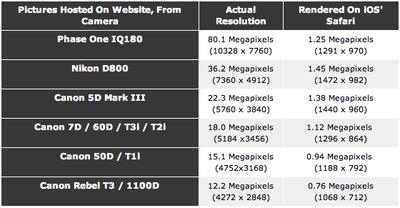
comparison
Large images were automatically scaled down to near 1 megapixel resolutions. This means that if you are viewing large images through Safari, you aren't getting the full Retina experience. A workaround mentioned is to save the image to Photos which seems to preserve the original resolution.

These findings were confirmed by web developer Duncan Davidson who ran into the limit when trying to enhance his websites with Retina-sized images.


Popular Stories

iOS 26

iOS 26.3 and iOS 26.4 Will Add These New Features to Your iPhone

Tuesday February 3, 2026 7:47 am PST by
We are still waiting for the iOS 26.3 Release Candidate to come out, so the first iOS 26.4 beta is likely still at least a week or two away. Following beta testing, iOS 26.4 will likely be released to the general public in March or April. Below, we have recapped known or rumored iOS 26.3 and iOS 26.4 features so far. iOS 26.3 iPhone to Android Transfer Tool iOS 26.3 makes it easier...
Apple Logo Black

Apple's Next Launch is 'Imminent'

Sunday February 1, 2026 12:31 pm PST by
The calendar has turned to February, and a new report indicates that Apple's next product launch is "imminent," in the form of new MacBook Pro models. "All signs point to an imminent launch of next-generation MacBook Pros that retain the current form factor but deliver faster chips," Bloomberg's Mark Gurman said on Sunday. "I'm told the new models — code-named J714 and J716 — are slated...
iOS 26 Home Feature

Apple Gives Final Warning to Home App Users

Tuesday February 3, 2026 8:55 am PST by
In 2022, Apple introduced a new Apple Home architecture that is "more reliable and efficient," and the deadline to upgrade and avoid issues is fast approaching. In an email this week, Apple gave customers a final reminder to upgrade their Home app by February 10, 2026. Apple says users who do not upgrade may experience issues with accessories and automations, or lose access to their smart...
Aston Martin CarPlay Ultra Screen

Apple's CarPlay Ultra to Expand to These Vehicle Brands Later This Year

Sunday February 1, 2026 10:08 am PST by
Last year, Apple launched CarPlay Ultra, the long-awaited next-generation version of its CarPlay software system for vehicles. Nearly nine months later, CarPlay Ultra is still limited to Aston Martin's latest luxury vehicles, but that should change fairly soon. In May 2025, Apple said many other vehicle brands planned to offer CarPlay Ultra, including Hyundai, Kia, and Genesis. In his Powe...
Apple Foldable Thumb

First Foldable iPhone Design Details Revealed

Monday February 2, 2026 7:19 am PST by
Apple's first foldable iPhone will feature relocated volume buttons, an all-black camera plateau, a smaller Dynamic Island, and more, according to design leaks from a known Weibo leaker. The user known as "Instant Digital" today claimed to share several key details about the design of the foldable iPhone: The volume buttons will be located on the top edge of the device, aligned to the...

Top Rated Comments

Lordskelic Avatar
181 months ago
What's the point of the retina display if the images are just going to be scaled down? Didn't apple think about this before they released the iPad 3rd Generation?
Score: 14 Votes (Like | Disagree)
slicecom Avatar
181 months ago
The Safari scaling issue is infuriating when looking for wallpapers. You simply can't look for them in your iPad because they're compressed to hell and scaled down to 1024x1024, you have to look for them on a computer, then transfer them to your iPad. I hope they fix this.
Score: 9 Votes (Like | Disagree)
kolax Avatar
181 months ago
What's the reason for the large images being scaled down? iOS bug?

EDIT: For those who say it is for memory, cellular reasons or speed of the web browser, the iPad 3 is meant for high resolution images. If there's one available, and you are on WiFi, then why restrain it. It does have 1GB of memory..

This makes sense on other iOS devices, but the iPad 3's selling point is the retina display. Seems daft to downscale images below the 3 megapixel screen the iPad 3 has when a WiFi connection is available along with enough memory.
Score: 8 Votes (Like | Disagree)
rmwebs Avatar
181 months ago
Probably Safari scales images on the server side (like an Apple proxy, as Opera does with its Opera Mini "turbo mode"). This may be one more agreement between Apple and carriers to keep low bandwidth usage.

No. Wifi content does not go through a proxy. This is built into the Safari app.
Score: 6 Votes (Like | Disagree)
Riemann Zeta Avatar
181 months ago
Expecting a mobile device (even one with 1GB of RAM) to be able to render 10-80 MPixel images is a little nuts. Even if we ignore the download bandwidth, the GPU itself doesn't have the memory or the bus throughput needed to render such a large image to framebuffer.

As for the battery, I think the meter is wildly inaccurate for iOS 5.1 on the iPad 3. Apple will need to calibrate it better in the 5.1.1 update that is soon to follow.
Score: 5 Votes (Like | Disagree)
palouf Avatar
181 months ago
Images in Ios safari were already downgraded, is it the same issue Here

Hi all,

I remember having trouble reading an online comic because some strips were bigger than 2Mega Pixels, the image was unsharp, as if the number of pixels was reduced to 1/4th (was confirmed on the ios Safari specifications doc)

is'nt it the same kind of behaviour ?

update: https://developer.apple.com/library/safari/#documentation/appleapplications/reference/safariwebcontent/CreatingContentforSafarioniPhone/CreatingContentforSafarioniPhone.html (https://developer.apple.com/library/safari/#documentation/appleapplications/reference/safariwebcontent/CreatingContentforSafarioniPhone/CreatingContentforSafarioniPhone.html)

Know iOS Resource Limits

Your webpage performing well on the desktop is no guarantee that it will perform well on iOS. Keep in mind that iOS uses EDGE (lower bandwidth, higher latency), 3G (higher bandwidth, higher latency), and Wi-Fi (higher bandwidth, lower latency) to connect to the Internet. Therefore, you need to minimize the size of your webpage. Including unused or unnecessary images, CSS, and JavaScript in your webpages adversely affects your site’s performance on iOS.

Because of the memory available on iOS, there are limits on the number of resources it can process:

The maximum size for decoded GIF, PNG, and TIFF images is 3 megapixels for devices with less than 256 MB RAM and 5 megapixels for devices with greater or equal than 256 MB RAM.

That is, ensure that width * height ≤ 3 * 1024 * 1024 for devices with less than 256 MB RAM. Note that the decoded size is far larger than the encoded size of an image.

The maximum decoded image size for JPEG is 32 megapixels using subsampling.

JPEG images can be up to 32 megapixels due to subsampling, which allows JPEG images to decode to a size that has one sixteenth the number of pixels. JPEG images larger than 2 megapixels are subsampled—that is, decoded to a reduced size. JPEG subsampling allows the user to view images from the latest digital cameras.
Score: 5 Votes (Like | Disagree)