
iPhoto for iOS, Updates for iMovie and Garageband Go Live on App Store

iphotologoEarlier today, Apple announced iPhoto for the iPad and iPhone, saying it would launch today. Keeping to its word, iPhoto is now available for purchase. [Direct Link]

Additionally, updates to iMovie and GarageBand are now live as well.

With iPhoto for iOS, Apple brings Multi-Touch to photography in a breakthrough way. Browse, edit, and share your photos from your iPad or iPhone, like never before – all the powerful tools you need are at your fingertips. And with iCloud, you can share your experiences as stunning photo journals.

Use simple gestures to quickly sort through photos and find your best shots. A powerful set of Multi-Touch tools helps you perfect color and exposure, crop, straighten, and retouch images. Enhance pictures by adding beautiful, Apple-designed effects with just a tap. Or use fingertip brushes to apply adjustments exactly where you want them. In addition to posting photos to Facebook, Flickr, and Twitter, you can beam photos between your iPhone and iPad, stream photos and slideshows to your Apple TV with AirPlay, and use iCloud to publish photo journals to the web to share your stories with friends and family in a whole new way.
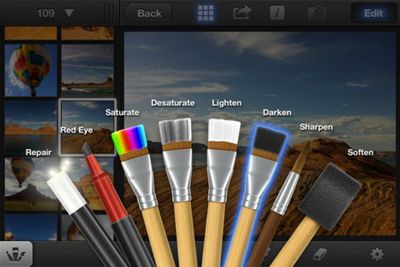
iphotoscreenshot
iPhoto is a universal app available for $4.99 on the App Store. [Direct Link]

iMovie is a universal app available for $4.99 on the App Store, and is a free upgrade for current owners. [Direct Link]


GarageBand is a universal app available for $4.99 on the App Store, and is a free upgrade for current owners. [Direct Link]

Popular Stories

iOS 26

iOS 26.3 and iOS 26.4 Will Add These New Features to Your iPhone

Tuesday February 3, 2026 7:47 am PST by
We are still waiting for the iOS 26.3 Release Candidate to come out, so the first iOS 26.4 beta is likely still at least a week or two away. Following beta testing, iOS 26.4 will likely be released to the general public in March or April. Below, we have recapped known or rumored iOS 26.3 and iOS 26.4 features so far. iOS 26.3 iPhone to Android Transfer Tool iOS 26.3 makes it easier...
Apple Logo Black

Apple's Next Launch is 'Imminent'

Sunday February 1, 2026 12:31 pm PST by
The calendar has turned to February, and a new report indicates that Apple's next product launch is "imminent," in the form of new MacBook Pro models. "All signs point to an imminent launch of next-generation MacBook Pros that retain the current form factor but deliver faster chips," Bloomberg's Mark Gurman said on Sunday. "I'm told the new models — code-named J714 and J716 — are slated...
iOS 26 Home Feature

Apple Gives Final Warning to Home App Users

Tuesday February 3, 2026 8:55 am PST by
In 2022, Apple introduced a new Apple Home architecture that is "more reliable and efficient," and the deadline to upgrade and avoid issues is fast approaching. In an email this week, Apple gave customers a final reminder to upgrade their Home app by February 10, 2026. Apple says users who do not upgrade may experience issues with accessories and automations, or lose access to their smart...
Aston Martin CarPlay Ultra Screen

Apple's CarPlay Ultra to Expand to These Vehicle Brands Later This Year

Sunday February 1, 2026 10:08 am PST by
Last year, Apple launched CarPlay Ultra, the long-awaited next-generation version of its CarPlay software system for vehicles. Nearly nine months later, CarPlay Ultra is still limited to Aston Martin's latest luxury vehicles, but that should change fairly soon. In May 2025, Apple said many other vehicle brands planned to offer CarPlay Ultra, including Hyundai, Kia, and Genesis. In his Powe...
Apple Foldable Thumb

First Foldable iPhone Design Details Revealed

Monday February 2, 2026 7:19 am PST by
Apple's first foldable iPhone will feature relocated volume buttons, an all-black camera plateau, a smaller Dynamic Island, and more, according to design leaks from a known Weibo leaker. The user known as "Instant Digital" today claimed to share several key details about the design of the foldable iPhone: The volume buttons will be located on the top edge of the device, aligned to the...

Top Rated Comments

GoGa Avatar
182 months ago
My question is...with the iPad 3....will you FINALLY be able to transfer HD 1080p video shot with a canon dslr like the T3i to the ipad via the Apple cam kit....and then BE ABLE TO EDIT THAT VIDEO IN IMOVIE?!!!! Lol

Thats all i wanna know. Love my ipad 1st gen....but skipped the ipad 2nd gen cause it couldnt do this. I am a photographer/videographer/blogger who travels alot, and I LOVE the form factor of the ipad and all it does.

But this is the one sticking point for me. I know there will always be things a laptop or desktop can do that an ipad isnt meant for....however...Tim Cook keeps stressing about a "Post PC world"....and this is a real world application. People shoot high quality video with dslrs and would like to edit that video while on the road. It seems like the umbilical cord has been cut btwn the ios devices and computers with the icloud and syncing....but not being able to load and edit video directly onto your ipad keeps the device stuck in the umbilical cord days. I find it very annoying.

The new retina display and faster speed make it the perfect device to edit videos while on the road.

You can do this, they updated iMovie a few months ago to support this.
Score: 12 Votes (Like | Disagree)
Anaemik Avatar
182 months ago
Just a heads up, apparently you can't run iPhoto on the iPad 1:

"Requirements: Compatible with iPhone 4, iPhone 4S, iPad 2 Wi-Fi, and iPad 2 Wi-Fi + 3G.Requires iOS 5.1 or later."

Didn't want someone to buy it over the desktop iTunes and then find out after the fact.
Thank you for mentioning it. You just saved me wasting some money.

----------

This is bloody annoying. If you try to install it on an iPad 1st Gen it produces a pop-up stating that you need a front facing camera - Why /

Are we expected to believe that all the photos used in the Apple demo were taken on an iPad ? No, of course not - they were up loaded onto the iPad the same as the 1000's on mine, - so why can't I have use of the app ?
I'd say the "front facing camera" requirement is Apple-speak for "the iPad 1 is far too crippled in the RAM department for you to even think about running this app. But lol, as if we're just going to come right out and say that".
Score: 10 Votes (Like | Disagree)
Branskins Avatar
182 months ago
Dumb question:

Can this iPhoto somehow access iPhoto on your mac over WiFi or anything?
Score: 10 Votes (Like | Disagree)
FoxMcCloud Avatar
182 months ago
wouoldve been nice if iphoto replaced the stock photos app
Score: 9 Votes (Like | Disagree)
bpmarkowitz Avatar
182 months ago
Just a heads up, apparently you can't run iPhoto on the iPad 1:

"Requirements: Compatible with iPhone 4, iPhone 4S, iPad 2 Wi-Fi, and iPad 2 Wi-Fi + 3G.Requires iOS 5.1 or later."

Didn't want someone to buy it over the desktop iTunes and then find out after the fact.
Score: 9 Votes (Like | Disagree)
Max_Walker Avatar
182 months ago
Just a heads up, apparently you can't run iPhoto on the iPad 1:

"Requirements: Compatible with iPhone 4, iPhone 4S, iPad 2 Wi-Fi, and iPad 2 Wi-Fi + 3G.Requires iOS 5.1 or later."

Didn't want someone to buy it over the desktop iTunes and then find out after the fact.

This is bloody annoying. If you try to install it on an iPad 1st Gen it produces a pop-up stating that you need a front facing camera - Why /

Are we expected to believe that all the photos used in the Apple demo were taken on an iPad ? No, of course not - they were up loaded onto the iPad the same as the 1000's on mine, - so why can't I have use of the app ?
Score: 8 Votes (Like | Disagree)