

 Microsoft's Office team introduced an iPhone version of OneNote to-do/notes application earlier this year, and has now followed it up with an iPad edition.
Whether you need to track and share shopping lists, gift-giving plans, recipe clippings and collections, or event and travel planning, you'll never forget or miss a thing with OneNote by your side.
What’s new in this version
OneNote for iOS builds on previous releases with the following new features in version 1.3:
- Support for iPad and iPad 2
- Localization into several new languages and markets
- Tabbed user interface
- Quick note creation in the Unfiled Notes section
- Table rendering
- Improved Windows Live sign-in experience
- Option to sync notebooks only over a Wi-Fi connection
- Integrated upgrade option
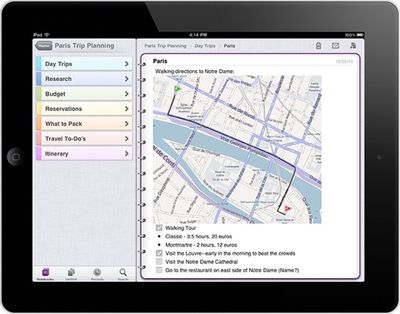
New for the latest edition of OneNote is a limit on how many notes can be created in the free edition. Now, up to 500 notes is free for all users, but to unlock unlimited functionality is unlocked via in-app purchase, $4.99 on the iPhone and $14.99 on the iPad.
OneNote is free on the App store for the iPad [Direct Link] or the iPhone [Direct Link].






















Top Rated Comments
Ignorance
First and foremost it's a free-form note-taking application, not a Task-Manager, which is a huge difference. This alone makes the comparison to OmniFocus invalid, as OmniFocus is a full-blown Task-Manager, not a Note-Taking-Tool. 2Do is basically an application to manage arrays of text input (a list with strings). Of course it adds functionality like marking things as done etc., but at it's core it's just a fancy list.
As I stated in the first sentence, OneNote is a free-form note-taking app. That means that the program logic does not force you to use predetermined spaces (Views) to input data. Consequently you can just click anywhere on your "page" and start typing stuff. But not only that, as you can also cut, copy and paste from nearly anywhere and put it into your page as well. You could, for example, enter some text and press a button inside OneNote which lets you cut and paste anything thats visible on the screen. It's kinda hard to explain without going further into details, but OneNote is basically the nearest you can get to a piece of paper which you can obviously use to write down anything you want, anywhere you want (which is huge in order to arrange text, pictures etc. the way YOU want).
Besides Excel, OneNote is the best application Microsoft has ever written, and that's not because it's very complex, but it works flawlessly and very straight forward. Especially if you have a tablet-Pc, you'll LOVE OneNote!:cool:
If they didn't implemented the "free-form" aspect of the desktop app, I don't see "any" benefits besides Windows support though:rolleyes:
as much as an Apple fan I am, Microsoft makes some quality stuff. Windows 7 is actually pretty nice and I use it every now and then. Xbox 360 kinect is pretty interesting, and no one makes better productivity software than Microsoft right now.