
An Extensive List of Things You Can Say to Siri - MacRumorsOpen MenuShow RoundupsShow Forums menuVisit ForumsOpen Sidebar
Skip to Content

An Extensive List of Things You Can Say to Siri

siri iconTUAW publishes an extensive list of phrases that the new Siri personal assistant functionality for the iPhone 4S is capable of understanding. The list, broken down into categories, outlines the various types of information and tasks Siri can deal with and provides some interesting insight into how users can help Siri learn to understand their requests.

For example, several demonstrations of Siri have included users referring to other people by their relationships (wife, dad, etc.) rather than by name. Informing Siri of those relationships is as easy as telling the system what they are, and Siri will remember those associations from that point on. Example voice input using relationships includes:

- My mom is Susan Park
- Michael Manning is my brother
- Call my brother at work

Another interesting and flexible use of Siri is in the creation of notes, a feature that allows users to make records of a wide range of content on their devices.

Creating and finding notes

- Note that I spent $12 on lunch
- Note: check out that new Alicia Keys album
- Find my restaurant note
- Create a reading list note
- Add Tom Sawyer to my reading list note

And while the example phrases show how users can make requests of and provide information to Siri, the examples are just that – examples. As demonstrated yesterday, Siri is capable of understanding natural language, allowing users to ask essentially the same question in a number of ways without needing to employ specific syntax.
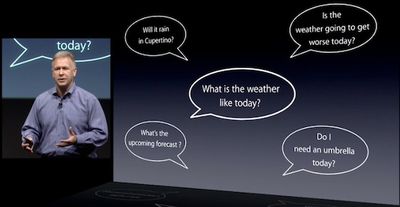
schiller siri weather phrases
Siri's example input phrases are broken down into the following categories:

- Address Book: Querying Contacts, Finding Contacts, Relationships
- Calendars: Adding Events, Changing Events, Asking About Events
- Alarms: Setting Alarms, Checking the Clock, Using a Timer
- Email: Sending Messages, Checking Messages, Responding to Messages
- Friends: Checking Up on Friends
- Maps: Directions, Local Businesses
- Messages: Sending Texts, Reading Texts, Replying to Texts
- Music: Playback
- Notes: Creating and Finding Notes
- Phone: Phone Calls
- Reminders: Requesting Reminders
- Stocks: Checking Stocks

The full list of example phrases is included at TUAW, but Siri's capabilities extend even beyond the items included on the list, as evidenced by demonstrations of Siri searching the Internet, Wikipedia, and Wolfram Alpha for specific information.


Related Forum: iPhone

Popular Stories

iOS 27 on iPhone 17 1

iOS 27 Will Add These New Features to Your iPhone

Saturday May 2, 2026 8:43 am PDT by
Apple is expected to unveil iOS 27 during its WWDC 2026 keynote on June 8, and there are already many rumored features and changes for iPhones. The first developer beta of iOS 27 will likely be available immediately following the keynote, and a public beta typically follows in July. Following beta testing, the software update should be released to all users with a compatible iPhone in...
Apple MacBook Pro M4 hero

Why You Might Want to Wait to Buy a MacBook Pro

Friday May 1, 2026 3:43 pm PDT by
Apple refreshed the 14-inch and 16-inch MacBook Pro with M5 Pro and M5 Max models in March 2026, but depending on your needs and interests, you might want to skip this generation because there's something better in the works. The M5 Pro and M5 Max MacBook Pro models have faster chips, but the same design that Apple has used since 2021. An updated design with new display technology and faster ...
Apple Event Logo

Apple Just Released a New Accessory

Monday May 4, 2026 8:13 am PDT by
Apple today released a new Pride Edition Sport Loop for the Apple Watch. The band features a rainbow design with 11 colors of woven nylon yarns. The new Pride Edition Sport Loop is available to order now on Apple.com and in the Apple Store app in 40mm, 42mm, and 46mm sizes, and it will be available at Apple Store locations starting later this week. In the U.S., the band costs $49. There...

Top Rated Comments

190 months ago
Will Siri be intelligent enough to find out which gas stations have the cheapest price points?

Will siri be helpful enough to find me a local deal?

I also own a small business and this will be a ground breaking feature for me.

If not, apple can take it back.
Typical algorithm used by Android owners to post comments at MacRumors:

1. Find: an impossible and pointless thing that the iDevice can't do
2. State: "If the {iDevice} can't do {impossible task} then it's {epic fail\won't buy\buy an android instead}
3. Look: like an idiot
Score: 51 Votes (Like | Disagree)
Caliber26 Avatar
190 months ago
"Siri, who is this person next to me in my bed?"

"His name is Jonathan Keller. You met him last night at Revolution Night Club, on South Bumby Avenue in Orlando Florida."

"Thank you, Siri."
Score: 41 Votes (Like | Disagree)
Bonch Avatar
190 months ago
"Cindy is a bitch"

"Call my bitch"

I'm going to try it. :)
Score: 27 Votes (Like | Disagree)
190 months ago
I'm curious if Siri will able to do multiple things using one command, example, "Set four alarms starting 06:00 AM at an interval of 20 minutes". If it can, that's a huge thing. It'll be very useful for me, because I have a tendency to set multiple alarms at an interval to avoid oversleeping :) :).

Super excited about Siri!!!
Score: 25 Votes (Like | Disagree)
190 months ago


What's it like with non-American accents? Most voice recognition programs are RUBBISH because I wouldn't say "my mom is..." I'd say "my mum is..." (in my native accent) so it wouldn't work.

If it's like anything else Apple, they haven't tested it outside the USA.

There's a video by BBC, check it out, it understands british accent and also replies in one :)
Score: 22 Votes (Like | Disagree)
190 months ago
I don't understand how some people can say that this is stupid and that they won't use it after day 1... I can not wait to just speak a text message instead of typing it, or reply to this forum by talking instead of typing... It will be so nice to tell my phone to set an alarm clock instead of opening it up and doing it. I also put my work schedule in my phone, it normally takes 3-4 minutes for each week. This will now take 1 minute!

- Joe
Score: 20 Votes (Like | Disagree)
Related Apple News: Reviews | Culture | Buyers Guide | South Africa | Mac