Apple's iOS 5 Beta 2 that was released to developers Friday contains a number of new findings. The biggest one we covered yesterday with the additional of Wi-Fi syncing.
AppleInsider posts a couple of screenshots from the new lock-screen notifications which show a slightly more prominent display:
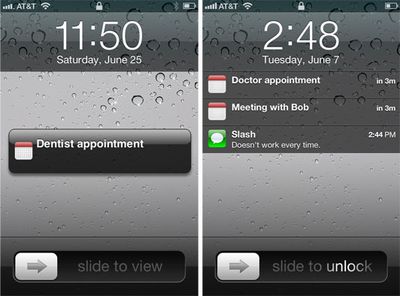
They also point out that the keyboard in iMessage now recedes when scrolling upwards into message history.

3G download support for Over the Air updates appears to be confirmed with these strings found by 9to5mac. Apple had announced that the new version of iOS will support "Over the Air" updates which allows the operating system to be upgraded without syncing to your computer. These strings seem to indicate that this can occur over Wi-Fi or 3G.
Another more subtle tweak was posted by Johan Brook which reveals that Apple is now supporting a new CSS property that will allow web developers to get "native" iOS scrolling behavior in their web apps. This refers to the "momentum" inherent in native apps. DaringFireball previously described this behavior:
One area in particular where iPhone web apps fall short of native iPhone apps is scrolling. Take for example a long list, such as your full address book in Contacts, or all your songs in the iPod app. When you scroll these lists, you can fling the list, and the list will scroll at high speed after you let go. The effect is sort of like spinning a wheel with very little friction. With iPhone web apps, you can make a list that looks almost, maybe even exactly, like a native iPhone list view. But all web views on the iPhone scroll with almost no momentum. You can’t fling them. iPhone web views feel like they have a lot of scrolling friction.
While there have been javascript work-arounds floating around, with iOS 5 this functionality will be easily implemented for web apps.

Sunday February 1, 2026 10:08 am PST by Joe Rossignol
Last year, Apple launched CarPlay Ultra, the long-awaited next-generation version of its CarPlay software system for vehicles. Nearly nine months later, CarPlay Ultra is still limited to Aston Martin's latest luxury vehicles, but that should change fairly soon.
In May 2025, Apple said many other vehicle brands planned to offer CarPlay Ultra, including Hyundai, Kia, and Genesis.
In his Powe...
Sunday February 1, 2026 12:31 pm PST by Joe Rossignol
The calendar has turned to February, and a new report indicates that Apple's next product launch is "imminent," in the form of new MacBook Pro models.
"All signs point to an imminent launch of next-generation MacBook Pros that retain the current form factor but deliver faster chips," Bloomberg's Mark Gurman said on Sunday. "I'm told the new models — code-named J714 and J716 — are slated...
Sunday February 1, 2026 5:42 am PST by Joe Rossignol
Apple is planning to launch new MacBook Pro models with M5 Pro and M5 Max chips alongside macOS 26.3, according to Bloomberg's Mark Gurman.
"Apple's faster MacBook Pros are planned for the macOS 26.3 release cycle," wrote Gurman, in his Power On newsletter today.
"I'm told the new models — code-named J714 and J716 — are slated for the macOS 26.3 software cycle, which runs from...
Tuesday February 3, 2026 7:47 am PST by Joe Rossignol
We are still waiting for the iOS 26.3 Release Candidate to come out, so the first iOS 26.4 beta is likely still at least a week or two away. Following beta testing, iOS 26.4 will likely be released to the general public in March or April.
Below, we have recapped known or rumored iOS 26.3 and iOS 26.4 features so far.
iOS 26.3
iPhone to Android Transfer Tool
iOS 26.3 makes it easier...
Saturday January 31, 2026 10:51 am PST by Joe Rossignol
Apple recently updated its online store with a new ordering process for Macs, including the MacBook Air, MacBook Pro, iMac, Mac mini, Mac Studio, and Mac Pro.
There used to be a handful of standard configurations available for each Mac, but now you must configure a Mac entirely from scratch on a feature-by-feature basis. In other words, ordering a new Mac now works much like ordering an...
So glad it will go away when scrolling through past messages, I always hated leaving the conversation and going back in just to remove the keyboard! :D
I'm not very fond of the new lock screen notification bubbles in this build. It's going back to the iOS 4 days; the bubble itself is not consistent with the rest of iOS' UI, not to mention the gradient looks like crap.
The one thing that's annoying me is the pull-down icon, it's one of the tackiest things I've seen and really doesn't 'fit' in, it just seems like it was made in 5 seconds.. it also doesn't seem to look like an icon for pull-down, I don't really know what it's meant to look like :s
LOL. Talk about anal retentive. :P
It clearly imitates a physical button with horizontal notches to provide the "grip" to your finger to pull down against.