Walkthrough of Apple's iMessage in iOS 5
One of the surprising new iOS 5 features announced during the WWDC 2011 keynote was the introduction of Apple's own messaging service called iMessage. The new service offers a number of advantages over current SMS/text messaging. Features include delivery receipts, see when someone's typing, secure encryption and support for iPad and iPod Touch devices. iMessage also circumvents the costly text messaging plans required by carriers. According to DaringFireball, Apple's mobile carrier partners only learned about the new feature at the same time as the rest of us: during the keynote.
Cult of Mac has posted a nice walkthrough explaining how iMessages work alongside standard SMS messages.
Fortunately, for the end user, the transition will be relatively transparent. iMessage has been integrated into the existing "Messages" app. If you would like to text someone, iOS 5 automatically checks to see if they are eligible to receive iMessages rather than the more costly standard text message:
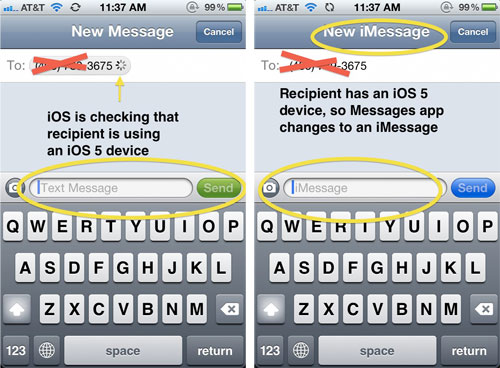
Once a contact is known to support iMessage, a special blue chat bubble appears by that contact's name to indicate they support iMessage. If you don't want to ever send any standard text messages, there is a preference for Messages to only try to send iMessages instead of SMSs. In summary:
Overall, iMessages are great. Being able to see when a message has been delivered and whether it's been read or not really enhance the communication experience. The best part is that you don't have to even think about them because if Apple is doing all of the work completely behind the scenes so that you won't even notice. Using iMessages on multiple devices with the new support of iCloud ensures that you'll never miss a beat when you're working on both your iPad and iPhone.
Apple previewed iOS 5 during the WWDC 2011 keynote on Monday. iOS 5 is presently available as a beta to registered developers but won't be released to the public until this fall.

Popular Stories
Last year, Apple launched CarPlay Ultra, the long-awaited next-generation version of its CarPlay software system for vehicles. Nearly nine months later, CarPlay Ultra is still limited to Aston Martin's latest luxury vehicles, but that should change fairly soon.
In May 2025, Apple said many other vehicle brands planned to offer CarPlay Ultra, including Hyundai, Kia, and Genesis.
In his Powe...
The calendar has turned to February, and a new report indicates that Apple's next product launch is "imminent," in the form of new MacBook Pro models.
"All signs point to an imminent launch of next-generation MacBook Pros that retain the current form factor but deliver faster chips," Bloomberg's Mark Gurman said on Sunday. "I'm told the new models — code-named J714 and J716 — are slated...
Apple is planning to launch new MacBook Pro models with M5 Pro and M5 Max chips alongside macOS 26.3, according to Bloomberg's Mark Gurman.
"Apple's faster MacBook Pros are planned for the macOS 26.3 release cycle," wrote Gurman, in his Power On newsletter today.
"I'm told the new models — code-named J714 and J716 — are slated for the macOS 26.3 software cycle, which runs from...
We are still waiting for the iOS 26.3 Release Candidate to come out, so the first iOS 26.4 beta is likely still at least a week or two away. Following beta testing, iOS 26.4 will likely be released to the general public in March or April.
Below, we have recapped known or rumored iOS 26.3 and iOS 26.4 features so far.
iOS 26.3
iPhone to Android Transfer Tool
iOS 26.3 makes it easier...
Apple recently updated its online store with a new ordering process for Macs, including the MacBook Air, MacBook Pro, iMac, Mac mini, Mac Studio, and Mac Pro.
There used to be a handful of standard configurations available for each Mac, but now you must configure a Mac entirely from scratch on a feature-by-feature basis. In other words, ordering a new Mac now works much like ordering an...