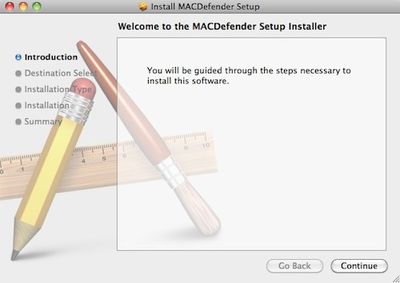
New 'MACDefender' Malware Threat for Mac OS X

094840 macdefender

Antivirus firm Intego today noted the discovery of new malware known as "MACDefender" targeting Mac OS X users via Safari. According to the report, the malware appears to be being deployed via JavaScript as a compressed ZIP file reached through Google searches.

When a user clicks on a link after performing a search on a search engine such as Google, this takes them to a web site whose page contains JavaScript that automatically downloads a file. In this case, the file downloaded is a compressed ZIP archive, which, if a specific option in a web browser is checked (Open "safe" files after downloading in Safari, for example), will open.

More information is available in Apple's support communities (1, 2), where users report that the malware is popping up directly in Google image searches.

Users running administrator accounts and with the Safari option to open "safe" files automatically checked appear to be most at risk, with some claiming that no notification of installation was seen or password required. Only when a screen popped up asking for a credit card number to sign up for virus protection did they realize that malware had been installed on their systems.

For those infected with the MACDefender malware, the following steps are recommended:

1. Open Applications > Utilities > Activity Monitor and quit any processes linked to MACDefender.

2. Delete MACDefender from the Applications folder.

3. Check System Preferences > Accounts > Login Items for suspicious entries

4. Run a Spotlight search for "MACDefender" to check for any associated files that might still be lingering.

Full details on the malware and the simplest steps needed for its complete removal are still being investigated.

Users are of course reminded that day-to-day system usage with standard accounts rather than administrator ones, as well as unchecking the Safari option for automatically opening "safe" files, are two of the simplest ways users can enhance their online security, adding extra layers of confirmation and passwords in the way of anything being installed on their systems.


Popular Stories

iOS 26

iOS 26.4 and iOS 27 Features Revealed in New Leak

Friday December 12, 2025 10:56 am PST by
Macworld's Filipe Espósito today revealed a handful of features that Apple is allegedly planning for iOS 26.4, iOS 27, and even iOS 28. The report said the features are referenced within the code for a leaked internal build of iOS 26 that is not meant to be seen by the public. However, it appears that Espósito and/or his sources managed to gain access to it, providing us with a sneak peek...
iOS 26

iOS 26.2 Coming Soon With These 8 New Features on Your iPhone

Thursday December 11, 2025 8:49 am PST by
Apple seeded the second iOS 26.2 Release Candidate to developers earlier this week, meaning the update will be released to the general public very soon. Apple confirmed iOS 26.2 would be released in December, but it did not provide a specific date. We expect the update to be released by early next week. iOS 26.2 includes a handful of new features and changes on the iPhone, such as a new...
iOS 26

Apple Releases iOS 26.2 With Alarms for Reminders, Lock Screen Changes, Enhanced Safety Alerts and More

Friday December 12, 2025 10:10 am PST by
Apple today released iOS 26.2, the second major update to the iOS 26 operating system that came out in September, iOS 26.2 comes a little over a month after iOS 26.1 launched. ‌iOS 26‌.2 is compatible with the ‌iPhone‌ 11 series and later, as well as the second-generation ‌iPhone‌ SE. The new software can be downloaded on eligible iPhones over-the-air by going to Settings >...
AirPods Pro Firmware Feature

Apple Releases New Firmware for AirPods Pro 2 and AirPods Pro 3

Thursday December 11, 2025 11:28 am PST by
Apple today released new firmware designed for the AirPods Pro 3 and the prior-generation AirPods Pro 2. The AirPods Pro 3 firmware is 8B30, up from 8B25, while the AirPods Pro 2 firmware is 8B28, up from 8B21. There's no word on what's include in the updated firmware, but the AirPods Pro 2 and AirPods Pro 3 are getting expanded support for Live Translation in the European Union in iOS...
macOS Tahoe 26 Thumb

Apple Releases macOS Tahoe 26.2 With Edge Light

Friday December 12, 2025 10:08 am PST by
Apple today released macOS Tahoe 26.2, the second major update to the macOS Tahoe operating system that came out in September. macOS Tahoe 26.2 comes five weeks after Apple released macOS Tahoe 26.1. Mac users can download the macOS Tahoe update by using the Software Update section of System Settings. macOS Tahoe 26.2 includes Edge Light, a feature that illuminates your face with soft...
AirTag 2 Mock Feature

Apple AirTag 2: Four New Features Found in iOS 26 Code

Thursday December 11, 2025 10:31 am PST by
The AirTag 2 will include a handful of new features that will improve tracking capabilities, according to a new report from Macworld. The site says that it was able to access an internal build of iOS 26, which includes references to multiple unreleased products. Here's what's supposedly coming: An improved pairing process, though no details were provided. AirTag pairing is already...
ipados 26 1 slide over

Apple Releases iPadOS 26.2 With Multitasking Improvements

Friday December 12, 2025 10:09 am PST by
Apple today released iPadOS 26.2, the second major update to the iPadOS 26 operating system released in September. iPadOS 26.2 comes a month after iPadOS 26.1. The new software can be downloaded on eligible iPads over-the-air by going to Settings > General > Software Update. iPadOS 26.2 continues with the multitasking improvements that were added with iPadOS 26.1. You can now drag and...
bug security vulnerability issue fix larry

Update Now: iOS 26.2 Fixes 20+ Security Vulnerabilities

Friday December 12, 2025 11:11 am PST by
Apple today released iOS 26.2, iPadOS 26.2, and macOS 26.2, all of which introduce new features, bug fixes, and security improvements. Apple says that the updates address over 20 vulnerabilities, including two bugs that are known to have been actively exploited. There are a pair of WebKit vulnerabilities that could allow maliciously crafted web content to execute code or cause memory...

Top Rated Comments

miles01110 Avatar
191 months ago
lol

10 years and finally a malware attack.

Still unreal.

:D

Actually there's been malware for OS X since it was introduced. There is malware for every operating system.

Nothing can defend against user stupidity.
Score: 8 Votes (Like | Disagree)
KnightWRX Avatar
191 months ago
WOW! Malware that requires the user to do a Google search, then download, and install. For all of this, it asks for your credit card number.

How can we ever defend our computers against such a diabolical threat?!
Hum, download and install are automatic. Good thing I don't use Safari.


As I understand it, Safari will open the zip file since it's a "safe" download. But that doesn't mean it'll execute the code within that zip file, so how is this malware executing without user permission?
I haven't seen this malware first hand, but a zip file can be made with absolute paths, making "unzipping" the file put everything where it needs to be to start up automatically on next log in/reboot.

Who's the brainiac who made zip files "safe" ?

so much for the no malware on macs myth :D
funny how the apple fanboys are getting all defensive :rolleyes:
No viruses on the Mac. There's been malware for OS X for quite a while now.
Score: 8 Votes (Like | Disagree)
*LTD* Avatar
191 months ago
Mac OS X fanboys really need to stop clinging to the mentality that "viruses" don't exist for OS X

They don't.
Score: 6 Votes (Like | Disagree)
GGJstudios Avatar
191 months ago
4. Run a Spotlight search for "MACDefender" to check for any associated files that might still be lingering

That's a sure way *not* to find any related files.
The only effective method for complete app removal is manual deletion:
Best way to FULLY DELETE a program (https://forums.macrumors.com/showpost.php?p=11171082&postcount=16)
One thing Macs need anti-virus is to scan mails for Windows viruses, so that those doesn't to you PC. That is all.
That doesn't protect Windows PCs from malware from other sources, which is a far greater threat than receiving files from a Mac. Each Windows user should be running their own anti-virus, to protect them from malware from all sources.
Yes so much. Because Malware can copy itself and infect a computer.
No, only a virus can do that. A trojan requires user involvement to spread.
So few virus for MAC than when one appears it is news... :)
This isn't a virus.
Mac OS X fanboys really need to stop clinging to the mentality that "viruses" don't exist for OS X and that "malware" is a Windows-only problem.
I agree. While no Mac OS X viruses exist at this time, that doesn't mean they won't in the future. And malware has always been a threat. What's important is to understand the kinds of threats and the most effective methods for protection.

The fact is, the days of viruses are long gone.
I wouldn't go so far as to say that. Just when you do, someone will release a new virus into the wild. While they may not be as prevalent as they once were, they're by no means extinct.

The fact is, understanding the proper terminology and different payloads and impacts of the different types of malware prevents unnecessary panic and promotes a proper security strategy.

I'd say it's people that try to just lump all malware together in the same category, making a trojan that relies on social engineering sound as bad as a self-replicating worm that spreads using a remote execution/privilege escalation bug that are quite ignorant of general computer security.
The best defense a Mac user has against current malware threats is education and common sense. Understanding the basic differences between a virus, trojan, worm, and other types of malware will help a user defend against them. Doing simple things like unchecking the "Open "safe" files after downloading" option is quite effective.

I despise the "X is a file downloaded from the Internet" dialog introduced in SL. Really wish you could disable it.
That's one of the simple lines of defense for a user, as it lets them know they're about to open a newly-downloaded app. It only does that the first time you launch the app, so why bother disabling such a helpful reminder?
To the end user it makes no difference. It's fine if you know, but to a novice quickly correcting them on the difference between a virus, a trojan, or whatever else contributes approximately zero percent towards solving the problem.
Actually, it helps a user to have some understanding about malware. Part of the problem is a novice user is likely to engage in dangerous activities, such as installing pirated software, unless they know what a trojan is and how it infects a system. Also, understanding what a virus is, how it spreads, and the fact that none exist for Mac OS X will prevent them from instantly assuming that everything unexpected that happens on their Mac is the result of a virus. Also, understanding that antivirus apps can't detect a virus that doesn't yet exist will prevent them from installing AV and having a false sense of security, thinking they're immune to threats. Educating a user goes a very long way in protecting them, by teaching them to practice safe computing habits.

Mac Virus/Malware Info (https://forums.macrumors.com/showpost.php?p=9400648&postcount=4)
Score: 5 Votes (Like | Disagree)
dethmaShine Avatar
191 months ago
unbiased as opposed to a Mac site.... yeah right!


Mac users tend to be a better target for old fashioned phishing/vishing because...well, 'nothing bad happens on a Mac..' right?

Now from google pointing 'sources', you are consistently jumping on to mac users, eh?

Good going.

Yup nothing happens to my mac except for what I do it. It's that simple. Why don't you just ask Google why they decided to abandon Windows?
Score: 4 Votes (Like | Disagree)
3282868 Avatar
191 months ago
unbiased as opposed to a Mac site.... yeah right!


Mac users tend to be a better target for old fashioned phishing/vishing because...well, 'nothing bad happens on a Mac..' right?

Sure it can, but it's the percentage and the variables of these "bad" incidents that are key as you are generalizing without specifics.

How about unbiased studies, and percentages of viruses and malware between the two? Those would be facts (again, from an impartial party/experiment).

Also, you're on a Mac based website, so of course there are OS X defenders. Go to Engadget, et al if you don't wish to be here, you're free to decide :)
Score: 4 Votes (Like | Disagree)