iPhone Activation and Syncing Video - MacRumorsOpen MenuShow RoundupsShow Forums menuVisit ForumsOpen Sidebar
Skip to Content

iPhone Activation and Syncing Video

Besides announcing rate plans today, Apple has also posted a video demonstrating how to activate and sync the iPhone.
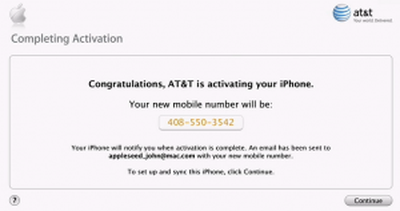
activating 300

The iPhone is activated through iTunes. Activation works for both existing and new AT&T customers, and allows users to transfer their existing phone number to the iPhone.

The syncing portion of the video demonstrates how to sync email accounts, address, safari bookmarks and more.

Apple and AT&T Inc. today announced that iPhone users will be able to activate their new iPhones using Apple's popular iTunes software running on a PC or Mac computer in the comfort and privacy of their own home or office, without having to wait in a store while their phone is activated. Activating iPhone takes only minutes as iTunes guides the user through simple steps to choose their service plan, authorize their credit and activate their iPhone. Once iPhone is activated, users can then easily sync all of their phone numbers and other contact information, calendars, email accounts, web browser bookmarks, music, photos, podcasts, TV shows and movies just like they do when they sync their iPods with iTunes.

Several readers have noted that the syncing video shows "74.40 GB" capacity at one point, but this most likely represents an editing error.


Related Forum: iPhone

Popular Stories

imac video apple feature

Apple Released Yet Another New Product Today

Friday March 20, 2026 2:39 pm PDT by
Apple has unveiled a whopping nine new products so far this March, including an iPhone 17e, iPad Air models with the M4 chip, MacBook Air models with the M5 chip, MacBook Pro models with M5 Pro and M5 Max chips, the all-new MacBook Neo, an updated Studio Display, a higher-end Studio Display XDR, AirPods Max 2, and now the Nike Powerbeats Pro 2. iPhone 17e features the same overall design as...
ios 26 4 pastel

iOS 26.4: Top 10 New Features Coming to Your iPhone

Friday March 20, 2026 2:44 pm PDT by
iOS 26.4 isn't the major update with new Siri features that we hoped for, but there are some useful quality of life improvements, and a little bit of fun with an AI playlist generator and new emoji characters. Playlist Playground - Apple Music has a Playlist Playground option that lets you generate playlists from text-based descriptions. You can include moods, feelings, activities, or...
iPhone 18 Pro Deep Red Feature

iPhone 18 Pro Launching Later This Year With These 12 New Features

Wednesday March 18, 2026 7:39 am PDT by
While the iPhone 18 Pro and iPhone 18 Pro Max are not expected to launch for another six months or so, there are already plenty of rumors about the devices. It was initially reported that the iPhone 18 Pro models would have fully under-screen Face ID, with only a front camera visible in the top-left corner of the screen. However, the latest rumors indicate that only one Face ID component...

Top Rated Comments

MBHockey Avatar
245 months ago
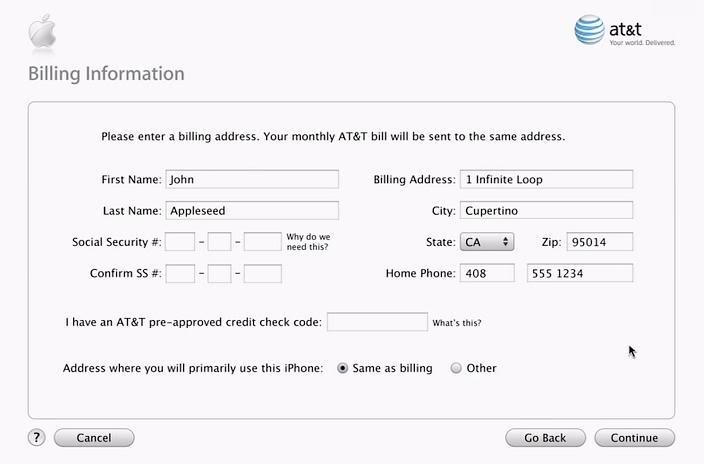
For those of you who want to get pre-approved for the iPhone (or you're worried about your credit), take the following steps:

1. Call AT&T at 1-888-333-6651.
2. Choose option 3 for new service, and then 3 again.
3. Tell them you're interested in buying the iPhone and want to get pre-approved. They'll ask for your SSN, ID, address, etc. They'll run a credit check and let you know if you're approved or not.
4. Be sure to ask for a BAN number before you hang up. This BAN number is good for 30 days.
5. After buying your iPhone on Friday, enter the BAN number in the "pre-approved credit check code" field during activation.

See screen shot below:


Just one less thing to worry about. :)
I just got off the phone with them and they said you cannot do that. I asked if he was sure, and he said "I can assure you nobody has called and gotten pre-approved"

He was kind of a jerk about it to. I'm calling back and hopefully getting a different person.

Edit: Grr, called again. Got a different guy. He told me the same thing, but he was much nicer.
Score: 1 Votes (Like | Disagree)
Related Apple News: Ipad | Iphone | Travel | Entertainment | Opinion