ZENS recently debuted its latest product, an iPhone/Apple Watch Power Bank that has a built-in Apple Watch charging puck and a USB port, allowing you to charge all of your devices at once.

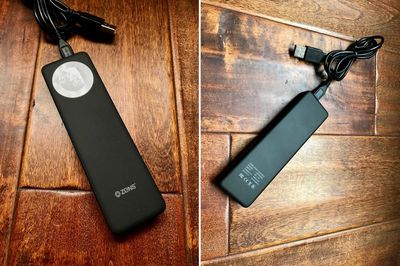
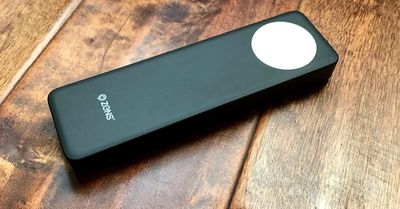
Priced at €69.99 (or $78.00) the 4,000 mAh ZENS Power Bank is about the size and shape of a chocolate bar, though perhaps a bit wider. Because it's neither short nor particularly flat, it doesn't fit well in a pocket, but it's a good size for a backpack or bag when traveling.
zenspowerbankdesign
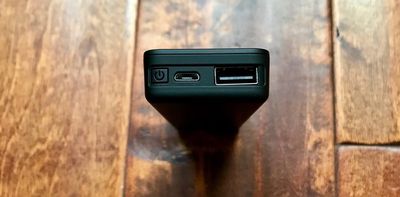
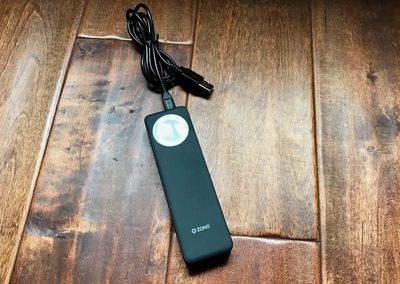
The Power Bank is sturdy and well-made, constructed from a soft-finish black plastic material. At one end, there's an Apple Watch charging puck built into the device, and at the top, there's a USB port for plugging in an iPhone or other USB-powered device, and a micro-USB port that's used for charging.

There's a single button that's used as an on/off switch, which needs to be pressed whenever the Apple Watch is placed on top of it to activate charging. The Power Bank has a single blue LED next to the micro-USB port so you can tell if it has charge left, but because there aren't multiple LEDs, there's no way to tell exactly how much charge is remaining.
zenspowerbankusbport
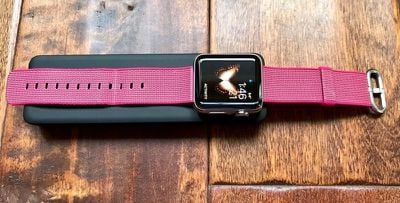
Due to the flat, skinny shape of the ZENS Power Bank, I sometimes had trouble getting my Apple Watch situated just right so it would charge, and a knock was enough to dislodge it if I happened to hit it when reaching for something on my nightstand in the middle of the night. That said, it does work with multiple bands and it's no less convenient than using the Apple Watch charger on its own.
zenspowerbankthickness
I took the ZENS iPhone/Apple Watch Power Bank with me on a trip recently, and I can confirm that at 4,000 mAh, it has enough juice to keep an Apple Watch charged for a week. I used it for nine days straight to keep my 38mm Apple Watch charged, but I wasn't draining it every single day.

As for the iPhone, the ZENS Power Bank can do just about one full iPhone 7 Plus charge and one full Apple Watch charge, but that eats up a lot of the capacity because it's limited to 4,000 mAh, which is on the small side for portable iPhone batteries.

I was able to get it to charge my iPhone 7 Plus and my Apple Watch, but it was essentially drained after that. I don't have an iPhone 7 to test, but you could potentially get two charges out of the Power Bank because the iPhone 7 has a lower-capacity 1,960 mAh battery inside. It's worth noting that the Power Bank offers 2-amp charging, so the iPhone will charge at a decent speed.
zenspowerbankwithapplewatch
Because it can only deliver a single charge to an iPhone 7 Plus and an Apple Watch simultaneously, this is only going to work for day trips when you need a little extra juice. Conferences, a long day at Disneyland, and a night camping will all work fine, but don't buy this for a longer trip unless you only need to charge your Apple Watch.

If you just want something to power the Apple Watch, this will work for a solid week of standard Apple Watch use. A little more if you're not using much battery, and a little less if you're draining your watch every day.

At home, the Power Bank is nice if you want an Apple Watch charger that has no cords and only needs to be charged once a week from a computer or USB power adapter (it doesn't come with one). It can sit on a desk without taking up too much room, and its neutral design will match most decor.

Bottom Line

The ZENS iPhone/Apple Watch Power Bank costs approximately $78, which is not a great price for a 4,000 mAh battery pack.

On Amazon, you can get a smaller 5,200 mAh battery pack for $15.99, or a 10,000 mAh battery pack for $30, but it won't have the built-in Apple Watch charger that's in the ZENS Power Bank.
zenspowerbankfinal
If you don't want to carry around an Apple Watch charger and want a built-in solution, the ZENS iPhone/Apple Watch Power Bank will deliver it, but personally, I'd rather pay much less for more power, especially if I'm seeking something that's got enough juice to charge my iPhone. You're going to be carrying a micro-USB charging cord and a Lightning cord to charge the iPhone if you use the ZENS Power Bank anyway, so I'm not sure how much of a convenience factor it's adding.

If you want a cord-free desktop Apple Watch charging solution or need a way to power an Apple Watch alone for a week, however, the ZENS iPhone/Apple Watch Power Bank could be worth checking out.

Pros:

  • Can keep Apple Watch charged for a week
  • Built-in Apple Watch charging puck

Cons:

  • Expensive
  • Low capacity
  • Not suitable for more than 1 iPhone 7 Plus charge
  • Requires micro-USB cord for charging
  • No way to determine charge level

How to Buy

The ZENS iPhone/Apple Watch Power Bank can be purchased from the ZENS website for €69.99 or about $78. It ships from the Netherlands to the United States and many other countries around the world.


Tags: Review, ZENS

Top Rated Comments

oneMadRssn Avatar
118 months ago
Kickstart it! I bet there are a lot of people who would pay $30 for a cable like that. I wonder how much both MFi components would cost?
I don't have the time nor the wherewithal to do that. If someone that does is reading this, I'm picturing a simple white cable, 4 feet long. One end is a standard USB-A plug (or USB-C maybe?) The other end is a regular lightning plug. About 4-6" down from the lighting-end of the cable is the charging puck, where the cable comes in from the USB end on one side, and 180-degrees oppose it the cable comes out to the lightning end.

[]USB]---------------3'6"---------------((puck))----6"----==lightning
Score: 2 Votes (Like | Disagree)
Analog Kid Avatar
118 months ago
I don't have the time nor the wherewithal to do that. If someone that does is reading this, I'm picturing a simple white cable, 4 feet long. One end is a standard USB-A plug (or USB-C maybe?) The other end is a regular lightning plug. About 4-6" down from the lighting-end of the cable is the charging puck, where the cable comes in from the USB end on one side, and 180-degrees oppose it the cable comes out to the lightning end.

[]USB]---------------3'6"---------------((puck))----6"----==lightning
As long as we're dreaming, can I ask for a bare puck that has a lightning socket in the side so I can just stick it on the end of a lightning cable?
Score: 2 Votes (Like | Disagree)
paul4339 Avatar
118 months ago
I don't quite get why they used micro-USB.
Score: 1 Votes (Like | Disagree)

Popular Stories

iOS 26

iOS 26.4 and iOS 27 Features Revealed in New Leak

Friday December 12, 2025 10:56 am PST by
Macworld's Filipe Espósito today revealed a handful of features that Apple is allegedly planning for iOS 26.4, iOS 27, and even iOS 28. The report said the features are referenced within the code for a leaked internal build of iOS 26 that is not meant to be seen by the public. However, it appears that Espósito and/or his sources managed to gain access to it, providing us with a sneak peek...
iOS 26

iOS 26.2 Coming Soon With These 8 New Features on Your iPhone

Thursday December 11, 2025 8:49 am PST by
Apple seeded the second iOS 26.2 Release Candidate to developers earlier this week, meaning the update will be released to the general public very soon. Apple confirmed iOS 26.2 would be released in December, but it did not provide a specific date. We expect the update to be released by early next week. iOS 26.2 includes a handful of new features and changes on the iPhone, such as a new...
iOS 26

Apple Releases iOS 26.2 With Alarms for Reminders, Lock Screen Changes, Enhanced Safety Alerts and More

Friday December 12, 2025 10:10 am PST by
Apple today released iOS 26.2, the second major update to the iOS 26 operating system that came out in September, iOS 26.2 comes a little over a month after iOS 26.1 launched. ‌iOS 26‌.2 is compatible with the ‌iPhone‌ 11 series and later, as well as the second-generation ‌iPhone‌ SE. The new software can be downloaded on eligible iPhones over-the-air by going to Settings >...
AirPods Pro Firmware Feature

Apple Releases New Firmware for AirPods Pro 2 and AirPods Pro 3

Thursday December 11, 2025 11:28 am PST by
Apple today released new firmware designed for the AirPods Pro 3 and the prior-generation AirPods Pro 2. The AirPods Pro 3 firmware is 8B30, up from 8B25, while the AirPods Pro 2 firmware is 8B28, up from 8B21. There's no word on what's include in the updated firmware, but the AirPods Pro 2 and AirPods Pro 3 are getting expanded support for Live Translation in the European Union in iOS...
macOS Tahoe 26 Thumb

Apple Releases macOS Tahoe 26.2 With Edge Light

Friday December 12, 2025 10:08 am PST by
Apple today released macOS Tahoe 26.2, the second major update to the macOS Tahoe operating system that came out in September. macOS Tahoe 26.2 comes five weeks after Apple released macOS Tahoe 26.1. Mac users can download the macOS Tahoe update by using the Software Update section of System Settings. macOS Tahoe 26.2 includes Edge Light, a feature that illuminates your face with soft...
AirTag 2 Mock Feature

Apple AirTag 2: Four New Features Found in iOS 26 Code

Thursday December 11, 2025 10:31 am PST by
The AirTag 2 will include a handful of new features that will improve tracking capabilities, according to a new report from Macworld. The site says that it was able to access an internal build of iOS 26, which includes references to multiple unreleased products. Here's what's supposedly coming: An improved pairing process, though no details were provided. AirTag pairing is already...
ipados 26 1 slide over

Apple Releases iPadOS 26.2 With Multitasking Improvements

Friday December 12, 2025 10:09 am PST by
Apple today released iPadOS 26.2, the second major update to the iPadOS 26 operating system released in September. iPadOS 26.2 comes a month after iPadOS 26.1. The new software can be downloaded on eligible iPads over-the-air by going to Settings > General > Software Update. iPadOS 26.2 continues with the multitasking improvements that were added with iPadOS 26.1. You can now drag and...
bug security vulnerability issue fix larry

Update Now: iOS 26.2 Fixes 20+ Security Vulnerabilities

Friday December 12, 2025 11:11 am PST by
Apple today released iOS 26.2, iPadOS 26.2, and macOS 26.2, all of which introduce new features, bug fixes, and security improvements. Apple says that the updates address over 20 vulnerabilities, including two bugs that are known to have been actively exploited. There are a pair of WebKit vulnerabilities that could allow maliciously crafted web content to execute code or cause memory...