Wi-Fi 6E, the latest advancement in Wi-Fi technology, offers several benefits when enabled on your iPhone or Mac, but it can also cause problems. This article explains what Wi-Fi 6E is, which Apple devices support it, and how to turn it off if you encounter issues.
Mac Pro Fifteen Inch Air Yellow iphone 14 Triptych Feature

What is Wi-Fi 6E?

Wi-Fi 6 operates on the 2.4GHz and 5GHz bands, while Wi-Fi 6E also works over the 6GHz band for increased bandwidth. Wi-Fi 6E offers faster wireless speeds, lower latency, and less signal interference, so long as a supported device is connected to a Wi-Fi 6E router, which are available from brands like TP-Link, Asus, and Netgear.

Wi-Fi 6E can handle more simultaneous connections without a decrease in performance, making it ideal for environments with many connected devices, such as smart homes and modern offices.

Does My Apple Device Support Wi-Fi 6E?

As Wi-Fi 6E is relatively new, not all devices support it yet. This means you might not be able to take full advantage of its features if other devices in your network are not Wi-Fi 6E compatible. Apple devices that support the standard are as follows:

  • iMac (24-inch, Nov 2023)
  • MacBook Pro (14-inch, Nov 2023)
  • MacBook Pro (16-inch, Nov 2023)
  • MacBook Pro (14-inch, 2023) or MacBook Pro (16-inch, 2023)
  • Mac mini (2023)
  • Mac Studio (2023)
  • Mac Pro (2023)
  • iPhone 15 Pro or iPhone 15 Pro Max
  • iPad Pro 11-inch (4th generation) or iPad Pro 12.9 inch (6th generation)

Using Wi-Fi 6E Networks

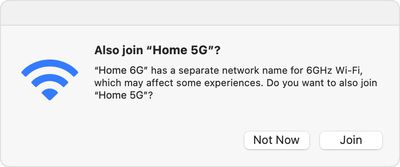
To use a Wi-Fi 6E network with an Apple device, you need a Wi-Fi 6E router that also has its 2.4GHz or 5GHz bands enabled. For the best Wi-Fi performance, Apple recommends using a single network name across the router's 2.4GHz, 5GHz, and 6GHz bands. Otherwise, your Apple device will identify the network as having "limited compatibility," and the overall experience with some activities over the network might not be as expected.
macos ventura also join 5g separate network name for 6ghz wi fi

Disabling Wi-Fi 6E Networks

The 6 GHz frequency band can have a shorter range and less ability to penetrate walls and other obstacles compared to the lower 2.4 GHz band. This might require more strategic placement of routers or the use of range extenders in larger spaces. Additionally, if your Mac is experiencing the "limited connectivity" issues described above, it may potentially lead to increased power consumption on your Mac, which could impact battery life.

Fortunately, if you experience any issues with a Wi-Fi 6E network, you can turn off Wi-Fi 6E mode for that network, and your Apple device will no longer use that network's 6GHz band.

On Mac

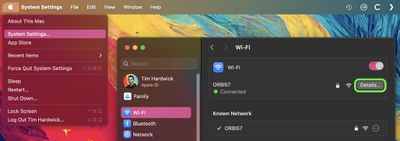
  1. Click the Apple logo () in the menu bar and select System Settings.
  2. Click Wi-Fi in the side column.
  3. Click Details next to the name of the Wi-Fi 6E network you're connected to.
  4. From the pop-up menu next to "Wi-Fi 6E Mode," choose Off.
settings

On iPhone and iPad

  1. Open the Settings app and tap Wi-Fi.

  2. Tap the name of the Wi-Fi 6E network you're connected to.
  3. Tap Wi-Fi 6E Mode, then tap Off.

Note that Wi-Fi 6E is not available in China mainland, while in Japan, Wi-Fi 6E requires iOS 16.2 or later or macOS 13.2 or later.


Top Rated Comments

metalsiren Avatar
29 months ago
"Additionally, operating on a higher frequency band may lead to increased power consumption on your Mac, which could impact battery life in portable devices."

This is WRONG, I do wifi for a living. Wifi 6E actually reduces power consumption with a feature called TWT or target wake time. compared to 24/5. disabling wifi 6e on the router wont make a difference for the clients power. When the client is connected to an SSID that has 24/5/6 enabeld yes the client will check for roam candidates (aka another AP to go to if you need to roam) but 80211k neighbor lists fixes that.

so really confused with the above statement.
Score: 23 Votes (Like | Disagree)
WarmWinterHat Avatar
29 months ago
I just upgraded to wifi 6 from 802.11n last year.. It'll probably be another decade until I look at 6e, or 7.

Upgrading routers is like buying a water heater. What a hassle.
Score: 13 Votes (Like | Disagree)
metalsiren Avatar
29 months ago

Wi-Fi 7 next year?
its coming but its even more complex and builds on 6E

as in 320bonding 6Ghz channels compared to 180 bonding, 4k QAM compared to 1K QAM (you only get the higher one being closer). the big thing is Multi-Link Capabilities where it can connect to 2 bands and send data on them both like being connected to 5/6 at the same time. (still have to see it in practice though)
Score: 9 Votes (Like | Disagree)
singularity0993 Avatar
29 months ago
Do these new WiFi standards really make a difference? I mean, if you are serious about network speed you’ll (have to) use ethernet anyway.
Score: 8 Votes (Like | Disagree)
WannaGoMac Avatar
29 months ago

Do these new WiFi standards really make a difference? I mean, if you are serious about network speed you’ll (have to) use ethernet anyway.
For most people nope, their Internet speed will be far lower than their Wi-Fi speed. And, if you care you use ethernet cable on everything you can because that’s still best.
Score: 8 Votes (Like | Disagree)
Fuzzball84 Avatar
29 months ago
WiFi 8 will allow you to use beam focusing. No longer will you require a microwave. Simply placing a few routers in the house will enable you to heat that ready meal with a click of the button.
Score: 8 Votes (Like | Disagree)

Popular Stories

Aston Martin CarPlay Ultra Screen

Apple's CarPlay Ultra to Expand to These Vehicle Brands Later This Year

Sunday February 1, 2026 10:08 am PST by
Last year, Apple launched CarPlay Ultra, the long-awaited next-generation version of its CarPlay software system for vehicles. Nearly nine months later, CarPlay Ultra is still limited to Aston Martin's latest luxury vehicles, but that should change fairly soon. In May 2025, Apple said many other vehicle brands planned to offer CarPlay Ultra, including Hyundai, Kia, and Genesis. In his Powe...
Apple Logo Black

Apple's Next Launch is 'Imminent'

Sunday February 1, 2026 12:31 pm PST by
The calendar has turned to February, and a new report indicates that Apple's next product launch is "imminent," in the form of new MacBook Pro models. "All signs point to an imminent launch of next-generation MacBook Pros that retain the current form factor but deliver faster chips," Bloomberg's Mark Gurman said on Sunday. "I'm told the new models — code-named J714 and J716 — are slated...
Apple MacBook Pro M4 hero

New MacBook Pros Reportedly Launching Alongside macOS 26.3

Sunday February 1, 2026 5:42 am PST by
Apple is planning to launch new MacBook Pro models with M5 Pro and M5 Max chips alongside macOS 26.3, according to Bloomberg's Mark Gurman. "Apple's faster MacBook Pros are planned for the macOS 26.3 release cycle," wrote Gurman, in his Power On newsletter today. "I'm told the new models — code-named J714 and J716 — are slated for the macOS 26.3 software cycle, which runs from...
iOS 26

iOS 26.3 and iOS 26.4 Will Add These New Features to Your iPhone

Tuesday February 3, 2026 7:47 am PST by
We are still waiting for the iOS 26.3 Release Candidate to come out, so the first iOS 26.4 beta is likely still at least a week or two away. Following beta testing, iOS 26.4 will likely be released to the general public in March or April. Below, we have recapped known or rumored iOS 26.3 and iOS 26.4 features so far. iOS 26.3 iPhone to Android Transfer Tool iOS 26.3 makes it easier...
14 inch MacBook Pro Keyboard

Apple Changes How You Order a Mac

Saturday January 31, 2026 10:51 am PST by
Apple recently updated its online store with a new ordering process for Macs, including the MacBook Air, MacBook Pro, iMac, Mac mini, Mac Studio, and Mac Pro. There used to be a handful of standard configurations available for each Mac, but now you must configure a Mac entirely from scratch on a feature-by-feature basis. In other words, ordering a new Mac now works much like ordering an...