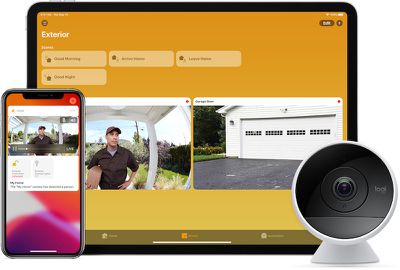
What's New With HomeKit in iOS 15

iOS 15 didn't focus heavily on improvements to HomeKit and the Home app, but there are some notable features like expanded HomeKit Secure Video support and new Siri functionality.
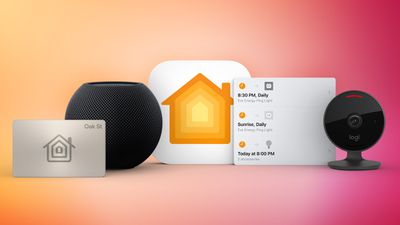
iOS 15 HomeKit Guide
This guide highlights all of the features that are new to ‌HomeKit‌ in the iOS 15 and iPadOS 15 updates.

HomeKit Secure Video

iOS 15 introduces a new iCloud+ service that offers privacy-based features like ‌iCloud‌ Private Relay and Hide My Email, but the feature also comes with ‌HomeKit Secure Video‌ improvements.

homekit secure video
With ‌iCloud‌+, Apple is increasing the number of ‌HomeKit Secure Video‌ cameras supported with each ‌iCloud‌ plan. There have been no changes to ‌iCloud‌ plans and all ‌iCloud‌ plans are now ‌iCloud‌+ plans, but more camera footage can be stored.

The $0.99 per month 50GB ‌iCloud‌+ storage plan offers support for one ‌HomeKit Secure Video‌ Camera, which is a major improvement because previously, the 200GB plan was required to use ‌HomeKit Secure Video‌.

With the $2.99 per month 200GB ‌iCloud‌+ plan that previously offered support for one camera, you can now record with five ‌HomeKit Secure Video‌ cameras at one time. The $9.99 per month 2TB ‌iCloud‌+ storage plan supports unlimited ‌HomeKit Secure Video‌ cameras, up from five.

All ‌HomeKit Secure Video‌ footage that's stored in ‌iCloud‌ is secure and end-to-end encrypted, and no camera footage counts against the total ‌iCloud‌ storage that you have available. To use ‌HomeKit Secure Video‌, you need the 50GB plan at a minimum, along with a HomePod, HomePod mini, Apple TV, or iPad that serves as a home hub for your ‌HomeKit‌ devices.

Package Detection

‌HomeKit Secure Video‌ already supports people detection to narrow down motion alerts, but in iOS 15, security cameras and video doorbells that support ‌HomeKit Secure Video‌ can detect a package delivery and let you know when the package you're waiting for arrives on your doorstep.

Home Keys

HomeKit-enabled door locks that support iOS 15's new Home Keys feature can store a digital key in the Wallet app.
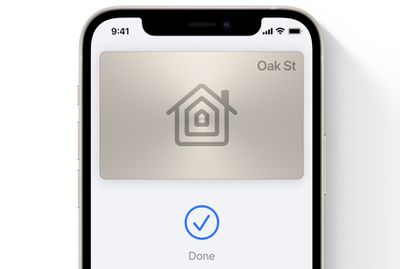
ios 15 wallet app home key
The digital key can be used to tap to unlock a compatible lock, so you don't need a manufacturer's app to use digital unlocking features.

Home Keys can be accessed on the iPhone or on the Apple Watch using the Wallet app.

Time-Based Siri Commands

‌Siri‌ in iOS 15 can be used to control a ‌HomeKit‌ device at a specific time. So if you want your bedroom lights to turn off at 9:00 p.m., you can say "Hey ‌Siri‌, turn the bedroom lights off at 9:00 p.m., and the voice assistant complies.
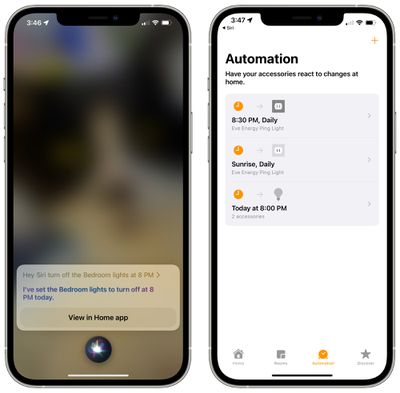
siri homekit automations
This feature uses the Automation option in the Home app, so every time you ask ‌Siri‌ control a ‌HomeKit‌ device at a specific time, it creates an automation. You can view and delete automations in the Automation section of the Home app.

Siri-Enabled Third-Party Accessories

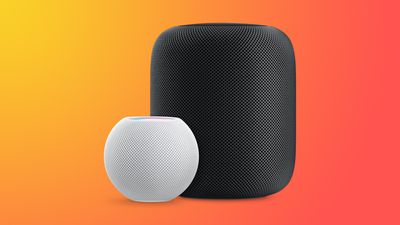
Third-party ‌HomeKit‌ accessory makers can integrate ‌Siri‌ functionality into their devices in iOS 15, but the person using the device needs to own a ‌HomePod‌ that can be used to route requests. This functionality needs to be implemented by manufacturers and so it won't be available right when iOS 15 launches.
HomePodandMini feature orange
With ‌Siri‌ integration, you can ask any compatible product in your home to send messages, set reminders, contact family members, control devices, and more.

Guide Feedback

Have questions about the new ‌HomeKit‌ changes in iOS 15, know of a feature we left out, or want to offer feedback on this guide? Send us an email here.


Related Forum: iOS 15

Popular Stories

Aston Martin CarPlay Ultra Screen

Apple's CarPlay Ultra to Expand to These Vehicle Brands Later This Year

Sunday February 1, 2026 10:08 am PST by
Last year, Apple launched CarPlay Ultra, the long-awaited next-generation version of its CarPlay software system for vehicles. Nearly nine months later, CarPlay Ultra is still limited to Aston Martin's latest luxury vehicles, but that should change fairly soon. In May 2025, Apple said many other vehicle brands planned to offer CarPlay Ultra, including Hyundai, Kia, and Genesis. In his Powe...
Apple Logo Black

Apple's Next Launch is 'Imminent'

Sunday February 1, 2026 12:31 pm PST by
The calendar has turned to February, and a new report indicates that Apple's next product launch is "imminent," in the form of new MacBook Pro models. "All signs point to an imminent launch of next-generation MacBook Pros that retain the current form factor but deliver faster chips," Bloomberg's Mark Gurman said on Sunday. "I'm told the new models — code-named J714 and J716 — are slated...
iOS 26

iOS 26.3 and iOS 26.4 Will Add These New Features to Your iPhone

Tuesday February 3, 2026 7:47 am PST by
We are still waiting for the iOS 26.3 Release Candidate to come out, so the first iOS 26.4 beta is likely still at least a week or two away. Following beta testing, iOS 26.4 will likely be released to the general public in March or April. Below, we have recapped known or rumored iOS 26.3 and iOS 26.4 features so far. iOS 26.3 iPhone to Android Transfer Tool iOS 26.3 makes it easier...
Apple MacBook Pro M4 hero

New MacBook Pros Reportedly Launching Alongside macOS 26.3

Sunday February 1, 2026 5:42 am PST by
Apple is planning to launch new MacBook Pro models with M5 Pro and M5 Max chips alongside macOS 26.3, according to Bloomberg's Mark Gurman. "Apple's faster MacBook Pros are planned for the macOS 26.3 release cycle," wrote Gurman, in his Power On newsletter today. "I'm told the new models — code-named J714 and J716 — are slated for the macOS 26.3 software cycle, which runs from...
iOS 26 Home Feature

Apple Gives Final Warning to Home App Users

Tuesday February 3, 2026 8:55 am PST by
In 2022, Apple introduced a new Apple Home architecture that is "more reliable and efficient," and the deadline to upgrade and avoid issues is fast approaching. In an email this week, Apple gave customers a final reminder to upgrade their Home app by February 10, 2026. Apple says users who do not upgrade may experience issues with accessories and automations, or lose access to their smart...

Top Rated Comments

siddavis Avatar
58 months ago

I have one word for you, “Updating…”
Two words, "Not Responding"
Score: 23 Votes (Like | Disagree)
Think|Different Avatar
58 months ago

In all honesty, I gave up on HomeKit enabled devices. In all honesty, it would have been dope if Apple would have bought Arlo and then have a sure shot HomeKit native system (granted they would still be pricey, since Arlo's cameras + month packages (especially with 24/7 recording) is $$$). Then again, HomeKit is still quirky AF. I'll probably get ratio'd to heck, but that's just my opinion.
I'm a huge believer (and inve$tor, ha) in HomeKit accessories in every room but even I'd say "quirky AF" is pretty apt. It's the comments, not yours, that claim "it's trash" or simply "doesn't work" or something else dramatic. Legit, solid HK accessories – no, not Hoobs/Homebridge hacks – work solid depending on your home network. But very diverse wireless networks and issues at home, from boxes to mesh to ISPs to microwaves, really seem to create most 'IOT' issues, HomeKit or otherwise. This article highlights how much more Apple could do, personally. I'd have to hope further development on API or UX with Home app/HK was paused a bit this year while the 'more important' Matter alliance stuff is being worked out.
Score: 12 Votes (Like | Disagree)
nitramluap Avatar
58 months ago
"This feature uses the Automation option in the Home app, so every time you ask ‌Siri‌ control a ‌HomeKit‌ device at a specific time, it creates an automation."

Yes, this makes me not want to use it. It creates unnecessary clutter. It's like the alarm issue when created with Siri - you end up with dozens of alarms which you need to manually delete.

It needs to be smarter. Siri should ask "Do you want to repeat this every day?". If it's a single request it shouldn't store it as an automation, or if it does, delete it immediately after running.

EDIT: better grammar
Score: 11 Votes (Like | Disagree)
PBG4 Dude Avatar
58 months ago

In all honesty, I gave up on HomeKit enabled devices. In all honesty, it would have been dope if Apple would have bought Arlo and then have a sure shot HomeKit native system (granted they would still be pricey, since Arlo's cameras + month packages (especially with 24/7 recording) is $$$). Then again, HomeKit is still quirky AF. I'll probably get ratio'd to heck, but that's just my opinion.
I have one word for you, “Updating…”
Score: 11 Votes (Like | Disagree)
aesc80 Avatar
58 months ago
In all honesty, I gave up on HomeKit enabled devices. In all honesty, it would have been dope if Apple would have bought Arlo and then have a sure shot HomeKit native system (granted they would still be pricey, since Arlo's cameras + month packages (especially with 24/7 recording) is $$$). Then again, HomeKit is still quirky AF. I'll probably get ratio'd to heck, but that's just my opinion.
Score: 8 Votes (Like | Disagree)
aesc80 Avatar
58 months ago

Do you have issues with people assuming you are not being honest? But, I agree. Homekit is a strange hodgepodge ATM.
It's Macrumors - if you're not in love with Apple, then you're trash (unless it's something seriously bad, like CSAM). It's important to remember that while Apple tends to make features to be absolutely great (can't tell you how much I use AirDrop in my job, and I love it!), they'll swing and a miss on certain other ones. HomeKit is definitely in that list.

Homepods were grossly overpriced, Siri just wasn't exactly built like Google / Alexa to drive that kind of at-home interaction, and HomeKit overall is arranged in a way that feels like it belongs on Ubuntu rather than an smooth iOS device. It's a pain because, for my personal life, I'm so invested in the Apple ecosystem. It's just a shame that Apple invested so much into things like Smart Car that may never see the day (unless it gets released as an OS system for some other auto manufacturer), and nothing like IoT and Smart Home, where iOS and tvOS would totally shine.
Score: 7 Votes (Like | Disagree)