Following rumors of a performance-boosting "Pro Mode" coming in the next update to macOS Catalina, developer Marco Arment has argued that Apple should bring an iPhone-style Low Power Mode to MacBooks as well.
Since iOS 9, Apple has included a Low Power Mode on iPhones that reduces the amount of power that the device uses when the battery gets low, and Arment this week shared his experience with his own self-styled equivalent for macOS.
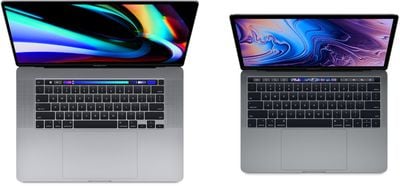
His method involves the use of a third-party app called Turbo Boost Switcher Pro that enables users to disable Intel Turbo Boost on a Mac's processor. According to Arment, disabling Turbo Boost has increased his 16-inch MacBook Pro's battery life by an estimated 30-50 percent and made it "a much better laptop" the vast majority of the time he uses it.
With Turbo Boost disabled, peak CPU power consumption drops by 62%, with a correspondingly huge reduction in temperature. This has two massive benefits:
The fans never audibly spin up. When Turbo Boost is enabled, the fans annoyingly spin up every time the system is under a heavy sustained load. Disable it, and it’s almost impossible to get them to be audible.
It runs significantly cooler. Turbo Boost lets laptops get too hot to comfortably hold in your lap, and so much heat radiates out that it can make hands sweaty. Disable it, and the laptop only gets moderately warm, not hot, and hands stay comfortably dry.
Arment claims that despite the reduction in processing power, his MacBook Pro is "still fast enough to do everything I need (including significant development with Xcode)." His only concern is that the app which allows him to enjoy these benefits is on borrowed time: Turbo Boost Switcher Pro relies on a legacy kernel extension that likely won't be supported in future versions of macOS.
"I suspect that this is the last year I'll get to run the latest OS and be able to turn off Turbo Boost at will, making all of my future laptop usage significantly worse," says Arment.
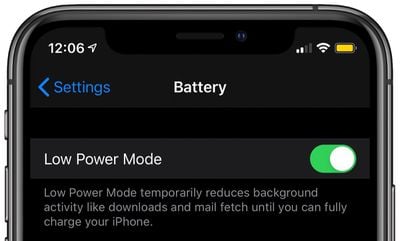
An iPhone's Low Power Mode reduces battery usage by disabling background app refreshing and automatic downloads, locking the screen after 30 seconds, and via other methods. Would you be happy to see an optional Low Power Mode in a future version of macOS, too? Let us know in the comments.
Friday December 12, 2025 10:56 am PST by Joe Rossignol
Macworld's Filipe Espósito today revealed a handful of features that Apple is allegedly planning for iOS 26.4, iOS 27, and even iOS 28.
The report said the features are referenced within the code for a leaked internal build of iOS 26 that is not meant to be seen by the public. However, it appears that Espósito and/or his sources managed to gain access to it, providing us with a sneak peek...
Monday December 15, 2025 2:05 pm PST by Juli Clover
Last week, details about unreleased Apple devices and future iOS features were shared by Macworld. This week, we learned where the information came from, plus we have more findings from the leak.
As it turns out, an Apple prototype device running an early build of iOS 26 was sold, and the person who bought it shared the software. The OS has a version number of 23A5234w, and the first...
The first foldable iPhone will feature a series of design and hardware firsts for Apple, according to details shared by the Weibo leaker known as Digital Chat Station.
According to a new post, via machine translation, Apple is developing what the leaker describes as a "wide foldable" device, a term used to refer to a horizontally oriented, book-style foldable with a large internal display....
Monday December 15, 2025 3:05 pm PST by Juli Clover
Software from an iPhone prototype running an early build of iOS 26 leaked last week, giving us a glimpse at future Apple devices and iOS features. We recapped device codenames in our prior article, and now we have a list of some of the most notable feature flags that were found in the software code.
In some cases, it's obvious what the feature flags are referring to, while some are more...
Friday December 12, 2025 10:10 am PST by Juli Clover
Apple today released iOS 26.2, the second major update to the iOS 26 operating system that came out in September, iOS 26.2 comes a little over a month after iOS 26.1 launched. iOS 26.2 is compatible with the iPhone 11 series and later, as well as the second-generation iPhone SE.
The new software can be downloaded on eligible iPhones over-the-air by going to Settings >...
Thursday December 11, 2025 8:49 am PST by Joe Rossignol
Apple seeded the second iOS 26.2 Release Candidate to developers earlier this week, meaning the update will be released to the general public very soon.
Apple confirmed iOS 26.2 would be released in December, but it did not provide a specific date. We expect the update to be released by early next week.
iOS 26.2 includes a handful of new features and changes on the iPhone, such as a new...
Friday December 12, 2025 10:08 am PST by Juli Clover
Apple today released macOS Tahoe 26.2, the second major update to the macOS Tahoe operating system that came out in September. macOS Tahoe 26.2 comes five weeks after Apple released macOS Tahoe 26.1.
Mac users can download the macOS Tahoe update by using the Software Update section of System Settings.
macOS Tahoe 26.2 includes Edge Light, a feature that illuminates your face with soft...
Monday December 15, 2025 7:41 am PST by Joe Rossignol
Apple released the AirPods Max on December 15, 2020, meaning the over-ear headphones launched five years ago today. While the AirPods Max were updated with a USB-C port and new color options last year, followed by support for lossless audio and ultra-low latency audio this year, the headphones lack some of the features that have been introduced for newer generations of the regular AirPods and the ...
The reason I’ve been a Mac user rather than a Windows user for the past 20 years was because a Mac historically “just worked.” They were computers to do work on.
I want my computer to intelligently adapt itself to what I’m doing. I want it to manage its own updates. I just don’t want it to bother me and I don’t want to have to spend any time configuring or maintaining it.
The reason I’ve been a Mac user rather than a Windows user for the past 20 years was because a Mac historically “just worked.” They were computers to do work on.
I want my computer to intelligently adapt itself to what I’m doing. I want it to manage its own updates. I just don’t want it to bother me and I don’t want to have to spend any time configuring or maintaining it.
You won't have to change this, but others may want to
It wouldn't need a low power mode if the MBP able to offer an all-week battery life.
Battery life isn't the only benefit, mainly heat and fan noise, which can really improve the experience of using the machine.
Most workflows don't even need a powerful processor so there is usually a lot of potential energy, heat and noise that can be avoided without the user noticing any difference in performance.
Low power mode would be an excellent option on the Mac. I use it - not often, but occasionally - on my iPhone, and those times it's very useful to stretch the power whenever I'm away from any power outlets... :)