Third-Party Mac Icons Reimagined in OS X Yosemite Style

With the introduction of OS X Yosemite, Apple introduced a significant visual change with an iOS 7-like "flat" look and completely redesigned icons. While Apple's icons will see a refresh once Yosemite is released, users will have to wait until third-party companies have updated their icons to match Apple's new design language for OS X icons.

In the meantime, users in this long running MacRumors' forums thread have been designing their own "flat" versions of both Apple and third-party applications, allowing some users to switch out their icons until the real thing is available. Additionally, some users are redesigning Apple's own icons for users who are using Mavericks rather than the Yosemite beta.
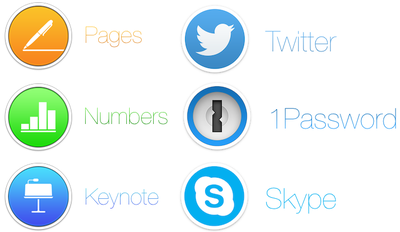
icons
iWork, Twitter, Skype and 1Password icons by Arn0

While the icons may not be fully representative of the official icons, they do provide a look into Apple's new icon philosophy enacted upon an icon not designed for it, allowing for a glimpse into various companies' processes.

Forum member Arn0 had been taking requests from other forum members, recreating various icons to fit more along more nicely with Yosemite's design aesthetics.

Alongside stand-alone apps like 1Password, Twitter and Skype, Arn0 also redesigned icons for entire suites of software, like Adobe's Creative Suite. Thread starter Humex has been sharing a number of different examples of flat OS X icons from around the web, including concepts that hew closer to Apple's style than Arn0.

Alternatively, designers like drflash have taken a different approach to flat design. Rather than mimic Apple's philosophy and match OS X Yosemite, they created their own design language with Flat OS, which provides a completely different experience for OS X users. The design seems to marry "flat" design alongside some skeumorphic principles, giving icons a more tangible feel.
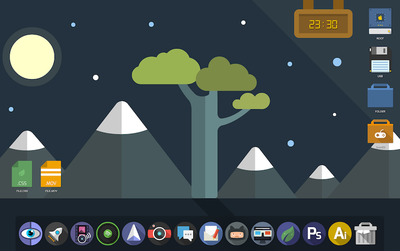
flatos
Flat OS X by drflash

In a blog post on Gizmodo, MartianCraft's Nick Keppol explains that Yosemite's new look centers around four basic ideas: visual rhythm in the dock, three basic icon shapes and their design grid, shape hierarchy and lighting effects and materials.

Visual rhythm allows the new dock to look more consistent, although that is helped by the fact that OS X icons are now broken up into three types: circles, squares and titled rectangles. While Apple itself isn't totally consistent with these three types, Keppol found that - for the most part - circles are used for more consumer-oriented apps, squares are used for System-related utilizes and titled rectangles are used for applications that are most often used for work.

Finally, Apple uses Hollywood-style yellow and orange highlights and blue and teal shadows to give the metal-like materials that the icons are made out of feel warm and tangible. This helps create the illusion that the icons are more physical than previous icons while also looking flatter than before.

If you'd like to switch out your icons until they're fully upgraded with OS X Yosemite, the icon sets shown are linked above, while all of Arn0's redesigned icons are available to download via Dropbox. Icon sets from arn0 and other designers are also available to download via the forum thread. Here are easy instructions on how to change app icons on OS X.


Popular Stories

iOS 26

iOS 26.4 and iOS 27 Features Revealed in New Leak

Friday December 12, 2025 10:56 am PST by
Macworld's Filipe Espósito today revealed a handful of features that Apple is allegedly planning for iOS 26.4, iOS 27, and even iOS 28. The report said the features are referenced within the code for a leaked internal build of iOS 26 that is not meant to be seen by the public. However, it appears that Espósito and/or his sources managed to gain access to it, providing us with a sneak peek...
iOS 26

iOS 26.2 Coming Soon With These 8 New Features on Your iPhone

Thursday December 11, 2025 8:49 am PST by
Apple seeded the second iOS 26.2 Release Candidate to developers earlier this week, meaning the update will be released to the general public very soon. Apple confirmed iOS 26.2 would be released in December, but it did not provide a specific date. We expect the update to be released by early next week. iOS 26.2 includes a handful of new features and changes on the iPhone, such as a new...
iOS 26

Apple Releases iOS 26.2 With Alarms for Reminders, Lock Screen Changes, Enhanced Safety Alerts and More

Friday December 12, 2025 10:10 am PST by
Apple today released iOS 26.2, the second major update to the iOS 26 operating system that came out in September, iOS 26.2 comes a little over a month after iOS 26.1 launched. ‌iOS 26‌.2 is compatible with the ‌iPhone‌ 11 series and later, as well as the second-generation ‌iPhone‌ SE. The new software can be downloaded on eligible iPhones over-the-air by going to Settings >...
AirPods Pro Firmware Feature

Apple Releases New Firmware for AirPods Pro 2 and AirPods Pro 3

Thursday December 11, 2025 11:28 am PST by
Apple today released new firmware designed for the AirPods Pro 3 and the prior-generation AirPods Pro 2. The AirPods Pro 3 firmware is 8B30, up from 8B25, while the AirPods Pro 2 firmware is 8B28, up from 8B21. There's no word on what's include in the updated firmware, but the AirPods Pro 2 and AirPods Pro 3 are getting expanded support for Live Translation in the European Union in iOS...
macOS Tahoe 26 Thumb

Apple Releases macOS Tahoe 26.2 With Edge Light

Friday December 12, 2025 10:08 am PST by
Apple today released macOS Tahoe 26.2, the second major update to the macOS Tahoe operating system that came out in September. macOS Tahoe 26.2 comes five weeks after Apple released macOS Tahoe 26.1. Mac users can download the macOS Tahoe update by using the Software Update section of System Settings. macOS Tahoe 26.2 includes Edge Light, a feature that illuminates your face with soft...
AirTag 2 Mock Feature

Apple AirTag 2: Four New Features Found in iOS 26 Code

Thursday December 11, 2025 10:31 am PST by
The AirTag 2 will include a handful of new features that will improve tracking capabilities, according to a new report from Macworld. The site says that it was able to access an internal build of iOS 26, which includes references to multiple unreleased products. Here's what's supposedly coming: An improved pairing process, though no details were provided. AirTag pairing is already...
ipados 26 1 slide over

Apple Releases iPadOS 26.2 With Multitasking Improvements

Friday December 12, 2025 10:09 am PST by
Apple today released iPadOS 26.2, the second major update to the iPadOS 26 operating system released in September. iPadOS 26.2 comes a month after iPadOS 26.1. The new software can be downloaded on eligible iPads over-the-air by going to Settings > General > Software Update. iPadOS 26.2 continues with the multitasking improvements that were added with iPadOS 26.1. You can now drag and...
bug security vulnerability issue fix larry

Update Now: iOS 26.2 Fixes 20+ Security Vulnerabilities

Friday December 12, 2025 11:11 am PST by
Apple today released iOS 26.2, iPadOS 26.2, and macOS 26.2, all of which introduce new features, bug fixes, and security improvements. Apple says that the updates address over 20 vulnerabilities, including two bugs that are known to have been actively exploited. There are a pair of WebKit vulnerabilities that could allow maliciously crafted web content to execute code or cause memory...

Top Rated Comments

iRock1 Avatar
149 months ago
Oh please, don't start giving ideas to Apple. Following this frigging absurd path, it wouldn't surprise me at all if they come out with something like this in a few years:

Score: 21 Votes (Like | Disagree)
Lapidus Avatar
149 months ago
I don't think they ALL should be round..
Score: 21 Votes (Like | Disagree)
MacFather Avatar
149 months ago
Deleted.
Score: 20 Votes (Like | Disagree)
designaholic Avatar
149 months ago
No.
Score: 17 Votes (Like | Disagree)
RightMACatU Avatar
149 months ago
I hate 'em, I hate 'em, I hate 'em!
Took 20+ years to get some nice 3D effects in OSs and Apps; Took only one year to take it all out. I guess that they simply ran out of ideas esthetically-wise ;)
Score: 13 Votes (Like | Disagree)
QCassidy352 Avatar
149 months ago
I don't like them at all. I hope people realize that "flat" is not inherently better or a logical step forward, regardless of what Apple says in its keynotes. Its a design choice, just like skeuomorphism, which some people will like and others will not, and which can be taken to an extreme (or not).

IMO, there's a happy medium to be struck between "felt" in Game Center or "ripped edges" in Calendar and this cartoony mess.
Score: 13 Votes (Like | Disagree)