Apple Aims to Prevent Blurry or Underexposed iPhone Photos with Automatic Image Buffering and Comparison

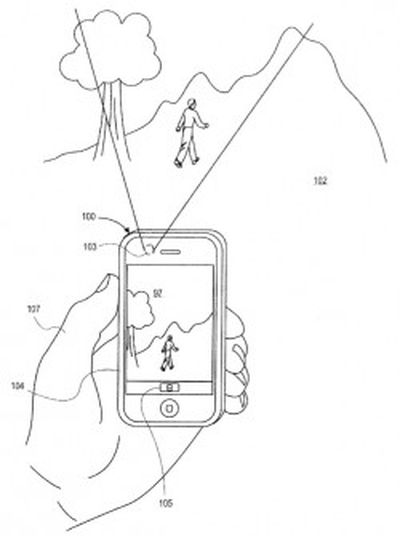
iphone_camera_view_patentA newly-published patent application from Apple discovered by AppleInsider describes methods that would allow an iPhone to buffer a series of photos before the user presses the shutter button for the device's camera and then automatically select the best one.

It is not uncommon for camera-shake or a less than optimal angle to result in blurry or dark photos in low-light conditions, even on the relatively capable camera on the iPhone. What the patent allows for is for the camera to start taking a series of photos before the user presses the shutter release, then automatically compare them with the one taken at the moment the button was pressed. If the system judges that one of the buffered photos is better, it stores that one in place of the one taken at shutter release.

In particular, the system seeks to minimize the camera shake that can accompany press the iPhone's volume button or tapping the screen to trigger the shutter by capturing images before the button or screen is even touched.

The algorithm described in the patent application uses a scoring system which measures contrast (the usual method used to judge focus), image resolution, dynamic range (the balance of light and dark tones in the image) and color rendering properties to determine which is the best version of the photo. The others are then discarded.

While the selection of the image is an automatic process, the system could allow the user to confirm the device's choice of the best available photo.

The patent application was filed in October of last year but references an earlier application filed in 2009, so it is possible that elements of this approach are used in current iPhones and iPads, although it is clear that the current Camera app for iOS does not include all aspects of the system.


Tag: Patent

Popular Stories

Aston Martin CarPlay Ultra Screen

Apple's CarPlay Ultra to Expand to These Vehicle Brands Later This Year

Sunday February 1, 2026 10:08 am PST by
Last year, Apple launched CarPlay Ultra, the long-awaited next-generation version of its CarPlay software system for vehicles. Nearly nine months later, CarPlay Ultra is still limited to Aston Martin's latest luxury vehicles, but that should change fairly soon. In May 2025, Apple said many other vehicle brands planned to offer CarPlay Ultra, including Hyundai, Kia, and Genesis. In his Powe...
iOS 26

iOS 26.3 and iOS 26.4 Will Add These New Features to Your iPhone

Tuesday February 3, 2026 7:47 am PST by
We are still waiting for the iOS 26.3 Release Candidate to come out, so the first iOS 26.4 beta is likely still at least a week or two away. Following beta testing, iOS 26.4 will likely be released to the general public in March or April. Below, we have recapped known or rumored iOS 26.3 and iOS 26.4 features so far. iOS 26.3 iPhone to Android Transfer Tool iOS 26.3 makes it easier...
Apple Logo Black

Apple's Next Launch is 'Imminent'

Sunday February 1, 2026 12:31 pm PST by
The calendar has turned to February, and a new report indicates that Apple's next product launch is "imminent," in the form of new MacBook Pro models. "All signs point to an imminent launch of next-generation MacBook Pros that retain the current form factor but deliver faster chips," Bloomberg's Mark Gurman said on Sunday. "I'm told the new models — code-named J714 and J716 — are slated...
Apple MacBook Pro M4 hero

New MacBook Pros Reportedly Launching Alongside macOS 26.3

Sunday February 1, 2026 5:42 am PST by
Apple is planning to launch new MacBook Pro models with M5 Pro and M5 Max chips alongside macOS 26.3, according to Bloomberg's Mark Gurman. "Apple's faster MacBook Pros are planned for the macOS 26.3 release cycle," wrote Gurman, in his Power On newsletter today. "I'm told the new models — code-named J714 and J716 — are slated for the macOS 26.3 software cycle, which runs from...
iOS 26 Home Feature

Apple Gives Final Warning to Home App Users

Tuesday February 3, 2026 8:55 am PST by
In 2022, Apple introduced a new Apple Home architecture that is "more reliable and efficient," and the deadline to upgrade and avoid issues is fast approaching. In an email this week, Apple gave customers a final reminder to upgrade their Home app by February 10, 2026. Apple says users who do not upgrade may experience issues with accessories and automations, or lose access to their smart...

Top Rated Comments

JaySoul Avatar
169 months ago
Don't other smartphone cameras already do this?
Score: 9 Votes (Like | Disagree)
bushido Avatar
169 months ago
i like this on my friends galaxy s3
Score: 5 Votes (Like | Disagree)
firestarter Avatar
169 months ago
Massive prior art on this... it's a fantastic example of how the US patent office truly sucks.

Time for Apple to start innovating and stop rehashing other people's ideas...
Score: 4 Votes (Like | Disagree)
nmg196 Avatar
169 months ago
Don't other smartphone cameras already do this?

Yes, many other physical cameras and apps already do this. They take quick series of pictures either side of the shutter button press then attempt to work out which one is the best by analysing them for motion blur. The one with the least motion blur is then saved out. It's often mis-marketed as an "image stabiliser" function but effectively achieves the same thing most of the time.

Some cameras with face detection go further and attempt to discard photos where people are blinking. Chances are, it's taken 10 photos either side of the shutter press, that at least one will be crisp with nobody blinking. I'm not sure why Apple are now trying to patent this common technique - it's hardly new.
Score: 4 Votes (Like | Disagree)
mouser45 Avatar
169 months ago
Don't other smartphone cameras already do this?
Score: 4 Votes (Like | Disagree)
Michael73 Avatar
169 months ago
I think I'd be wary of such a feature. I take pictures all the time of my kids, friends, dog, etc. Getting everyone to look at the camera at the same time or with eyes open is a real pain. I'm not sure I want an algorithm choosing to keep the best photo at the expense of what I mentioned above. EVEN WITH the ability to accept or reject, if I'm shooting a bunch of photos all at once (say at my kids sporting events) I may not have time to review and choose the one I want to keep. I'm not sure there's a great way to get around these issues other than perhaps to have an 'on-off' toggle or to have the ability to always to photos in this mode and then be able to decide at a later time which one to keep.
Score: 3 Votes (Like | Disagree)