

With the release of iPhone 4, Apple CEO Steve Jobs has fired up his email account again and is responding to a number of customer emails. First it was his description of the signal strength concerns as a non issue. And in another pair of publicized responses, Jobs has briefly addressed both future wireless syncing of iOS devices and the replacement of the iPhone's on-screen "hold" button available during calls with a button for activating the new FaceTime video calling feature.
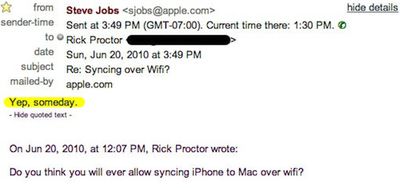
Mashable first reported on the Wi-Fi phone syncing topic earlier this week amidst the excitement of the iPhone 4 launch, noting that Jobs replied "Yep, someday," to a question from a customer about possible future wireless syncing of his iPhone to his Mac. Jobs offered no timeframe for a launch of the feature.
Earlier this year, one developer created his own Wi-Fi syncing solution and hoped that Apple would distribute it through the App Store, but the company rejected the application last month. It is now available for jailbroken devices connecting to both Mac and Windows computers at a price of $9.99.
The second issue comes to our attention via TechCrunch, which points to a LiveJournal posting from a user who asked about the removal of the "hold" button from the iPhone's on-screen calling screen to make room for a new button for initiating FaceTime video calls. Jobs' response: "Hold doesnt do anything more than Mute."
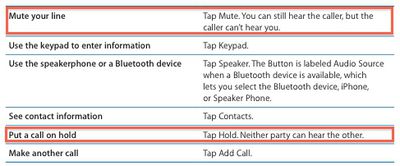
Table from Page 50 of iPhone OS 3.1 User Guide (PDF link)
Interestingly, Jobs was neither entirely correct nor thorough in his answer. As noted in Apple's own user guide for devices running iPhone OS 3.1, the "mute" functionality silences the user's own voice in the conversation while continuing to allow them to hear the party on the other end of the line. The "hold" functionality silences both ends of the conversation.
Fortunately for users looking to make use of the hold functionality that seemed to have disappeared, a commenter on the TechCrunch piece notes that simply holding down the "mute" button for a few seconds will activate the "hold" functionality.

Sunday February 1, 2026 10:08 am PST by Joe Rossignol
Last year, Apple launched CarPlay Ultra, the long-awaited next-generation version of its CarPlay software system for vehicles. Nearly nine months later, CarPlay Ultra is still limited to Aston Martin's latest luxury vehicles, but that should change fairly soon.
In May 2025, Apple said many other vehicle brands planned to offer CarPlay Ultra, including Hyundai, Kia, and Genesis.
In his Powe...
Sunday February 1, 2026 12:31 pm PST by Joe Rossignol
The calendar has turned to February, and a new report indicates that Apple's next product launch is "imminent," in the form of new MacBook Pro models.
"All signs point to an imminent launch of next-generation MacBook Pros that retain the current form factor but deliver faster chips," Bloomberg's Mark Gurman said on Sunday. "I'm told the new models — code-named J714 and J716 — are slated...
Sunday February 1, 2026 5:42 am PST by Joe Rossignol
Apple is planning to launch new MacBook Pro models with M5 Pro and M5 Max chips alongside macOS 26.3, according to Bloomberg's Mark Gurman.
"Apple's faster MacBook Pros are planned for the macOS 26.3 release cycle," wrote Gurman, in his Power On newsletter today.
"I'm told the new models — code-named J714 and J716 — are slated for the macOS 26.3 software cycle, which runs from...
Tuesday February 3, 2026 7:47 am PST by Joe Rossignol
We are still waiting for the iOS 26.3 Release Candidate to come out, so the first iOS 26.4 beta is likely still at least a week or two away. Following beta testing, iOS 26.4 will likely be released to the general public in March or April.
Below, we have recapped known or rumored iOS 26.3 and iOS 26.4 features so far.
iOS 26.3
iPhone to Android Transfer Tool
iOS 26.3 makes it easier...
Saturday January 31, 2026 10:51 am PST by Joe Rossignol
Apple recently updated its online store with a new ordering process for Macs, including the MacBook Air, MacBook Pro, iMac, Mac mini, Mac Studio, and Mac Pro.
There used to be a handful of standard configurations available for each Mac, but now you must configure a Mac entirely from scratch on a feature-by-feature basis. In other words, ordering a new Mac now works much like ordering an...
















